shadcn.io is an independent project built on shadcn/ui
Filter opens Filter Options. Three checkboxes are listed: Active, Pending, and Archived. Active starts checked. Apply Filters spans the panel and closes it.
Use it to keep filters next to the list they narrow, instead of in a sidebar. Apply does not filter the list until you read the boxes. A filter that is the whole page fits a Sheet. In React, Base UI does not apply the filters.
Installation
Anatomy
Usage
<Popover onOpenChange={setOpen} open={open}>
  <PopoverTrigger render={<Button variant="outline" />}>
    <FilterIcon aria-hidden="true" data-icon="inline-start" />
    Filter
  </PopoverTrigger>
  <PopoverContent className="w-80 max-w-full">
    <PopoverTitle>Filter Options</PopoverTitle>
    <FieldGroup className="gap-3">
      {statuses.map((status) => (
        <Field key={status.value} orientation="horizontal">
          <Checkbox
            defaultChecked={status.checked}
            id={`filter-${status.value}`}
            name="status"
            value={status.value}
          />
          <FieldLabel
            className="font-normal"
            htmlFor={`filter-${status.value}`}
          >
            {status.label}
          </FieldLabel>
        </Field>
      ))}
    </FieldGroup>
    <Button className="w-full" onClick={handleApply} size="sm">
      Apply Filters
    </Button>
  </PopoverContent>
</Popover>
FAQ
How are the status checkboxes built?
statuses lists Active, Pending and Archived. Each row is a Field with orientation="horizontal", a Checkbox named status with the status as its value, and a FieldLabel.
The checkbox id is filter- plus the value, and the label's htmlFor matches it.
Which filter starts checked?
Active, whose entry has checked: true. Pending and Archived start unchecked. The checkboxes take it as their starting value only, so they stay uncontrolled.
The prop is defaultChecked on Checkbox.
How do I close this panel from code?
Apply Filters closes the panel.
Here the panel is controlled: open and onOpenChange on Popover, and the button's handler sets the state to false. The callback gets the next open state first.
How does the Filter button become the trigger?
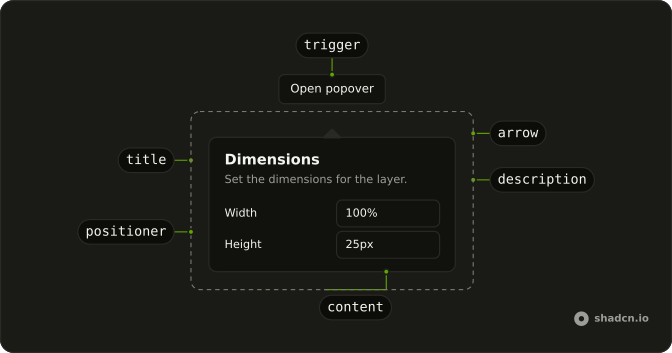
The trigger is a Button with variant="outline". FilterIcon has aria-hidden="true" and data-icon="inline-start", and the label is Filter. PopoverContent is w-80 max-w-full, and PopoverTitle reads Filter Options.
Pass the button to render on PopoverTrigger, and use PopoverContent as the panel.
API Reference
Popover
Sets onOpenChange={setOpen} and open={open}. The rest is on the Popover page.
Button
Sets variant="outline", onClick={handleApply} and size="sm". The rest is on the Button page.
Field
Sets orientation="horizontal", htmlFor, filter-, status and value. The rest is on the Field page.
Checkbox
Sets defaultChecked={status.checked}, id, filter-, status, value and name="status". The rest is on the Checkbox page.