shadcn.io is an independent project built on shadcn/ui
Show Toast is an outline button. The notice says the file will be deleted permanently, with Cancel and then Delete. Delete is followed by File deleted. Cancel is followed by Deletion cancelled.
Use it for a quick yes or no that is safe to miss. The toast can still close on its own. If they must answer, use an Alert Dialog. In React, Base UI does not keep it open until they choose.
Installation
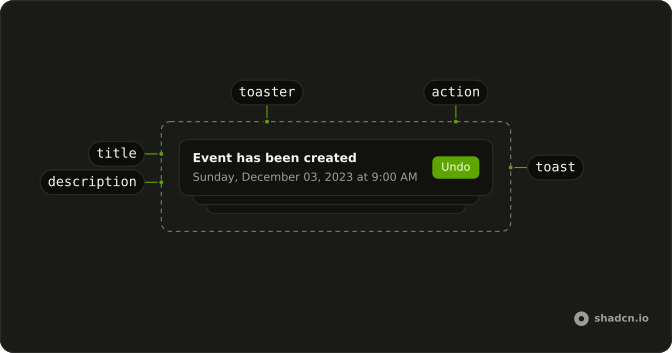
Anatomy
Usage
<>
  <Toaster />
  <Button onClick={handleShowToast} variant="outline">
    Show Toast
  </Button>
</>
FAQ
What do the two buttons say?
The title is "File will be deleted permanently". action.label is Delete and its onClick calls toast.success("File deleted"). cancel.label is Cancel and its onClick calls toast.info("Deletion cancelled").
What happens on Delete or Cancel?
Each onClick runs, then this toast closes. Neither handler calls preventDefault. Delete is followed by the success toast, Cancel by the info toast.
Which button is rendered first?
cancel is rendered before action, so Cancel comes first and Delete after it. Both are buttons in the toast. This file sets label and onClick on each.
Does this toast stay open until I choose?
No. This call omits dismissible and duration, so a swipe can close it and the normal timer still runs. Choosing Delete or Cancel closes it too.
When should this be an alert dialog?
Use an Alert Dialog when the question must stay open until the person picks. This file is a toast with action and cancel, and it can still close on its own.
API Reference
Sonner
No extra props in this demo. The rest is on the Sonner page.
Button
Sets onClick={handleShowToast} and variant="outline". The rest is on the Button page.