shadcn.io is an independent project built on shadcn/ui
Show Toast is an outline button. The title is Event has been created. Under it, in quieter text, is Monday, January 3rd at 6:00pm. There is no status icon.
Put the detail people need on the second line, and keep the title short. A notice built from page parts is Toast. In React, Base UI does not write the description.
Installation
Anatomy
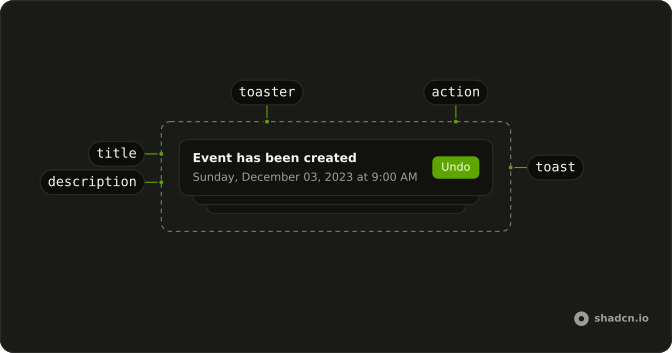
Usage
<>
  <Toaster />
  <Button onClick={handleShowToast} variant="outline">
    Show Toast
  </Button>
</>
FAQ
How is the second line set?
The call is toast("Event has been created", { description: "Monday, January 3rd at 6:00pm" }). The first string is the title. description is the line under it.
Does this toast have an icon?
No. The call is plain toast, so there is no success or error type. Pass description to toast.success the same way when you want Toaster's check icon and this second line.
Which other options does this call pass?
None. There is no action, duration, icon, or position in this file. The notice is the title plus that description.
Is the description one string?
Yes. "Monday, January 3rd at 6:00pm" is a single string. It renders in the description slot under the title, which already has a style for supporting text.
API Reference
Sonner
No extra props in this demo. The rest is on the Sonner page.
Button
Sets onClick={handleShowToast} and variant="outline". The rest is on the Button page.