shadcn.io is an independent project built on shadcn/ui
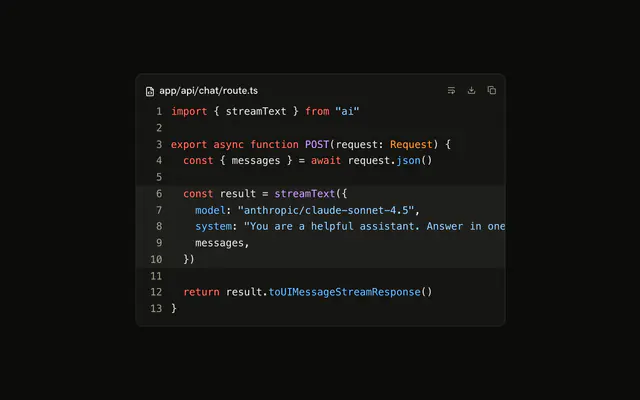
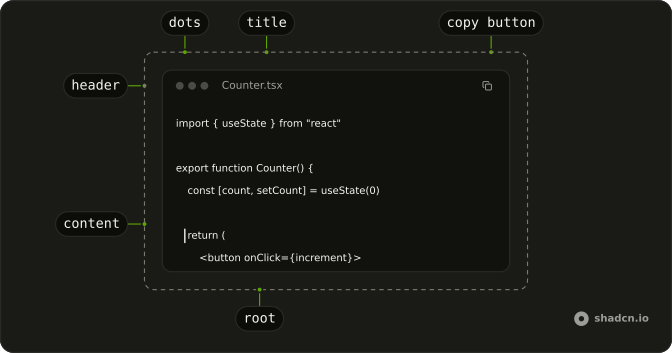
A code editor is a window of code that people can type in, colored as they type, with an optional title and copy button above it. Reach for it when the code is meant to be changed: a snippet to tweak before copying, a config to fill in, the files of a Sandbox.
To show code that only needs reading, use a Code Block, which renders less and can stream.
Installation
The install also adds useHighlightedCode and the highlighter it runs on, the same one Code Block uses.
Anatomy
Usage
import {
  CodeEditor, CodeEditorContent, CodeEditorCopyButton, CodeEditorDots,
  CodeEditorHeader, CodeEditorTitle,
} from "@/components/ui/code-editor";
CodeEditor holds the code and its language, and CodeEditorContent is the text box with the colored layer under it. The header is optional.
const code = `export const Counter = () => {
  const [count, setCount] = useState(0);
  return <button onClick={() => setCount(count + 1)}>{count}</button>;
};`;

const Editor = () => (
  <CodeEditor defaultValue={code} language="tsx">
    <CodeEditorHeader>
      <CodeEditorDots />
      <CodeEditorTitle>Counter.tsx</CodeEditorTitle>
      <CodeEditorCopyButton />
    </CodeEditorHeader>
    <CodeEditorContent label="Counter.tsx" />
  </CodeEditor>
);
Accessibility
The text box is a real textarea named by label, Code unless you set it, so a screen reader reads and edits the code as plain text. The colored layer under it is hidden from assistive technology, line numbers included. Tab indents instead of leaving, and a hidden hint on the text box says how to get out: Escape, then Tab or Shift + Tab. With readOnly set, Tab moves focus as usual and the hint goes. CodeEditorCopyButton is labeled Copy code and announces Copied through a polite live region.
- Tab
- Inserts spaces up to the next tab stop, or indents every line in the selection.
- Shift+Tab
- Outdents the line the caret is on, or every line in the selection.
- Enter
- Starts a new line at the same indentation, one step deeper after an opening bracket. Between a pair of brackets, the closing one moves to a line of its own.
- Escape
- Lets the next Tab or Shift + Tab move focus out of the editor instead of indenting. Any other key typed in between sets Tab back to indenting, though pressing Shift, Control, Alt or Meta on its own doesn't.
Demos
Languages
One editor switches between five files, TSX, HTML, CSS, JSON and Python, with the buttons in its header. The demo holds each file's code in state and passes the current one as value with the matching language, so an edit survives a switch. Use it when the reader picks the file or the language, and mark the current one with aria-pressed, as these buttons do.
Line numbers
A 33-line search hook sits in an editor with a fixed height, so it scrolls. lineNumbers adds a gutter as wide as the last line's number needs, and since CSS draws the numbers, they never get selected or copied with the code. Turn them on when someone will point at line 12, and leave them off on a five-line snippet.
Wrap
This Markdown changelog's lines are whole sentences, and with wrap and line numbers on, a long line folds onto several rows and keeps one number. Wrap prose, long strings and log output. Leave code unwrapped, where a statement broken across rows is easy to misread.
Typing
The code types itself out at about 70 characters a second, then a Replay button runs it again. The editor is controlled and read-only: the demo grows value on a timer and never takes input, and with reduced motion turned on the whole file appears at once. Keep this for a landing page, and give readers who should edit the plain editor.
Theme
Three color themes for one file: GitHub, which is what the install adds, then Accent and Mono, built from the page's own tokens. Each is a class on CodeEditor that sets the highlighter's --th-* variables, so only the colors change. Use tokens like these when the code should match the site rather than look like an editor.
FAQ
How is Code Editor editable without an editor library?
The text box is a plain textarea with transparent text and a visible caret. Under it, a highlighted copy of the same text is drawn with the same font, padding and line height, so each colored character sits exactly under the one being typed. Selection, undo and input methods work as in any text field, and an indent from Tab goes through the browser's own insert, so undo takes it back.
The whole file is highlighted again on every keystroke, which TanStack Highlight (opens in a new tab) does synchronously, in about half a millisecond for a 300-line file. That suits snippets and small files. For autocomplete, several cursors or files thousands of lines long, a full editor such as CodeMirror or Monaco is the right tool.
Which languages does Code Editor highlight?
TSX, JSX, TypeScript, JavaScript, HTML, CSS, JSON, Markdown, Python, Bash, SQL, YAML and diffs, plus short names such as ts, js, md, py, sh and yml. Pass the name as language. Anything else shows as plain text and stays editable.
To add a language, import its grammar from TanStack Highlight in the highlighter-core file the install adds and list it with the others. Code Block picks it up too, since both use that file.
How do I read or set the code in a React Code Editor?
Pass defaultValue and read each change from onValueChange, which receives the new code as a string. To hold the code yourself, pass value and update it in the same callback, as the Languages demo does.
CodeEditorCopyButton always copies the current code, whichever way you hold it.
How do I submit the code from a Code Editor with a form?
Give CodeEditorContent a name. It goes on the textarea, so the form posts the code with its other fields, and required keeps the form from submitting while the code is empty.
An id goes on the textarea too, so a label element can point at it, but the name a screen reader hears still comes from label. Set label to the visible label's text, or pass the label's id as aria-labelledby, which wins over it. A field's description or error goes in aria-describedby, read before the editor's own hint about Tab.
How do I give the Code Editor a fixed height with scrolling?
Give CodeEditor a height class, such as h-80 in the Line numbers demo, or give CodeEditorContent one, as the Languages demo does with h-56. Without either, the editor grows with its code.
Once the height is fixed, the code scrolls inside the frame and the header stays put. Long lines scroll sideways unless you set wrap, which folds them onto several rows instead.
Does Tab trap keyboard users inside the Code Editor?
No. Tab indents while the editor has focus, as in any code editor, but Escape followed by Tab moves focus on to the next control, and Escape followed by Shift + Tab moves it back. A hidden hint on the text box tells screen reader users so, and any key typed between Escape and the Tab sets it back to indenting.
When the code is only there to read, set readOnly on CodeEditorContent. Tab then moves focus as it does anywhere else, and the code stays selectable and copyable.
How do I change the Code Editor's colors?
Token colors are the highlighter's CSS variables, such as --th-keyword and --th-string, set to GitHub's light and dark palettes by the install. Change them in your theme to restyle every editor and code block at once.
For one editor, set the variables with a class on CodeEditor, as the Theme demo does with the page's own tokens. The frame itself uses your card, muted and border colors, so it follows the rest of the theme already.
When should I use Code Block instead of Code Editor?
Use a Code Block when the reader only reads or copies the code. It renders less, streams as text arrives and has line variants for diffs. Use Code Editor when the reader types.
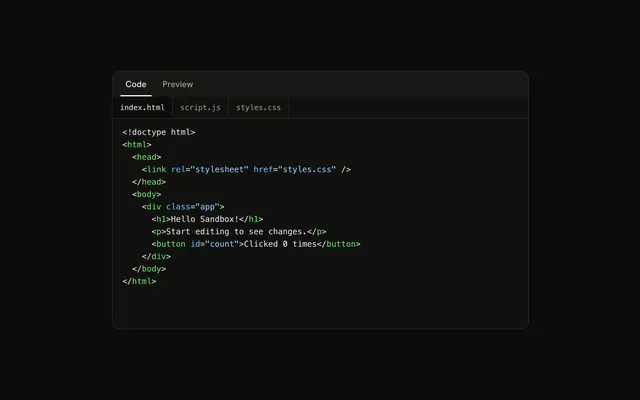
For HTML, CSS and JavaScript that should also run, use a Sandbox, which puts this editor beside a live preview.
API Reference
CodeEditor
value?string
The code, controlled.
defaultValue?string
The code when it starts, uncontrolled.
- Default
""
onValueChange?(value: string) → void
Called with the new code after each change.
- Parameters
value– string- Returns
void
language?string
The language to highlight: tsx, typescript, javascript, jsx,
html, css, json, markdown, python, bash, sql, yaml,
diff, or an alias (ts, js, md, py, sh). Anything else is
plain text.
- Default
"plaintext"
className?string
Merged with the part's classes.
CodeEditorHeader
<div> data-slot="code-editor-header"
className?string
Merged with the part's classes.
CodeEditorDots
<div> data-slot="code-editor-dots"
className?string
Merged with the part's classes.
CodeEditorTitle
<div> data-slot="code-editor-title"
className?string
Merged with the part's classes.
CodeEditorCopyButton
data-slot="code-editor-copy-button"
children?ReactNode
The content to display in the button.
clickEffect?boolean
Apply a click effect to the button.
- Default
true
download?LinkPrimitiveProps["download"]
With href, downloads the linked file instead of opening it.
href?string
When set, the button renders as a link.
isDisabled?boolean
Whether the button is disabled.
isLoading?boolean
Show a loading indicator.
- Default
false
pill?boolean
Fully rounded corners.
- Default
false
rel?string
With href, the link's relationship to the page (noreferrer, …).
size?"default" | "icon" | "icon-lg" | "icon-md" | "icon-sm" | "icon-xl" | "icon-xs" | "lg" | "md" | "sm" | "xl" | "xs"
Ark default: md.
- Type
"default" | "icon" | "icon-lg" | "icon-md" | "icon-sm" | "icon-xl" | "icon-xs" | "lg" | "md" | "sm" | "xl" | "xs"- Default
"icon-xs"
target?string
With href, where the linked page opens (_blank, …).
variant?"default" | "destructive" | "ghost" | "link" | "outline" | "secondary"
Ark default: default.
- Type
"default" | "destructive" | "ghost" | "link" | "outline" | "secondary"- Default
"ghost"
className?string
Merged with the part's classes.
data-copied?string
Present when copied is set.
CodeEditorContent
<div> data-slot="code-editor-content"
autoFocus?boolean
Focus the text box on mount.
id?string
The text box's id, for a label's htmlFor.
label?string
The text box's accessible name, such as the file's name.
- Default
"Code"
lineNumbers?boolean
Number each line in a gutter. The numbers aren't part of the code.
- Default
false
name?string
Posts the code with its form under this name.
placeholder?string
Shown while the code is empty.
readOnly?boolean
The code can be selected and copied, not changed.
- Default
false
required?boolean
The form won't submit while the code is empty.
tabSize?number
Spaces per indentation step: what Tab inserts and how wide a tab character is.
- Default
2
wrap?boolean
Wrap long lines instead of scrolling sideways.
- Default
false
className?string
Merged with the part's classes.
data-numbered?string
Present when lineNumbers is set.
data-wrap?string
Present when wrap is set.
--code-editor-digitsstring