shadcn.io is an independent project built on shadcn/ui
One short line shows on hover or focus, then it goes away. Don't put a link in it.
Use it when the control doesn't already say what it does, like an icon button. If the pointer should enter the content, use a Hover Card. In React, React Aria opens it on hover and keyboard focus, and a phone user can miss it.
Installation
Anatomy
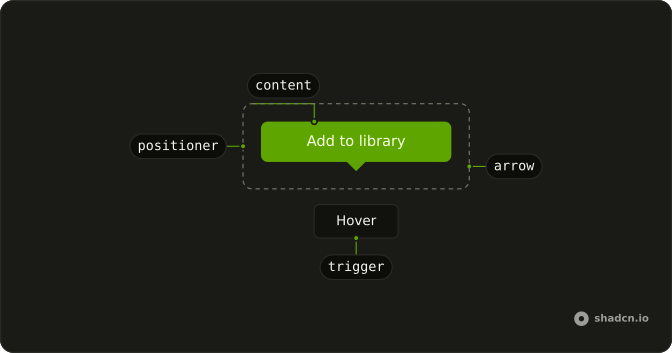
TooltipTrigger
TooltipArrow
└── TooltipArrowTip
TooltipContent
└── TooltipPositioner
Usage
import { Button } from "@/components/ui/button";
import { Tooltip, TooltipTrigger } from "@/components/ui/tooltip";
const TooltipDemo = () => (
<TooltipTrigger>
<Button variant="outline">Hover</Button>
<Tooltip>
<p>Add to library</p>
</Tooltip>
</TooltipTrigger>
);Accessibility
- Tab
- Opens/closes the tooltip without delay.
- Escape
- If open, closes the tooltip without delay.
- Enter
- Activate the focused item.
- Space
- Activate the focused control.
Demos
Sides
The same label, Add to library, opens on the left, the top, the bottom, and the right. The default is the top, and it should flip when there is no room, but you pin a side when the default would cover the thing the person is editing. Pick the side with empty space, not the side that looks balanced on an empty page.
Keyboard
The button is only a save icon. Its accessible name is Save Changes, and the tooltip repeats that name next to the S shortcut. Use this when an icon button has a keyboard equivalent worth advertising. The shortcut shown here is a hint, not the binding, so you still register the key yourself.
Disabled
A disabled button receives no hover or focus, so a tooltip wrapped around it never opens. Here the trigger is a span around the button, and that span takes the pointer. The label says the feature is unavailable. Wrap like this when people need the reason, and otherwise leave the button focusable and ignore the click.
Rtl
The first of two rows is the physical sides, labeled in Arabic. The second is labeled as the start and the end of the line, while the placement values are still left and right, so you can see those edges under a right-to-left page. The tooltip text is Arabic too. Set direction on the container when the page itself is not already right to left.
FAQ
How do I change the Tooltip delay in React?
Set the delay where the base reads it; a provider sets it once for every tooltip inside it.
With React Aria, use delay and closeDelay on TooltipTrigger.
Do I need a TooltipProvider with React Aria?
No: React Aria tooltips have no provider; TooltipTrigger holds the trigger and its Tooltip.
How do I change which side the Tooltip appears on?
It opens on top by default and flips when there is not enough room; the Sides demo shows all four sides.
Set placement on Tooltip, for example bottom.
Does the Tooltip work on mobile and touch screens?
Not as a hover hint: touch screens have no hover, so a Tooltip mostly shows when its trigger gets focus. For information people must be able to read on a phone, use a Toggle Tooltip, which opens on tap.
Is the Tooltip accessible to keyboard and screen reader users?
Yes. It opens when its trigger gets keyboard focus and closes on Escape, as the Keyboard demo shows. Keep tooltip text short and never put links or buttons inside it. Its text is linked to the trigger as its description, so screen readers read it after the trigger's name.
API Reference
Tooltip
data-slot="tooltip-content"
isOpen?boolean
Whether it's open, when you control it.
className?string
Merged with the part's classes.
--trigger-anchor-pointstringTooltipTrigger
defaultOpen?boolean
Whether the overlay is open by default (uncontrolled).
onOpenChange?(isOpen: boolean) → void
Handler that is called when the overlay's open state changes.
- Parameters
isOpen– boolean- Returns
void
closeDelay?number
The delay time for the tooltip to close. [See guidelines](https://spectrum.adobe.com/web/rsp/components/tooltip#behaviors).
- Default
500
delay?number
The delay time for the tooltip to show up. [See
guidelines](https://spectrum.adobe.com/web/rsp/components/tooltip#behaviors). Ark default: 1500.
- Default
0
isDisabled?boolean
Whether the tooltip should be disabled, independent from the trigger.
isOpen?boolean
Whether the overlay is open by default (controlled).
shouldCloseOnPress?boolean
Whether the tooltip should close when the trigger is pressed.
- Default
true
trigger?"hover" | "focus"
By default, opens for both focus and hover. Can be made to open only for focus.
- Type
"hover" | "focus"- Default
"hover"