shadcn.io is an independent project built on shadcn/ui
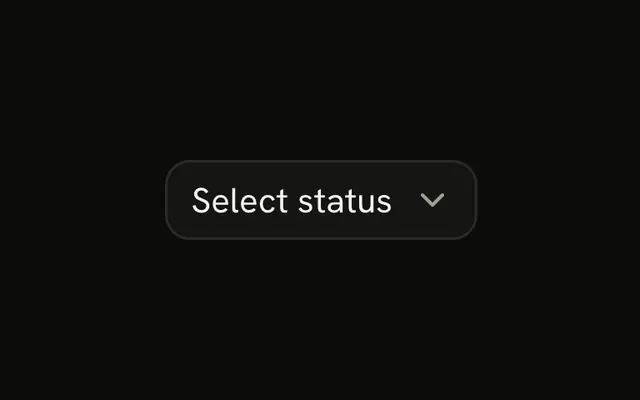
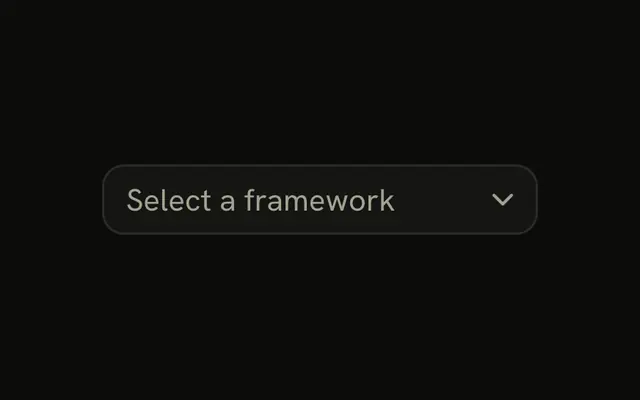
Known options live in a closed list. A button opens it and shows the one you picked.
Use it when the list is short enough to scan and people should not type their own value. If they need to filter a long catalog, use a Combobox. In React, you hold the chosen value when the form is controlled, and React Aria shows it on the trigger.
Installation
Anatomy
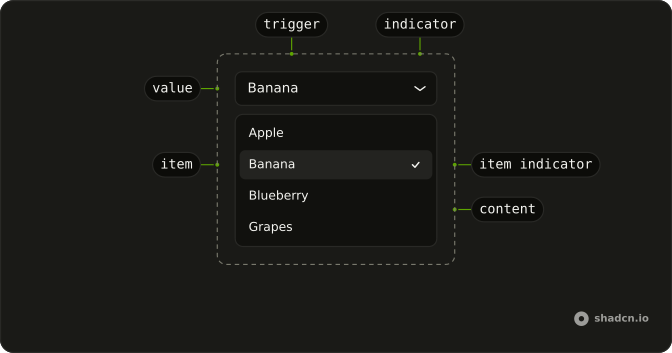
SelectRoot
├── SelectLabel
├── SelectClearTrigger
├── SelectItem
│   ├── SelectItemText
│   ├── SelectItemIndicator
│   └── SelectGroup
│       └── SelectGroupLabel
├── SelectList
├── SelectContent
│   └── SelectPositioner
├── SelectTrigger
│   └── SelectIndicator
└── SelectValue
Usage
import {
  Select, SelectContent, SelectGroup, SelectItem, SelectTrigger,
  SelectValue,
} from "@/components/ui/select";
const items = [
{ label: "Apple", value: "apple" },
{ label: "Banana", value: "banana" },
{ label: "Blueberry", value: "blueberry" },
];
const SelectDemo = () => (
<Select className="w-48" placeholder="Select a fruit">
<SelectTrigger>
<SelectValue />
</SelectTrigger>
<SelectContent>
<SelectGroup>
{items.map((item) => (
<SelectItem id={item.value} key={item.value}>
{item.label}
</SelectItem>
))}
</SelectGroup>
</SelectContent>
</Select>
);Accessibility
- Space
- When focus is on trigger, opens the select and focuses the first selected item. When focus is on the content, selects the highlighted item.
- Enter
- When focus is on trigger, opens the select and focuses the first selected item. When focus is on content, selects the focused item.
- Arrow Down
- When focus is on trigger, opens the select. When focus is on content, moves focus to the next item.
- Arrow Up
- When focus is on trigger, opens the select. When focus is on content, moves focus to the previous item.
- Escape
- Closes the select and moves focus to trigger.
- A-Z
- When focus is on trigger, selects the item whose label starts with the typed character. When focus is on the listbox, moves focus to the next item with a label that starts with the typed character.
- a-z
- When focus is on trigger, selects the item whose label starts with the typed character. When focus is on the listbox, moves focus to the next item with a label that starts with the typed character.
- Arrow Left
- Move left.
- Arrow Right
- Move right.
- Home
- Go to the start.
- End
- Go to the end.
Demos
Align Item
A switch above the fruit list turns item alignment on and off. On, the open popup lines the selected row up with the trigger. Off, the popup sits against an edge instead, which stays put once the list is long enough to scroll, while item alignment keeps a short list's choice under the pointer. The prop differs by base, and the FAQ on this page names it.
Groups
Fruits and vegetables are two groups, each with a heading, and a SelectSeparator between them. Group a list when the options are one choice but people scan by category, such as timezones, roles, or cuisines. The separator is only a visual break, not a second label. Skip both when you have a handful of peers and a heading would repeat the field label.
Scrollable
The list is timezones, grouped by region, and longer than the popup, so the content scrolls rather than growing to fit every zone. Use a scrolling select when the catalog is long but people still choose by looking, not by typing a filter. If they know the name and will type it, a Combobox is faster than hunting through a scroll. Headings still help once the list moves.
Disabled
disabled on the select keeps the trigger from opening, and the control reads as unavailable. Use it when an earlier answer is missing, or when this user cannot change a value that is already set. Do not disable an option to hide it: remove it, or leave it enabled and explain the constraint. A disabled select still shows its placeholder, so the field does not look missing.
Invalid
The fruit field is in an error state: a label, an invalid trigger, and a FieldError that says to select a fruit. Use this after submit when a choice was required and none was made. The sentence is the error, and the color only supports it. How you mark the control invalid differs by base, the FAQ names the prop, and the message belongs in a Field.
Rtl
dir is rtl, and the options are Arabic names for the same fruits. The trigger, the value, and the popup follow that direction, so the text and the indicator start on the right. Set dir on the select when only this field is right-to-left, and on the document when the whole page is. A single control with dir will not fix the headings around it.
FAQ
How do I control the selected Select value in React?
Keep the selection in state and pass it back to Select, or use the default prop when the first choice is enough. The shape of that value depends on the base.
The value is a key. Pass selectedKey, and onSelectionChange receives that key, pass defaultSelectedKey when you do not need control, and give each SelectItem an id that matches the key.
How do I show a placeholder in a Select?
The empty label is not a selected value. Show it until someone chooses an item, then replace it with the item label, so people can tell the prompt from a real choice.
Set placeholder on Select, not on SelectValue. The default copy is used when you omit it.
How do I align a Select popup with React Aria?
The popup can line the selected item up with the trigger, or sit against an edge. The Align Item demo is the place to compare those, except on React Aria, which only anchors the popup.
React Aria does not line the selected item up with the trigger. Set placement on SelectContent, which defaults to bottom, and offset is the gap.
How do I submit a Select with a form?
Set name on Select to the field name the form should receive. The selected value is submitted through a hidden field, so the visible trigger does not have to be a native select, and Select stays inside the form.
Set isRequired when a choice is mandatory. The prop is not required.
How do I show a Select as invalid?
Pair the control with Field so the message sits under the trigger, and keep that message in text because color alone is not the error. The Invalid demo is the pattern to copy.
Set isInvalid on Select. The trigger then exposes the invalid state.
Should I use a Select, a Combobox, or a Native Select?
Use Select for one choice from a list that stays closed until it is opened. Use a Combobox when people need to type and filter. Use a Native Select when you want the browser's own menu, which is often the better control on a phone.
Can I use a Select from the keyboard?
Yes. From the trigger, Enter, Space, or Arrow Down opens the list. Arrow keys move between items, Enter or Space selects the highlighted one, and Escape closes the list and returns focus to the trigger. Typing a letter moves to a label that starts with that letter.
How do I install Select in React?
Run the command in the Installation section above. It adds Select and its parts to your ui folder. Import from that folder when the command finishes, instead of copying the source by hand, and rerun the command later if you want the latest files. The command uses the shadcn CLI.
API Reference
Select
data-slot="select"
defaultOpen?boolean
Sets the default open state of the menu.
onOpenChange?(isOpen: boolean) → void
Method that is called when the open state of the menu changes.
- Parameters
isOpen– boolean- Returns
void
allowsEmptyCollection?boolean
Whether the select should be allowed to be open when the collection is empty.
defaultSelectedKey?Key | null
The initial selected key in the collection (uncontrolled). Deprecated.
- Type
Key | null
isOpen?boolean
Sets the open state of the menu.
onSelectionChange?(key: Key | null) → void
Handler that is called when the selection changes. Deprecated.
- Type
(key: Key | null) → void- Parameters
key– Key | null- Returns
void
selectedKey?Key | null
The currently selected key in the collection (controlled). Deprecated.
- Type
Key | null
selectionMode?M
Whether single or multiple selection is enabled.
- Default
"single"
shouldCloseOnSelect?boolean
Whether the Select should close when an item is selected. Defaults to true if selectionMode is single, false otherwise.
className?string
Merged with the part's classes.
data-invalid?string
Present when invalid is true.
data-readonly?string
Present when readOnly is true.
SelectGroup
data-slot="select-group"
children?ReactNode | ((item: T) → ReactElement)
Static child items or a function to render children.
- Type
ReactNode | ((item: T) → ReactElement)
dependencies?ReadonlyArray<any>
Values that should invalidate the item cache when using dynamic collections.
- Type
ReadonlyArray<any>
id?Key
The unique id of the section.
style?object
The inline [style](https://developer.mozilla.org/en-US/docs/Web/API/HTMLElement/style) for the element.
- Type
{ prop?: string]: string | number }
value?T
The object value that this section represents. When using dynamic collections, this is set automatically.
render?DOMRenderFunction<E, T>
Overrides the default DOM element with a custom render function.
This allows rendering existing components with built-in styles and behaviors
such as router links, animation libraries, and pre-styled components.
Requirements:
- You must render the expected element type (e.g. if <button> is expected, you cannot render an
<a>).
- Only a single root DOM element can be rendered (no fragments).
- You must pass through props and ref to the underlying DOM element, merging with your own prop
as appropriate.
- Type
DOMRenderFunction<E, T>
className?string
Merged with the part's classes.
data-invalid?string
Present when invalid is true.
data-readonly?string
Present when readOnly is true.
SelectValue
data-slot="select-value"
children?ChildrenOrFunction<T>
The children of the component. A function may be provided to alter the children based on component state.
- Type
ChildrenOrFunction<T>
style?StyleOrFunction<T>
The inline [style](https://developer.mozilla.org/en-US/docs/Web/API/HTMLElement/style) for the element. A function may be provided to compute the style based on component state.
- Type
StyleOrFunction<T>
render?DOMRenderFunction<E, T>
Overrides the default DOM element with a custom render function.
This allows rendering existing components with built-in styles and behaviors
such as router links, animation libraries, and pre-styled components.
Requirements:
- You must render the expected element type (e.g. if <button> is expected, you cannot render an
<a>).
- Only a single root DOM element can be rendered (no fragments).
- You must pass through props and ref to the underlying DOM element, merging with your own prop
as appropriate.
- Type
DOMRenderFunction<E, T>
className?string
Merged with the part's classes.
data-invalid?string
Present when invalid is true.
data-readonly?string
Present when readOnly is true.
SelectTrigger
isDisabled?boolean
Whether the button is disabled.
size?"sm" | "default"
The size.
- Type
"sm" | "default"- Default
"default"
className?string
Merged with the part's classes.
data-invalid?string
Present when invalid is true.
data-readonly?string
Present when readOnly is true.
SelectContent
defaultOpen?boolean
Whether the overlay is open by default (uncontrolled).
onOpenChange?(isOpen: boolean) → void
Handler that is called when the overlay's open state changes.
- Parameters
isOpen– boolean- Returns
void
arrowBoundaryOffset?number
The minimum distance the arrow's edge should be from the edge of the overlay element.
- Default
0
arrowRef?RefObject<Element | null>
A ref for the popover arrow element.
- Type
RefObject<Element | null>
boundaryElement?Element
Element that that serves as the positioning boundary.
- Default
document.body
containerPadding?number
The placement padding that should be applied between the element and its surrounding container.
- Default
12
crossOffset?number
The additional offset applied along the cross axis between the element and its anchor element.
- Default
0
getTargetRect?(target: Element) → DOMRect | null
Overrides the target element's bounding rectangle. Useful for positioning relative to a specific point such as the mouse cursor (e.g. context menus) or text selection.
- Type
(target: Element) → DOMRect | null- Default
target.getBoundingClientRect()- Parameters
target– Element- Returns
DOMRect | null
isEntering?boolean
Whether the popover is currently performing an entry animation.
isExiting?boolean
Whether the popover is currently performing an exit animation.
isKeyboardDismissDisabled?boolean
Whether pressing the escape key to close the popover should be disabled. Most popovers should not use this option. When set to true, an alternative way to close the popover with a keyboard must be provided.
- Default
false
isNonModal?boolean
Whether the popover is non-modal, i.e. elements outside the popover may be interacted with by assistive technologies. Most popovers should not use this option as it may negatively impact the screen reader experience. Only use with components such as combobox, which are designed to handle this situation carefully.
isOpen?boolean
Whether the overlay is open by default (controlled).
maxHeight?number
The maxHeight specified for the overlay element. By default, it will take all space up to the current viewport height.
offset?number
The additional offset applied along the main axis between the element and its
anchor element. Ark default: 8.
- Default
4
onBlurWithin?(e: FocusEvent) → void
Handler that is called when the target element and all descendants lose focus.
- Parameters
e– { relatedTarget: (EventTarget & RelatedTarget) | null; target: EventTarget & Target }- Returns
void
onFocusWithin?(e: FocusEvent) → void
Handler that is called when the target element or a descendant receives focus.
- Parameters
e– { relatedTarget: (EventTarget & RelatedTarget) | null; target: EventTarget & Target }- Returns
void
onFocusWithinChange?(isFocusWithin: boolean) → void
Handler that is called when the the focus within state changes.
- Parameters
isFocusWithin– boolean- Returns
void
placement?"bottom" | "bottom left" | "bottom right" | "bottom start" | "bottom end" | "top" | "top left" | "top right" | "top start" | "top end" | "left" | "left top" | "left bottom" | "start" | "start top" | "start bottom" | "right" | "right top" | "right bottom" | "end" | "end top" | "end bottom"
The placement of the element with respect to its anchor element.
- Type
"bottom" | "bottom left" | "bottom right" | "bottom start" | "bottom end" | "top" | "top left" | "top right" | "top start" | "top end" | "left" | "left top" | "left bottom" | "start" | "start top" | "start bottom" | "right" | "right top" | "right bottom" | "end" | "end top" | "end bottom"- Default
"bottom"
scrollRef?RefObject<Element | null>
A ref for the scrollable region within the overlay.
- Type
RefObject<Element | null>- Default
overlayRef
shouldCloseOnInteractOutside?(element: Element) → boolean
When user interacts with the argument element outside of the popover ref, return true if onClose should be called. This gives you a chance to filter out interaction with elements that should not dismiss the popover. By default, onClose will always be called on interaction outside the popover ref.
- Parameters
element– Element- Returns
boolean
shouldFlip?boolean
Whether the element should flip its orientation (e.g. top to bottom or left to right) when there is insufficient room for it to render completely.
- Default
true
shouldSkipAnimation?boolean
Whether the popover should appear and disappear without an entry or exit animation. This is used by components such as PreviewTrigger to skip animations when quickly swapping between overlays.
shouldUpdatePosition?boolean
Whether the overlay should update its position automatically.
- Default
true
slot?string | null
A slot name for the component. Slots allow the component to receive props from a parent
component. An explicit null value indicates that the local props completely override all
props received from a parent.
- Type
string | null
style?StyleOrFunction<T>
The inline [style](https://developer.mozilla.org/en-US/docs/Web/API/HTMLElement/style) for the element. A function may be provided to compute the style based on component state.
- Type
StyleOrFunction<T>
trigger?string
The name of the component that triggered the popover. This is reflected on the element
as the data-trigger attribute, and can be used to provide specific
styles for the popover depending on which element triggered it.
triggerRef?RefObject<Element | null>
The ref for the element which the popover positions itself with respect to. When used within a trigger component such as DialogTrigger, MenuTrigger, Select, etc., this is set automatically. It is only required when used standalone.
- Type
RefObject<Element | null>
UNSTABLE_portalContainer?Element
The container element in which the overlay portal will be placed. This may have unknown behavior depending on where it is portalled to. Deprecated. - Use a parent UNSAFE_PortalProvider to set your portal container instead.
- Default
document.body
render?DOMRenderFunction<E, T>
Overrides the default DOM element with a custom render function.
This allows rendering existing components with built-in styles and behaviors
such as router links, animation libraries, and pre-styled components.
Requirements:
- You must render the expected element type (e.g. if <button> is expected, you cannot render an
<a>).
- Only a single root DOM element can be rendered (no fragments).
- You must pass through props and ref to the underlying DOM element, merging with your own prop
as appropriate.
- Type
DOMRenderFunction<E, T>
className?string
Forwarded to the part.
data-invalid?string
Present when invalid is true.
data-readonly?string
Present when readOnly is true.
SelectPopover
data-slot="select-content"
defaultOpen?boolean
Whether the overlay is open by default (uncontrolled).
onOpenChange?(isOpen: boolean) → void
Handler that is called when the overlay's open state changes.
- Parameters
isOpen– boolean- Returns
void
arrowBoundaryOffset?number
The minimum distance the arrow's edge should be from the edge of the overlay element.
- Default
0
arrowRef?RefObject<Element | null>
A ref for the popover arrow element.
- Type
RefObject<Element | null>
boundaryElement?Element
Element that that serves as the positioning boundary.
- Default
document.body
containerPadding?number
The placement padding that should be applied between the element and its surrounding container.
- Default
12
crossOffset?number
The additional offset applied along the cross axis between the element and its anchor element.
- Default
0
getTargetRect?(target: Element) → DOMRect | null
Overrides the target element's bounding rectangle. Useful for positioning relative to a specific point such as the mouse cursor (e.g. context menus) or text selection.
- Type
(target: Element) → DOMRect | null- Default
target.getBoundingClientRect()- Parameters
target– Element- Returns
DOMRect | null
isEntering?boolean
Whether the popover is currently performing an entry animation.
isExiting?boolean
Whether the popover is currently performing an exit animation.
isKeyboardDismissDisabled?boolean
Whether pressing the escape key to close the popover should be disabled. Most popovers should not use this option. When set to true, an alternative way to close the popover with a keyboard must be provided.
- Default
false
isNonModal?boolean
Whether the popover is non-modal, i.e. elements outside the popover may be interacted with by assistive technologies. Most popovers should not use this option as it may negatively impact the screen reader experience. Only use with components such as combobox, which are designed to handle this situation carefully.
isOpen?boolean
Whether the overlay is open by default (controlled).
maxHeight?number
The maxHeight specified for the overlay element. By default, it will take all space up to the current viewport height.
offset?number
The additional offset applied along the main axis between the element and its
anchor element. Ark default: 8.
- Default
4
onBlurWithin?(e: FocusEvent) → void
Handler that is called when the target element and all descendants lose focus.
- Parameters
e– { relatedTarget: (EventTarget & RelatedTarget) | null; target: EventTarget & Target }- Returns
void
onFocusWithin?(e: FocusEvent) → void
Handler that is called when the target element or a descendant receives focus.
- Parameters
e– { relatedTarget: (EventTarget & RelatedTarget) | null; target: EventTarget & Target }- Returns
void
onFocusWithinChange?(isFocusWithin: boolean) → void
Handler that is called when the the focus within state changes.
- Parameters
isFocusWithin– boolean- Returns
void
placement?"bottom" | "bottom left" | "bottom right" | "bottom start" | "bottom end" | "top" | "top left" | "top right" | "top start" | "top end" | "left" | "left top" | "left bottom" | "start" | "start top" | "start bottom" | "right" | "right top" | "right bottom" | "end" | "end top" | "end bottom"
The placement of the element with respect to its anchor element. Ark default: bottom.
- Type
"bottom" | "bottom left" | "bottom right" | "bottom start" | "bottom end" | "top" | "top left" | "top right" | "top start" | "top end" | "left" | "left top" | "left bottom" | "start" | "start top" | "start bottom" | "right" | "right top" | "right bottom" | "end" | "end top" | "end bottom"- Default
"bottom start"
scrollRef?RefObject<Element | null>
A ref for the scrollable region within the overlay.
- Type
RefObject<Element | null>- Default
overlayRef
shouldCloseOnInteractOutside?(element: Element) → boolean
When user interacts with the argument element outside of the popover ref, return true if onClose should be called. This gives you a chance to filter out interaction with elements that should not dismiss the popover. By default, onClose will always be called on interaction outside the popover ref.
- Parameters
element– Element- Returns
boolean
shouldFlip?boolean
Whether the element should flip its orientation (e.g. top to bottom or left to right) when there is insufficient room for it to render completely.
- Default
true
shouldSkipAnimation?boolean
Whether the popover should appear and disappear without an entry or exit animation. This is used by components such as PreviewTrigger to skip animations when quickly swapping between overlays.
shouldUpdatePosition?boolean
Whether the overlay should update its position automatically.
- Default
true
slot?string | null
A slot name for the component. Slots allow the component to receive props from a parent
component. An explicit null value indicates that the local props completely override all
props received from a parent.
- Type
string | null- Default
select-content
style?StyleOrFunction<T>
The inline [style](https://developer.mozilla.org/en-US/docs/Web/API/HTMLElement/style) for the element. A function may be provided to compute the style based on component state.
- Type
StyleOrFunction<T>
trigger?string
The name of the component that triggered the popover. This is reflected on the element
as the data-trigger attribute, and can be used to provide specific
styles for the popover depending on which element triggered it.
triggerRef?RefObject<Element | null>
The ref for the element which the popover positions itself with respect to. When used within a trigger component such as DialogTrigger, MenuTrigger, Select, etc., this is set automatically. It is only required when used standalone.
- Type
RefObject<Element | null>
UNSTABLE_portalContainer?Element
The container element in which the overlay portal will be placed. This may have unknown behavior depending on where it is portalled to. Deprecated. - Use a parent UNSAFE_PortalProvider to set your portal container instead.
- Default
document.body
render?DOMRenderFunction<E, T>
Overrides the default DOM element with a custom render function.
This allows rendering existing components with built-in styles and behaviors
such as router links, animation libraries, and pre-styled components.
Requirements:
- You must render the expected element type (e.g. if <button> is expected, you cannot render an
<a>).
- Only a single root DOM element can be rendered (no fragments).
- You must pass through props and ref to the underlying DOM element, merging with your own prop
as appropriate.
- Type
DOMRenderFunction<E, T>
className?string
Merged with the part's classes.
data-invalid?string
Present when invalid is true.
data-readonly?string
Present when readOnly is true.
--trigger-anchor-pointstring--trigger-widthstringSelectList
data-slot="select-list"
className?string
Merged with the part's classes.
data-invalid?string
Present when invalid is true.
data-readonly?string
Present when readOnly is true.
SelectInput
data-slot="select-input-wrapper"
onClear?() → void
Handler that is called when the clear button is pressed.
- Returns
void
onSubmit?(value: string) → void
Handler that is called when the SearchField is submitted.
- Parameters
value– string- Returns
void
className?string
Merged with the part's classes.
data-invalid?string
Present when invalid is true.
data-readonly?string
Present when readOnly is true.
SelectLabel
data-slot="select-label"
render?DOMRenderFunction<E, T>
Overrides the default DOM element with a custom render function.
This allows rendering existing components with built-in styles and behaviors
such as router links, animation libraries, and pre-styled components.
Requirements:
- You must render the expected element type (e.g. if <button> is expected, you cannot render an
<a>).
- Only a single root DOM element can be rendered (no fragments).
- You must pass through props and ref to the underlying DOM element, merging with your own prop
as appropriate.
- Type
DOMRenderFunction<E, T>
className?string
Merged with the part's classes.
data-invalid?string
Present when invalid is true.
data-readonly?string
Present when readOnly is true.
SelectItem
data-slot="select-item"
children?ChildrenOrFunction<T>
The children of the component. A function may be provided to alter the children based on component state.
- Type
ChildrenOrFunction<T>
id?Key
The unique id of the item.
isDisabled?boolean
Whether the item is disabled.
onAction?() → void
Handler that is called when a user performs an action on the item. The exact user event depends
on the collection's selectionBehavior prop and the interaction modality.
- Returns
void
style?StyleOrFunction<T>
The inline [style](https://developer.mozilla.org/en-US/docs/Web/API/HTMLElement/style) for the element. A function may be provided to compute the style based on component state.
- Type
StyleOrFunction<T>
textValue?string
A string representation of the item's contents, used for features like typeahead.
value?T
The object value that this item represents. When using dynamic collections, this is set automatically.
render?(props: DetailedHTMLProps<LinkWithRequiredHref, HTMLAnchorElement> | React.JSX.IntrinsicElements[Fallback], renderProps: T) → ReactElement
Overrides the default DOM element with a custom render function.
This allows rendering existing components with built-in styles and behaviors
such as router links, animation libraries, and pre-styled components.
Note: You can check if 'href' in props in order to tell whether to render an <a> element.
Requirements:
- You must render the expected element type (e.g. if <a> is expected, you cannot render a
<button>).
- Only a single root DOM element can be rendered (no fragments).
- You must pass through props and ref to the underlying DOM element, merging with your own prop
as appropriate.
- Type
(props: DetailedHTMLProps<LinkWithRequiredHref, HTMLAnchorElement> | React.JSX.IntrinsicElements[Fallback], renderProps: T) → ReactElement- Parameters
props– DetailedHTMLProps<LinkWithRequiredHrefHTMLAnchorElement> | React.JSX.IntrinsicElements[Fallback]renderProps– T- Returns
ReactElement
className?string
Merged with the part's classes.
data-invalid?string
Present when invalid is true.
data-readonly?string
Present when readOnly is true.
SelectSeparator
data-slot="select-separator"
children?ReactNode
The children of the component.
elementType?string
The HTML element type that will be used to render the separator.
orientation?"horizontal" | "vertical"
The orientation of the separator.
- Type
"horizontal" | "vertical"- Default
"horizontal"
style?object
The inline [style](https://developer.mozilla.org/en-US/docs/Web/API/HTMLElement/style) for the element.
- Type
{ prop?: string]: string | number }
className?string
Merged with the part's classes.
data-invalid?string
Present when invalid is true.
data-readonly?string
Present when readOnly is true.
SelectEmpty
<div> data-slot="select-empty"
className?string
Merged with the part's classes.