shadcn.io is an independent project built on shadcn/ui
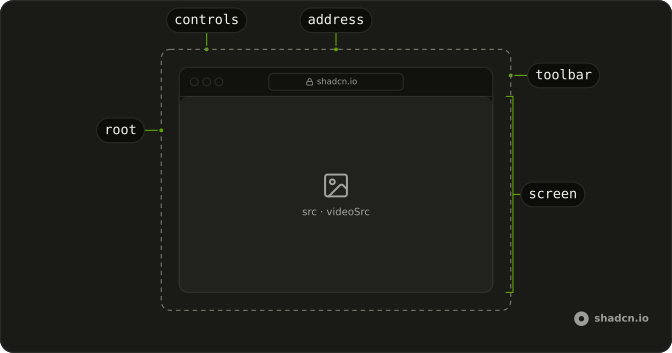
The Safari component draws a macOS browser window around a screen: three window buttons, an address bar with a padlock and the URL you pass, and in its default mode the toolbar buttons either side. The screen takes a screenshot, a recording or a live page in your own markup, at the shape you set with ratio. Use it to present a website or web app in a hero, a changelog or a case study.
For a mobile app, frame it in an iPhone or an Android phone instead.
Installation
Anatomy
Usage
import { Safari } from "@/components/ui/safari";url is the text in the address bar, written as Safari shows it, without the scheme. ratio is the screen's width over its height and defaults to 16 by 10.
<Safari
  alt="The pricing page with three plans"
  src="/screens/pricing.png"
  url="acme.com/pricing"
/>
Accessibility
The toolbar is a picture marked aria-hidden, address included, and none of its buttons can be focused or pressed. When the URL matters, say it in alt or in the text beside the window. alt becomes the screenshot's alt, or the recording's aria-label when there is one, which leaves a screenshot under it marked as decoration, as an empty alt does. A live page passed as children is ordinary content, read aloud and reached with Tab. When it is only an illustration, add inert to the window to take it out of both. A recording gets a Pause video button that takes focus, or under reduced motion its own controls.
Demos
Simple
mode set to simple keeps the three window buttons and the address bar, here reading shadcn.io/templates, and drops the sidebar, navigation, share and tab buttons. The quieter toolbar suits a small window, or a screenshot that should hold the eye. In a hero, the default mode's fuller toolbar reads as a browser at a glance.
Video
A short clip from a black-and-white film plays through videoSrc, muted and looping, under the address shadcn.io/templates/meeting-iq, in a screen with a ratio of 16 by 9. It is cropped like a screenshot, keeping its top edge, and under reduced motion it waits with its controls showing. Set ratio to the recording's own shape and none of it is cut.
Page
Children fill the screen with a small landing page for Northwind at localhost:3000: a header, a public beta badge, a heading, a line of copy and a Get started button, all in theme tokens. Use it when the product is the page itself and its text should stay live in both themes. The screen keeps its ratio, so content taller than it is cut off at the bottom.
Ratio
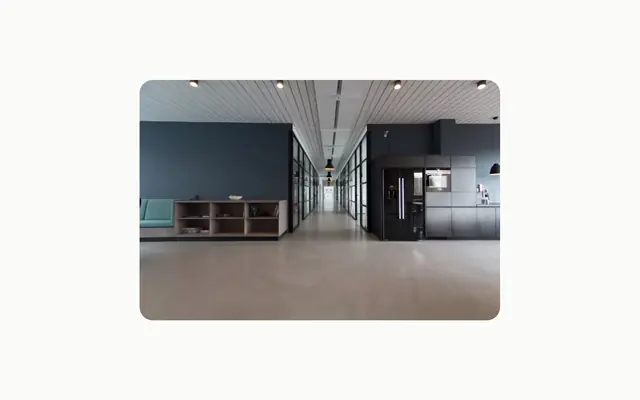
Two simple windows with landscape photos, one at a ratio of 4 by 3 and one at 21 by 9, side by side on a wide screen and stacked on a phone. The toolbar stays the same height whatever the shape, as in a real window. Set ratio to your screenshot's width over its height and the whole capture shows.
FAQ
How do I put a website screenshot in the Safari mockup?
Pass the image as src, describe it in alt, and put the page's address in url. The image covers the screen and keeps its top edge, where a page starts, so a capture taller than the screen loses its bottom.
Set ratio to the screenshot's width over its height and nothing is cut. The default of 16 by 10 already fits a 1440 by 900 window capture, and a full-page screenshot shows only as much of its top as the screen's shape allows.
How do I change the URL in the Safari mockup's address bar?
Pass it as url, without https://, the way Safari shows an address. A padlock comes before it, and an address too long for the bar is cut with an ellipsis. Leave url out and the bar shows no address and no padlock.
The address is always written left to right, even on a right-to-left page, while the rest of the toolbar mirrors. It sits in the toolbar that screen readers skip, so repeat it in alt when people need to hear it.
What is the difference between the Safari mockup's default and simple modes?
default draws Safari's full toolbar: the sidebar button, back and a dimmed forward, a privacy shield, a reload arrow inside the address bar, and share, new tab and tabs on the far side. simple keeps only the three window buttons and the address bar.
The mode is also written to the root as data-mode, so your own styles can target one or the other. Either way the toolbar is drawn, not built: none of its buttons responds to a click.
Can the Safari mockup play a screen recording in React?
It can. Pass the file as videoSrc and it plays muted, on a loop and inline, cropped to the screen with its top edge kept. Playback starts from an effect rather than the autoplay attribute, which lets a visitor with reduced motion turned on get a paused video with its controls showing.
Otherwise it plays only while the window is on screen, and a round button in the screen's bottom corner pauses it, showing on hover, on keyboard focus and on touch screens. It stays visible as a play button once the video is paused, or when the browser refuses to start it. Pass a screenshot as src as well, which stays visible under the video until its first frame.
Can I put a live page or app inside the Safari mockup?
Yes. Pass it as children and it fills the screen, as in the Page demo. The screen keeps its ratio and clips what overflows, so to let people scroll a long page, give the outer element absolute inset-0 overflow-y-auto.
An iframe with absolute inset-0 size-full shows a live site instead, laid out for the screen's width, as long as the site allows framing. Markup laid over a screenshot paints above it without a position of its own.
How does the Safari mockup look on a narrow screen?
The window takes the full width of its container, and the toolbar stays 44px tall. When the window is narrower than 28rem, the sidebar, back, forward, shield, share and tab buttons go, which leaves the address bar room for the URL.
That breakpoint is a container query on the window itself, so a small window in a wide layout drops them too. In simple mode, a spacer that balances the window buttons and keeps the address centered goes below 24rem, and the address bar takes its room.
Does the Safari mockup follow dark mode?
Yes. The window is card with a border, the address bar and an empty screen are muted, and the icons are muted-foreground, so it is light on a light page and dark on a dark one.
The three window buttons are gray dots in bg-foreground/12, not macOS's red, yellow and green. For those colors, or any other change to every window at once, edit the classes in the component's file, which is yours once installed.
API Reference
Safari
<div> data-slot="safari"
alt?string
What the screenshot or video shows, read by screen readers. Leave it empty when the picture is decoration.
- Default
""
mode?"default" | "simple"
How much of the toolbar shows: default has the sidebar, back and
forward, share, new tab and tabs buttons around the address bar;
simple keeps the window buttons and the address bar.
- Type
"default" | "simple"- Default
"default"
ratio?number
The screen's width divided by its height, such as 16 / 10. A picture
of another shape is cropped to it.
- Default
1.6
src?string
An image that fills the screen, cropped to it from the top.
url?string
The address shown in the address bar, after a padlock.
videoSrc?string
A video that fills the screen, muted and looping. It plays on its own while it's on screen, with a button to pause it, except under reduced motion, where it waits with its controls showing.
className?string
Merged with the part's classes.
data-mode?string
Mirrors mode.
data-paused?string
Present after onPause.
--safari-ratiostring