shadcn.io is an independent project built on shadcn/ui
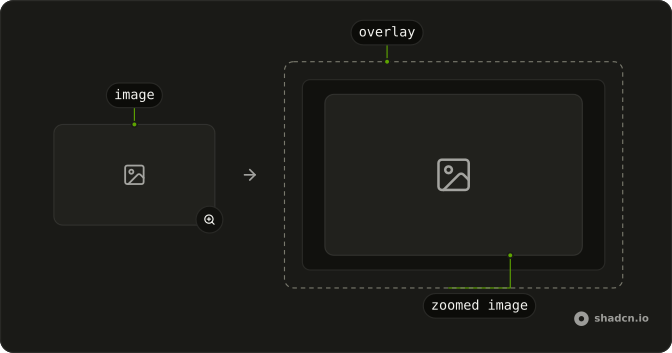
Image Zoom lets people click a photo, a screenshot or a diagram to see it enlarged over the page, then click again or press Escape to go back. It suits a product photo, a chart in an article or an architecture diagram that is too detailed at column width.
It is a viewer, so nothing is cropped or saved. To let people choose the part of a photo to keep, use an Image Cropper, and for a set of photos people page through, a Carousel.

Installation
Anatomy
Usage
import { ImageZoom } from "@/components/ui/image-zoom";Without children it renders this img itself, so width and height reserve its space before the file arrives and className styles the image.
<ImageZoom
  alt="A desk by a window"
  className="max-w-sm rounded-xl"
  height={450}
  src="https://images.unsplash.com/photo-1497366216548-37526070297c?auto=format&fit=crop&w=800&q=80"
  width={800}
/>
Accessibility
A click or tap on the image opens a modal dialog, named after the photo's alt, and locks the page behind it from scrolling. For the keyboard, the library lays a transparent button over the image, named Expand image followed by the alt, and the CSS that installs with the component rings it on focus. Focus moves to the Minimize image button in the dialog's corner when it opens, and back to the image when it closes. alt is empty unless you set it, which marks the photo as decorative.
- Tab
- Moves focus to the button over the image, which draws a ring around it.
- Enter
- On the image, opens the enlarged view. On Minimize image, closes it.
- Space
- Does the same as Enter.
- Escape
- While the image is enlarged, closes it and returns to the page.
Demos
High resolution
A 480 pixel thumbnail of a mountain range sits on the page, and zoomInProps points the enlarged view at a 2400 pixel copy of the same photo. Only the thumbnail loads with the page. The large file downloads when someone opens it and replaces the thumbnail once it arrives, so use this for a gallery or a product photo where the detail matters.
SVG
An inline SVG diagram passed as the child instead of src. The zoom finds the svg, clones it into the enlarged view and scales it to the window, where it stays sharp at any size. The aria-label on the svg names it, since there is no img to carry an alt. Pick this for diagrams and charts drawn in code rather than shipped as files.
FAQ
How do I show a higher-resolution image when Image Zoom opens?
Pass the large file as src inside zoomInProps and keep the small one as src on ImageZoom, as the High resolution demo does. The enlarged view opens with the small image already loaded, then swaps in the large one once it has downloaded and fits it to the window, less a 20 pixel margin, so the page stays light until someone asks for detail.
Without zoomInProps, the enlarged view shows the same file no bigger than its own pixel size, smaller only when the window can't hold it, so a small photo grows little. zoomInProps also takes srcSet and sizes for the large view.
How do I zoom an SVG or a diagram with Image Zoom in React?
Pass the SVG as the child of ImageZoom instead of src, as the SVG demo does. The zoom takes the first element inside that is an img or an svg, or that has role set to img or a data-zoom attribute, skipping any marked aria-hidden. It clones an SVG into the enlarged view, where it stays sharp.
With children, ImageZoom renders no img of its own and ignores alt, width, height and className. Put those on the child, and name an SVG with aria-label.
What alt text should I set on Image Zoom?
Describe the picture as you would for any img: ImageZoom passes alt to the image it renders, and the enlarged view reuses it as the dialog's name. Left out, alt is an empty string, which marks the photo as decorative and leaves the open dialog without a name.
For an SVG passed as a child, set aria-label on the svg instead, as the SVG demo does. That names the diagram on the page, but the open dialog stays unnamed, since the library takes the dialog's name from an img only.
Can keyboard users open Image Zoom?
Yes. Tab reaches the library's Expand image button, which the installed CSS lays transparent over the image and rings on focus, and Enter or Space opens the enlarged view. A screen reader hears Expand image followed by the photo's alt.
Focus then moves to the Minimize image button in the corner of the dialog, where Enter closes it, as Escape does anywhere, and it returns to the image afterwards. Both names are English; pass a11yNameButtonZoom and a11yNameButtonUnzoom through rmiz to translate them.
Does Image Zoom open on hover or on click, and how does it close?
On click or tap, never on hover. The enlarged image opens in a modal dialog, which the browser draws above everything else, so a parent with overflow hidden or a low z-index can't clip it, and the page behind stops scrolling while it is open.
It closes on Escape, on a click on the enlarged image or the space around it, on a turn of the mouse wheel, and on a short vertical swipe on a touch screen. Other options of the library go through rmiz, such as zoomMargin for the space left around the enlarged image, 20 pixels here.
How do I use Image Zoom with the Next.js Image component?
Pass the Image from next/image as the child of ImageZoom. The zoom finds the img it renders and enlarges the file the browser picked from its srcSet, which Next.js sized for the thumbnail. The library won't scale that file past its own size, so the enlarged view comes out little or no bigger than the thumbnail.
Add zoomInProps with a larger src, such as the original file, and the enlarged view swaps it in once it loads. The child keeps its own alt, width and height, since ImageZoom ignores those when it has children.
How do I know when Image Zoom opens or closes?
Pass rmiz with an onZoomChange callback, which receives true when the enlarged view opens and false when it closes, along with the event that caused it. Use it to pause a video beside the image, log which photos get a closer look, or hide a sticky header.
The open state itself stays inside the component. ImageZoom renders the library's uncontrolled zoom, so there is no prop to open it from your own code.
API Reference
ImageZoom
children?React.ReactNode
Custom trigger. Zoom finds the first img, svg, [role="img"], or [data-zoom].
rmiz?Omit<UncontrolledProps, "children" | "zoomImg">
Props for react-medium-image-zoom.
- Type
Omit<UncontrolledProps, "children" | "zoomImg">
zoomInProps?React.ComponentProps<"img">
Image props when zoomed. Defaults to the trigger src.
- Type
React.ComponentProps<"img">
className?string
Merged with the part's classes.