shadcn.io is an independent project built on shadcn/ui
Previous and next buttons move through a row of slides, one filling the frame.
Use it for a gallery, a few quotes, or a short onboarding sequence. For named panels people jump between, use Tabs. In React, React Aria keeps previous and next labeled, so an icon with no name is not enough.
Installation
Anatomy
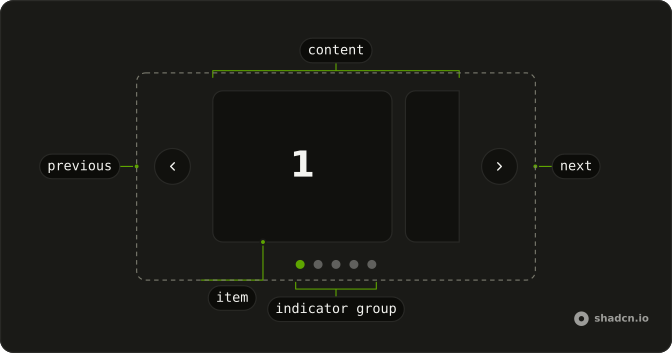
Carousel
├── CarouselItem
│   └── CarouselContent
├── CarouselControl
├── CarouselNext
├── CarouselPrevious
├── CarouselIndicator
│   └── CarouselIndicatorGroup
├── CarouselAutoplayTrigger
└── CarouselProgressText
Usage
import { Card, CardContent } from "@/components/ui/card";
import {
  Carousel, CarouselContent, CarouselItem, CarouselNext,
  CarouselPrevious,
} from "@/components/ui/carousel";
const slides = [1, 2, 3, 4, 5];
const CarouselDemo = () => (
<Carousel className="w-full max-w-[12rem] sm:max-w-xs">
<CarouselContent>
{slides.map((slide) => (
<CarouselItem key={slide}>
<div className="p-1">
<Card>
<CardContent className="flex aspect-square items-center justify-center p-6">
<span className="font-semibold text-4xl">{slide}</span>
</CardContent>
</Card>
</div>
</CarouselItem>
))}
</CarouselContent>
<CarouselPrevious />
<CarouselNext />
</Carousel>
);Accessibility
- Enter
- Activate the focused control.
- Space
- Activate the focused control.
- Arrow Down
- Move to the next item.
- Arrow Up
- Move to the previous item.
- Arrow Right
- Move to the next item.
- Arrow Left
- Move to the previous item.
- Home
- Go to the start.
- End
- Go to the end.
Demos
Size
Each card is narrower than the frame, so two sit side by side and a third can appear once the carousel is wide. Use that for thumbnails or logos, where one full-bleed slide wastes the row. The next card peeks in, which is the hint that more exist. Cap the width or the cards grow until that peek disappears.
Spacing
A multi-card row with a small gap, so neighboring borders do not touch. Tight spacing reads as one group, and a wide gutter reads as separate sections, which fights a carousel. A few pixels is enough when the cards already have an edge. Drop the gap for full-bleed photos that should meet.
Orientation
The track runs downward, about two cards in a fixed height, and the buttons point up and down. Set orientation to vertical and give the content a height, or the column grows with every slide and nothing actually scrolls. A short rail beside a detail view is the fit. A gallery across a page should stay horizontal, which is the default and the direction people expect to swipe.
Api
A line under the carousel says which slide is current, out of five, and updates as you move. The label is your markup, not a built-in caption, so it can match the way the rest of the page speaks. Use it when dots are not enough and a heading or side panel must stay in step. The FAQ shows how each stack reports that index.
Plugin
Slides advance on a two second timer and pause while the pointer is over the track. Leaving the track starts them again. Use a timer for a decorative gallery, not for a sentence someone must read. Keep previous and next, because autoplay is easy to miss, and pausing on hover is the minimum rather than a flourish.
Multiple
On a wide screen several cards share the row, and previous and next hide on small screens where one card already fills the width. Use several per view for tiles people compare, not for a hero. Hiding the buttons works only when a peek of the next card is hint enough. On touch, visible controls beat hoping for a swipe.
Rtl
The numerals are Arabic, and dir is rtl on the carousel, so forward sits where forward is on that page. Previous and next trade sides with the reading order. Set direction on the carousel itself. An ancestor with the right direction can still leave the scroll axis left to right, so try a translated slide rather than English cards with a direction attribute.
FAQ
How do I show several slides at once in the Carousel?
Give each CarouselItem a width class such as sm:basis-1/2 lg:basis-1/3, and pass opts with align set to start, as in the Multiple demo. One slide fills the track by default.
How do I make the Carousel autoplay in React?
Install embla-carousel-autoplay and pass it in plugins, such as Autoplay with a delay of 2000, as in the Plugin demo, which also pauses it on hover.
Let readers pause it, and avoid autoplay for content they need time to read.
How do I get the current slide of the Carousel?
Pass setApi to get Embla's API, read api.selectedScrollSnap(), and listen to its select event to keep a Slide 2 of 5 label in sync, as in the Api demo.
How do I loop the Carousel back to the first slide?
Pass opts with loop set to true: Next on the last slide goes back to the first.
How do I make a vertical Carousel?
Set orientation="vertical" and give CarouselContent a height, such as h-[270px], as in the Orientation demo. The previous and next buttons turn to point up and down.
Is the React Aria Carousel accessible?
The previous and next buttons have labels, Previous slide and Next slide, so screen readers announce them. The carousel is a region described as a carousel, and the left and right arrow keys move between slides while it has focus. Give the carousel a label that names its content, and don't hide essential information in slides people may never reach.
API Reference
Carousel
opts?CarouselOptions
Embla's options, such as loop or align.
orientation?"horizontal" | "vertical"
The orientation of the element.
- Type
"horizontal" | "vertical"- Default
"horizontal"
plugins?CarouselPlugin
Embla plugins, such as autoplay.
setApi?(api: CarouselApi) → void
Called with Embla's API once it's ready, to control the carousel from outside.
- Parameters
api– CarouselApi- Returns
void
className?string
Merged with the part's classes.
CarouselContent
<div> data-slot="carousel-content"
className?string
Merged with the part's classes.
CarouselItem
<div> data-slot="carousel-item"
className?string
Merged with the part's classes.
CarouselNext
data-slot="carousel-next"
children?ReactNode
The content to display in the button.
clickEffect?boolean
Apply a click effect to the button.
- Default
true
download?LinkPrimitiveProps["download"]
With href, downloads the linked file instead of opening it.
href?string
When set, the button renders as a link.
isDisabled?boolean
Whether the button is disabled.
isLoading?boolean
Show a loading indicator.
- Default
false
pill?boolean
Fully rounded corners.
- Default
false
rel?string
With href, the link's relationship to the page (noreferrer, …).
size?"default" | "icon" | "icon-lg" | "icon-md" | "icon-sm" | "icon-xl" | "icon-xs" | "lg" | "md" | "sm" | "xl" | "xs"
Ark default: md.
- Type
"default" | "icon" | "icon-lg" | "icon-md" | "icon-sm" | "icon-xl" | "icon-xs" | "lg" | "md" | "sm" | "xl" | "xs"- Default
"icon-sm"
target?string
With href, where the linked page opens (_blank, …).
variant?"default" | "destructive" | "ghost" | "link" | "outline" | "secondary"
Ark default: default.
- Type
"default" | "destructive" | "ghost" | "link" | "outline" | "secondary"- Default
"outline"
className?string
Merged with the part's classes.
CarouselPrevious
data-slot="carousel-previous"
children?ReactNode
The content to display in the button.
clickEffect?boolean
Apply a click effect to the button.
- Default
true
download?LinkPrimitiveProps["download"]
With href, downloads the linked file instead of opening it.
href?string
When set, the button renders as a link.
isDisabled?boolean
Whether the button is disabled.
isLoading?boolean
Show a loading indicator.
- Default
false
pill?boolean
Fully rounded corners.
- Default
false
rel?string
With href, the link's relationship to the page (noreferrer, …).
size?"default" | "icon" | "icon-lg" | "icon-md" | "icon-sm" | "icon-xl" | "icon-xs" | "lg" | "md" | "sm" | "xl" | "xs"
Ark default: md.
- Type
"default" | "icon" | "icon-lg" | "icon-md" | "icon-sm" | "icon-xl" | "icon-xs" | "lg" | "md" | "sm" | "xl" | "xs"- Default
"icon-sm"
target?string
With href, where the linked page opens (_blank, …).
variant?"default" | "destructive" | "ghost" | "link" | "outline" | "secondary"
Ark default: default.
- Type
"default" | "destructive" | "ghost" | "link" | "outline" | "secondary"- Default
"outline"
className?string
Merged with the part's classes.