shadcn.io is an independent project built on shadcn/ui
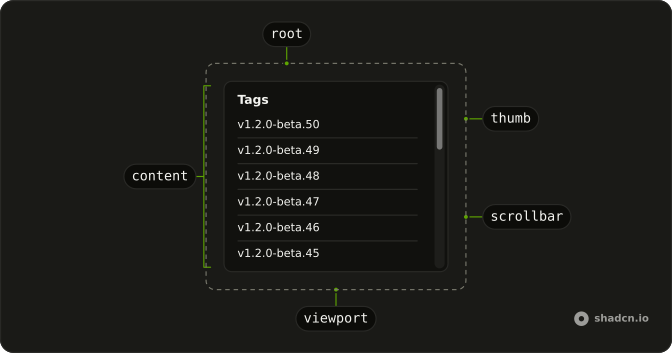
A scroll area is a box with a set height or width that scrolls its own content, so a long list stays inside a sidebar, a popover or a card instead of stretching the page. It suits a tag list, a chat log or a row of thumbnails.
When the items should snap one at a time and come with previous and next buttons, use a Carousel. On this page Scroll Area is a plain div with overflow: auto, not a React Aria component.
Installation
Anatomy
Usage
import { ScrollArea } from "@/components/ui/scroll-area";The height on ScrollArea is what makes it scroll. Its content can be any length.
const tags = Array.from({ length: 50 }, (_, i) => `v1.2.0-beta.${50 - i}`);

const Tags = () => (
  <ScrollArea className="h-72 w-48 rounded-md border">
    <div className="p-4">
      <h4 className="mb-4 font-medium text-sm leading-none">Tags</h4>
      {tags.map((tag) => (
        <div className="border-b py-2 text-sm last:border-0" key={tag}>
          {tag}
        </div>
      ))}
    </div>
  </ScrollArea>
);
Accessibility
The area is a plain div with overflow: auto, so the browser's own scrollbar and scrolling keys apply, and the component draws a focus ring for when the box has focus. It sets no tabIndex, so a list with nothing focusable inside joins the tab order only where the browser puts it there. Pass tabIndex={0}, role="region" and an aria-label to ScrollArea to make it a named stop in every browser.
- Tab
- Moves focus to the scrolling box when it is in the tab order, then on to the links and buttons inside it.
- Arrow Down
- When the box has focus, scrolls it down a short step.
- Arrow Up
- When the box has focus, scrolls it up a short step.
- Arrow Right
- When the box has focus and its content is wider than it, scrolls right.
- Arrow Left
- When the box has focus and its content is wider than it, scrolls left.
- Page Down
- When the box has focus, scrolls down by about the height of the box.
- Page Up
- When the box has focus, scrolls up by about the height of the box.
- Home
- When the box has focus, scrolls to the top.
- End
- When the box has focus, scrolls to the bottom.
Demos
Horizontal
Three photos with their photographers' names sit in one row that doesn't wrap, w-max inside a box at most max-w-sm wide, so the extra width becomes the scroll range. The browser adds the sideways bar by itself, since the area is a plain scrolling box. Use it for a strip of thumbnails or logos that must stay one row tall.
RTL
The tag list again, with an Arabic heading and dir set to rtl on the area, so the heading and rows align right. The area is a plain scrolling div, so dir is an ordinary attribute here and the browser decides which side its bar goes on. Use it for an Arabic or Hebrew interface.
FAQ
Why won't my Scroll Area scroll?
A Scroll Area scrolls only when its own box is shorter than its content, so it needs a height that doesn't come from the content: a class such as h-72, as the demo has, or h-full inside a parent whose height is set.
In a flex column, where the area takes its height from flex-1, add min-h-0 as well. A flex item won't shrink below its content without it, so the area grows to fit everything and has nothing left to scroll.
How do I give a Scroll Area a max height instead of a fixed one?
Put the class on ScrollArea, such as max-h-72. The area then stays as short as its content and starts to scroll once it reaches the limit, which suits a dropdown of results or a comment thread whose length you don't know in advance.
The area is itself the scrolling div, so the limit applies straight to the box that scrolls.
How do I make a Scroll Area scroll horizontally?
Make the content wider than the area and keep it from wrapping: a row with w-max, and whitespace-nowrap on the area, as the Horizontal demo does.
The area is a plain scrolling div, so the browser adds the horizontal bar by itself once the row is wider than the box.
How do I keep the Scroll Area scrollbar always visible?
The browser draws this bar, so it follows the operating system, and where the system uses overlay scrollbars, as macOS does with a trackpad, it shows only while the content moves. This Scroll Area has no setting that changes that, because the bar is the browser's own.
How do I change the color of the Scroll Area scrollbar?
The bar is the browser's, colored by the [scrollbar-color:var(--color-border)_transparent] class on ScrollArea, whose first value is the thumb and second the track. Change the first value to recolor the thumb, and drop [scrollbar-width:thin] for a wider bar. A browser without scrollbar-color support draws its default bar.
How do I scroll a Scroll Area to the bottom when a new message arrives?
Pass a ref to ScrollArea, which is the scrolling div itself, and in a useEffect that depends on the messages, set its scrollTop to its scrollHeight.
Scroll only when the reader was already at the end, so someone who moved up to an older message isn't pulled back down. A chat log, a build output and an activity feed all want that exception.
Should I use a Scroll Area or plain CSS overflow?
On this page they are the same thing. Scroll Area is a div with overflow: auto, a thin scrollbar tinted with the border color, and a focus ring, with no JavaScript behind it, so use it to get those defaults from one name, or write the classes yourself.
Neither one touches the page's own scrollbar. A Scroll Area styles the bar of its own box, and the window keeps the browser's.
Does a Scroll Area work in a right-to-left layout?
Yes. The area is a plain div, so it takes its direction from its own dir or the page's like any other element, as in the RTL demo, and the browser decides which side its scrollbar goes on. Nothing in the component needs to know about the direction.
API Reference
ScrollArea
<div> data-slot="scroll-area"
className?string
Merged with the part's classes.