shadcn.io is an independent project built on shadcn/ui
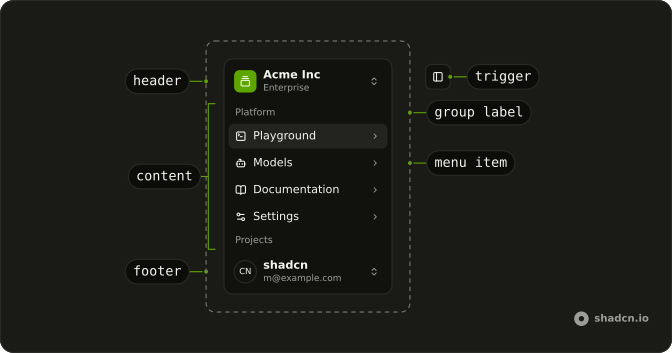
Grouped links in a rail beside the page. The rail can shrink to icons.
Use it for the stable navigation of a wide product. A few destinations on a phone fit better in Bottom Navigation. In React, React Aria keeps the rail open or closed, and the same header button opens it as a sheet on a narrow screen.
Installation
Anatomy
Usage
import {
  AudioWaveformIcon, BadgeCheckIcon, BellIcon, BookOpenIcon, BotIcon,
  ChevronRightIcon, ChevronsUpDownIcon, CommandIcon, CreditCardIcon,
  FolderIcon, ForwardIcon, FrameIcon, GalleryVerticalEndIcon,
  LogOutIcon, MapIcon, MoreHorizontalIcon, PieChartIcon, PlusIcon,
  Settings2Icon, SparklesIcon, SquareTerminalIcon, Trash2Icon,
} from "lucide-react";
import type React from "react";
import { useCallback, useState } from "react";
import {
  Avatar, AvatarFallback, AvatarImage,
} from "@/components/ui/avatar";
import {
  Collapsible, CollapsibleContent,
} from "@/components/ui/collapsible";
import {
  DropdownMenu, DropdownMenuGroup, DropdownMenuGroupLabel,
  DropdownMenuItem, DropdownMenuSeparator, DropdownMenuShortcut,
  DropdownMenuTrigger,
} from "@/components/ui/dropdown-menu";
import {
  Sidebar, SidebarContent, SidebarFooter, SidebarGroup,
  SidebarGroupLabel, SidebarHeader, SidebarInset, SidebarMenu,
  SidebarMenuAction, SidebarMenuButton, SidebarMenuItem, SidebarMenuSub,
  SidebarMenuSubButton, SidebarMenuSubItem, SidebarProvider,
  SidebarRail, SidebarTrigger, useSidebar,
} from "@/components/ui/sidebar";
// This is sample data.
const data = {
navMain: [
{
icon: SquareTerminalIcon,
isActive: true,
items: [
{
title: "History",
url: "#",
},
{
title: "Starred",
url: "#",
},
{
title: "Settings",
url: "#",
},
],
title: "Playground",
url: "#",
},
{
icon: BotIcon,
items: [
{
title: "Genesis",
url: "#",
},
{
title: "Explorer",
url: "#",
},
{
title: "Quantum",
url: "#",
},
],
title: "Models",
url: "#",
},
{
icon: BookOpenIcon,
items: [
{
title: "Introduction",
url: "#",
},
{
title: "Get Started",
url: "#",
},
{
title: "Tutorials",
url: "#",
},
{
title: "Changelog",
url: "#",
},
],
title: "Documentation",
url: "#",
},
{
icon: Settings2Icon,
items: [
{
title: "General",
url: "#",
},
{
title: "Team",
url: "#",
},
{
title: "Billing",
url: "#",
},
{
title: "Limits",
url: "#",
},
],
title: "Settings",
url: "#",
},
],
projects: [
{
icon: FrameIcon,
name: "Design Engineering",
url: "#",
},
{
icon: PieChartIcon,
name: "Sales & Marketing",
url: "#",
},
{
icon: MapIcon,
name: "Travel",
url: "#",
},
],
teams: [
{
logo: GalleryVerticalEndIcon,
name: "Acme Inc",
plan: "Enterprise",
},
{
logo: AudioWaveformIcon,
name: "Acme Corp.",
plan: "Startup",
},
{
logo: CommandIcon,
name: "Evil Corp.",
plan: "Free",
},
],
user: {
avatar: "https://github.com/shadcn.png",
email: "[email protected]",
name: "shadcn",
},
};
interface Team {
logo: React.ElementType;
name: string;
plan: string;
}
function TeamMenuItem({
index,
onSelect,
team,
}: {
index: number;
onSelect: (team: Team) => void;
team: Team;
}) {
const handleClick = useCallback(() => {
onSelect(team);
}, [onSelect, team]);
return (
<DropdownMenuItem className="gap-2 p-2" onAction={handleClick}>
<div className="flex size-6 items-center justify-center rounded-md border">
<team.logo aria-hidden="true" className="size-3.5 shrink-0" />
</div>
{team.name}
<DropdownMenuShortcut>⌘{index + 1}</DropdownMenuShortcut>
</DropdownMenuItem>
);
}
function TeamSwitcher({ teams }: { teams: Team[] }) {
const { isMobile } = useSidebar();
const [activeTeam, setActiveTeam] = useState(teams[0]);
const handleSelectTeam = useCallback((team: Team) => {
setActiveTeam(team);
}, []);
if (!activeTeam) {
return null;
}
return (
<SidebarMenu>
<SidebarMenuItem>
<DropdownMenuTrigger>
<SidebarMenuButton
className="data-[state=open]:bg-sidebar-accent data-[state=open]:text-sidebar-accent-foreground"
size="lg"
>
<div className="flex aspect-square size-8 items-center justify-center rounded-lg bg-sidebar-primary text-sidebar-primary-foreground">
<activeTeam.logo aria-hidden="true" className="size-4" />
</div>
<div className="grid flex-1 text-start text-sm leading-tight">
<span className="truncate font-medium">{activeTeam.name}</span>
<span className="truncate text-xs">{activeTeam.plan}</span>
</div>
<ChevronsUpDownIcon aria-hidden="true" className="ms-auto" />
</SidebarMenuButton>
<DropdownMenu
className="min-w-56 rounded-lg"
offset={4}
placement={isMobile ? "bottom start" : "right top"}
>
<DropdownMenuGroup>
<DropdownMenuGroupLabel className="text-muted-foreground text-xs">
Teams
</DropdownMenuGroupLabel>
{teams.map((team, index) => (
<TeamMenuItem
index={index}
key={team.name}
onSelect={handleSelectTeam}
team={team}
/>
))}
</DropdownMenuGroup>
<DropdownMenuSeparator />
<DropdownMenuGroup>
<DropdownMenuItem className="gap-2 p-2">
<div className="flex size-6 items-center justify-center rounded-md border bg-transparent">
<PlusIcon aria-hidden="true" className="size-4" />
</div>
<div className="font-medium text-muted-foreground">
Add team
</div>
</DropdownMenuItem>
</DropdownMenuGroup>
</DropdownMenu>
</DropdownMenuTrigger>
</SidebarMenuItem>
</SidebarMenu>
);
}
function NavMain({
items,
}: {
items: {
title: string;
url: string;
icon?: React.ElementType;
isActive?: boolean;
items?: {
title: string;
url: string;
}[];
}[];
}) {
return (
<SidebarGroup>
<SidebarGroupLabel>Platform</SidebarGroupLabel>
<SidebarMenu>
{items.map((item) => (
<Collapsible
className="group/collapsible"
defaultExpanded={item.isActive}
key={item.title}
>
<SidebarMenuItem>
<SidebarMenuButton slot="trigger" tooltip={item.title}>
{item.icon ? <item.icon aria-hidden="true" /> : null}
<span>{item.title}</span>
<ChevronRightIcon
aria-hidden="true"
className="ms-auto transition-transform duration-200 group-data-[state=open]/collapsible:rotate-90"
/>
</SidebarMenuButton>
<CollapsibleContent>
<SidebarMenuSub>
{item.items?.map((subItem) => (
<SidebarMenuSubItem key={subItem.title}>
<SidebarMenuSubButton href={subItem.url}>
<span>{subItem.title}</span>
</SidebarMenuSubButton>
</SidebarMenuSubItem>
))}
</SidebarMenuSub>
</CollapsibleContent>
</SidebarMenuItem>
</Collapsible>
))}
</SidebarMenu>
</SidebarGroup>
);
}
function NavProjects({
projects,
}: {
projects: {
name: string;
url: string;
icon: React.ElementType;
}[];
}) {
const { isMobile } = useSidebar();
return (
<SidebarGroup className="group-data-[collapsible=icon]:hidden">
<SidebarGroupLabel>Projects</SidebarGroupLabel>
<SidebarMenu>
{projects.map((item) => (
<SidebarMenuItem key={item.name}>
<SidebarMenuButton href={item.url}>
<item.icon aria-hidden="true" />
<span>{item.name}</span>
</SidebarMenuButton>
<DropdownMenuTrigger>
<SidebarMenuAction showOnHover>
<MoreHorizontalIcon aria-hidden="true" />
<span className="sr-only">More</span>
</SidebarMenuAction>
<DropdownMenu
className="w-48 rounded-lg"
placement={isMobile ? "bottom end" : "right top"}
>
<DropdownMenuItem>
<FolderIcon
aria-hidden="true"
className="text-muted-foreground"
/>
<span>View Project</span>
</DropdownMenuItem>
<DropdownMenuItem>
<ForwardIcon
aria-hidden="true"
className="text-muted-foreground"
/>
<span>Share Project</span>
</DropdownMenuItem>
<DropdownMenuSeparator />
<DropdownMenuItem>
<Trash2Icon
aria-hidden="true"
className="text-muted-foreground"
/>
<span>Delete Project</span>
</DropdownMenuItem>
</DropdownMenu>
</DropdownMenuTrigger>
</SidebarMenuItem>
))}
<SidebarMenuItem>
<SidebarMenuButton className="text-sidebar-foreground/70">
<MoreHorizontalIcon
aria-hidden="true"
className="text-sidebar-foreground/70"
/>
<span>More</span>
</SidebarMenuButton>
</SidebarMenuItem>
</SidebarMenu>
</SidebarGroup>
);
}
function NavUser({
user,
}: {
user: {
name: string;
email: string;
avatar: string;
};
}) {
const { isMobile } = useSidebar();
return (
<SidebarMenu>
<SidebarMenuItem>
<DropdownMenuTrigger>
<SidebarMenuButton
className="data-[state=open]:bg-sidebar-accent data-[state=open]:text-sidebar-accent-foreground"
size="lg"
>
<Avatar className="size-8 rounded-lg">
<AvatarImage alt={user.name} src={user.avatar} />
<AvatarFallback className="rounded-lg">CN</AvatarFallback>
</Avatar>
<div className="grid flex-1 text-start text-sm leading-tight">
<span className="truncate font-medium">{user.name}</span>
<span className="truncate text-xs">{user.email}</span>
</div>
<ChevronsUpDownIcon aria-hidden="true" className="ms-auto size-4" />
</SidebarMenuButton>
<DropdownMenu
className="min-w-56 rounded-lg"
offset={4}
placement={isMobile ? "bottom end" : "right bottom"}
>
<DropdownMenuGroup>
<DropdownMenuGroupLabel className="p-0 font-normal">
<div className="flex items-center gap-2 px-1 py-1.5 text-start text-sm">
<Avatar className="size-8 rounded-lg">
<AvatarImage alt={user.name} src={user.avatar} />
<AvatarFallback className="rounded-lg">CN</AvatarFallback>
</Avatar>
<div className="grid flex-1 text-start text-sm leading-tight">
<span className="truncate font-medium">{user.name}</span>
<span className="truncate text-xs">{user.email}</span>
</div>
</div>
</DropdownMenuGroupLabel>
</DropdownMenuGroup>
<DropdownMenuSeparator />
<DropdownMenuGroup>
<DropdownMenuItem>
<SparklesIcon aria-hidden="true" />
Upgrade to Pro
</DropdownMenuItem>
</DropdownMenuGroup>
<DropdownMenuSeparator />
<DropdownMenuGroup>
<DropdownMenuItem>
<BadgeCheckIcon aria-hidden="true" />
Account
</DropdownMenuItem>
<DropdownMenuItem>
<CreditCardIcon aria-hidden="true" />
Billing
</DropdownMenuItem>
<DropdownMenuItem>
<BellIcon aria-hidden="true" />
Notifications
</DropdownMenuItem>
</DropdownMenuGroup>
<DropdownMenuSeparator />
<DropdownMenuGroup>
<DropdownMenuItem>
<LogOutIcon aria-hidden="true" />
Log out
</DropdownMenuItem>
</DropdownMenuGroup>
</DropdownMenu>
</DropdownMenuTrigger>
</SidebarMenuItem>
</SidebarMenu>
);
}
const SidebarDemo = ({ ...props }: React.ComponentProps<typeof Sidebar>) => (
<div className="relative h-[400px] w-full overflow-hidden rounded-xl border">
<SidebarProvider className="h-full min-h-0 overflow-hidden">
<Sidebar className="absolute" collapsible="icon" {...props}>
<SidebarHeader>
<TeamSwitcher teams={data.teams} />
</SidebarHeader>
<SidebarContent>
<NavMain items={data.navMain} />
<NavProjects projects={data.projects} />
</SidebarContent>
<SidebarFooter>
<NavUser user={data.user} />
</SidebarFooter>
<SidebarRail />
</Sidebar>
<SidebarInset>
<header className="flex h-16 shrink-0 items-center gap-2 transition-[width,height] ease-linear group-has-data-[collapsible=icon]/sidebar-wrapper:h-12">
<div className="flex items-center gap-2 px-4">
<SidebarTrigger className="-ms-1" />
</div>
</header>
</SidebarInset>
</SidebarProvider>
</div>
);
Accessibility
- Enter
- Activate the focused control.
- Space
- Activate the focused control.
- Arrow Down
- Move down.
- Arrow Up
- Move up.
- Arrow Left
- Move left.
- Arrow Right
- Move right.
- Home
- Go to the start.
- End
- Go to the end.
Demos
Rtl
Arabic labels, dir set to rtl on the frame, and the rail on the right so it leads the line. collapsible is icon and variant is floating, with the team mark, groups, projects, and account menu from the main shell. Menus open toward the page. Set direction on those portaled menus too, or a dropdown stays left to right, and keep an accessible name on each icon.
FAQ
How do I control whether a Sidebar is open in React?
Wrap the layout in SidebarProvider, then render Sidebar beside SidebarInset. The desktop sidebar starts open, so keep a boolean in state only when something else must open or close it.
Pass open and defaultOpen on SidebarProvider. onOpenChange receives the next boolean, and useSidebar throws if you call it outside the provider.
How do I collapse a Sidebar to icons or off the screen?
Set collapsible on Sidebar. offcanvas, the default, slides it off the screen, icon shrinks it to icons, which the usage example does, and none keeps it open. variant is sidebar, floating, or inset, and it changes the chrome around that rail. data-state is expanded or collapsed.
How do I put a Sidebar on the right with React Aria?
The sidebar sits on the left by default, so move it to the other edge without swapping the document direction. The Rtl demo is a separate case, for right-to-left text. Set side on Sidebar. inline-start, the default, and inline-end follow the reading direction, so the rail leads the line in right-to-left text too; left and right are the screen's edges whatever the direction, as in shadcn/ui.
What happens to a Sidebar on a narrow screen?
On a narrow viewport the sidebar opens as a Sheet instead of pushing the layout. useSidebar returns isMobile, plus open, toggleSidebar, and state, which is expanded or collapsed. Call it only under SidebarProvider. SidebarTrigger calls toggleSidebar, so the same button works on both layouts.
How do I toggle a Sidebar from the keyboard, and does it persist?
Command or Ctrl, plus B, toggles the sidebar. The desktop open state is written to a cookie named sidebar_state, but the component does not read that cookie back. Pass defaultOpen yourself if the next load should match. The shortcut stays on, and the cookie is written whenever the desktop state changes, with no prop to turn either one off.
How do I mark the current Sidebar link?
Set isActive on the current SidebarMenuButton. That sets data-active, so the row uses the sidebar accent tokens. Pass tooltip with the item name. The tooltip shows while the sidebar is collapsed to icons, and it stays hidden when the sidebar is expanded or on a phone.
How do I change the Sidebar width and colors?
The provider sets the CSS variables --sidebar-width and --sidebar-width-icon. Override those variables to resize the rail and the icon rail. Colors use the sidebar background, foreground, and accent tokens. Edit the sidebar file under components/ui for structure, and keep data-state and data-collapsible working, because the layout depends on them.
How do I install Sidebar in React?
Run the command in the Installation section above. It adds Sidebar and its parts to your ui folder. Import from that folder when the command finishes, instead of copying the source by hand, and rerun the command later if you want the latest files. The command uses the shadcn CLI.
API Reference
Sidebar
<div>
collapsible?"offcanvas" | "icon" | "none"
How it collapses: offcanvas slides it out, icon shrinks it to its * icons, none keeps it open.
- Type
"offcanvas" | "icon" | "none"- Default
"offcanvas"
side?"inline-start" | "inline-end" | "left" | "right"
The edge it's on: inline-start (the default) and inline-end follow the reading direction; left and right are the screen's edges, as in shadcn/ui.
- Type
"inline-start" | "inline-end" | "left" | "right"- Default
"inline-start"
variant?"sidebar" | "floating" | "inset"
The visual style.
- Type
"sidebar" | "floating" | "inset"- Default
"sidebar"
className?string
Merged with the part's classes.
--sidebar-widthstring--sidebar-width-iconstringSidebarContent
<div> data-slot="sidebar-content"
className?string
Merged with the part's classes.
data-sidebar"content"
- Default
"content"
SidebarFooter
<div> data-slot="sidebar-footer"
className?string
Merged with the part's classes.
data-sidebar"footer"
- Default
"footer"
SidebarGroup
<div> data-slot="sidebar-group"
className?string
Merged with the part's classes.
data-sidebar"group"
- Default
"group"
SidebarGroupAction
<button> data-slot="sidebar-group-action"
className?string
Merged with the part's classes.
data-sidebar"group-action"
- Default
"group-action"
SidebarGroupContent
<div> data-slot="sidebar-group-content"
className?string
Merged with the part's classes.
data-sidebar"group-content"
- Default
"group-content"
SidebarGroupLabel
data-slot="sidebar-group-label"
elementType?React.ElementType
The element it renders, such as span.
className?string
Merged with the part's classes.
data-sidebar"group-label"
- Default
"group-label"
SidebarHeader
<div> data-slot="sidebar-header"
className?string
Merged with the part's classes.
data-sidebar"header"
- Default
"header"
SidebarInput
data-slot="sidebar-input"
children?ReactNode
The children of the component.
enterKeyHint?"enter" | "done" | "go" | "next" | "previous" | "search" | "send"
An enumerated attribute that defines what action label or icon to preset for the enter key on virtual keyboards. See [MDN](https://developer.mozilla.org/en-US/docs/Web/HTML/Global_attributes/enterkeyhint).
- Type
"enter" | "done" | "go" | "next" | "previous" | "search" | "send"
style?object
The inline [style](https://developer.mozilla.org/en-US/docs/Web/API/HTMLElement/style) for the element.
- Type
{ prop?: string]: string | number }
className?string
Merged with the part's classes.
data-sidebar"input"
- Default
"input"
SidebarInset
<main> data-slot="sidebar-inset"
className?string
Merged with the part's classes.
SidebarMenu
<div> data-slot="sidebar-menu"
className?string
Merged with the part's classes.
data-sidebar"menu"
- Default
"menu"
SidebarMenuAction
data-slot="sidebar-menu-action"
children?ReactNode
The content to display in the button.
isDisabled?boolean
Whether the button is disabled.
showOnHover?boolean
Hides the action until its menu item is hovered or focused, or its menu is * open. Always shown below md.
- Default
false
className?string
Merged with the part's classes.
data-sidebar"menu-action"
- Default
"menu-action"
SidebarMenuBadge
<div> data-slot="sidebar-menu-badge"
className?string
Merged with the part's classes.
data-sidebar"menu-badge"
- Default
"menu-badge"
SidebarMenuButton
data-slot="sidebar-menu-button"
children?ReactNode
The content to display in the button.
href?string
The URL it links to.
isActive?boolean
Whether the button is the current page: highlighted, and data-active.
- Default
false
isDisabled?boolean
Whether the button is disabled.
size?"default" | "lg" | "sm"
The size.
- Type
"default" | "lg" | "sm"- Default
"default"
tooltip?string | React.ComponentProps<typeof Tooltip>
The tooltip it shows while the sidebar is collapsed to icons: its text, or * the tooltip's props.
- Type
string | React.ComponentProps<typeof Tooltip>
variant?"default" | "outline"
The visual style.
- Type
"default" | "outline"- Default
"default"
className?string
Merged with the part's classes.
data-active?string
Mirrors isActive.
data-sidebar"menu-button"
- Default
"menu-button"
data-size?string
Mirrors size.
SidebarMenuItem
<div> data-slot="sidebar-menu-item"
className?string
Merged with the part's classes.
data-sidebar"menu-item"
- Default
"menu-item"
SidebarMenuSkeleton
<div> data-slot="sidebar-menu-skeleton"
showIcon?boolean
Draws an icon placeholder before the text line.
- Default
false
className?string
Merged with the part's classes.
data-sidebar"menu-skeleton"
- Default
"menu-skeleton"
--skeleton-widthstringSidebarMenuSub
<ul> data-slot="sidebar-menu-sub"
className?string
Merged with the part's classes.
data-sidebar"menu-sub"
- Default
"menu-sub"
SidebarMenuSubButton
data-slot="sidebar-menu-sub-button"
children?ReactNode
The content to display in the button.
href?string
The URL it links to.
isActive?boolean
Whether the button is the current page: highlighted, and data-active.
- Default
false
isDisabled?boolean
Whether the button is disabled.
size?"sm" | "md"
The size.
- Type
"sm" | "md"- Default
"md"
className?string
Merged with the part's classes.
data-active?string
Mirrors isActive.
data-sidebar"menu-sub-button"
- Default
"menu-sub-button"
data-size?string
Mirrors size.
SidebarMenuSubItem
<li> data-slot="sidebar-menu-sub-item"
className?string
Merged with the part's classes.
data-sidebar"menu-sub-item"
- Default
"menu-sub-item"
SidebarProvider
open?boolean
Whether it's open. Pair with onOpenChange to control it.
defaultOpen?boolean
Whether it starts open, when you don't control open.
- Default
true
onOpenChange?(open: boolean) → void
Called when it opens or closes.
- Parameters
open– boolean- Returns
void
persist?boolean
Persist the desktop open state to a cookie. * * @default true.
- Default
true
shortcut?boolean
Toggle the sidebar with ⌘B / Ctrl+B. * * @default true.
- Default
true
className?string
Merged with the part's classes.
SidebarRail
<button> data-slot="sidebar-rail"
className?string
Merged with the part's classes.
data-sidebar"rail"
- Default
"rail"
SidebarSeparator
data-slot="sidebar-separator"
children?ReactNode
The children of the component.
elementType?string
The HTML element type that will be used to render the separator.
orientation?"horizontal" | "vertical"
The orientation of the separator.
- Type
"horizontal" | "vertical"- Default
"horizontal"
style?object
The inline [style](https://developer.mozilla.org/en-US/docs/Web/API/HTMLElement/style) for the element.
- Type
{ prop?: string]: string | number }
className?string
Merged with the part's classes.
data-sidebar"separator"
- Default
"separator"
SidebarTrigger
children?ReactNode
The content to display in the button.
clickEffect?boolean
Apply a click effect to the button.
- Default
true
download?LinkPrimitiveProps["download"]
With href, downloads the linked file instead of opening it.
href?string
When set, the button renders as a link.
isDisabled?boolean
Whether the button is disabled.
isLoading?boolean
Show a loading indicator.
- Default
false
pill?boolean
Fully rounded corners.
- Default
false
rel?string
With href, the link's relationship to the page (noreferrer, …).
size?"default" | "icon" | "icon-lg" | "icon-md" | "icon-sm" | "icon-xl" | "icon-xs" | "lg" | "md" | "sm" | "xl" | "xs"
The size.
- Type
"default" | "icon" | "icon-lg" | "icon-md" | "icon-sm" | "icon-xl" | "icon-xs" | "lg" | "md" | "sm" | "xl" | "xs"- Default
"md"
target?string
With href, where the linked page opens (_blank, …).
variant?"default" | "destructive" | "ghost" | "link" | "outline" | "secondary"
The visual style.
- Type
"default" | "destructive" | "ghost" | "link" | "outline" | "secondary"- Default
"default"
className?string
Merged with the part's classes.