shadcn.io is an independent project built on shadcn/ui
Links for the site sit in one row. Some open a panel of related pages, and some are just a link.
Use it for destinations in a header. Commands such as Export or Delete belong in a Dropdown Menu. In React, Radix UI renders a navigation landmark, and router links go in the link part so the focus behavior stays.
Installation
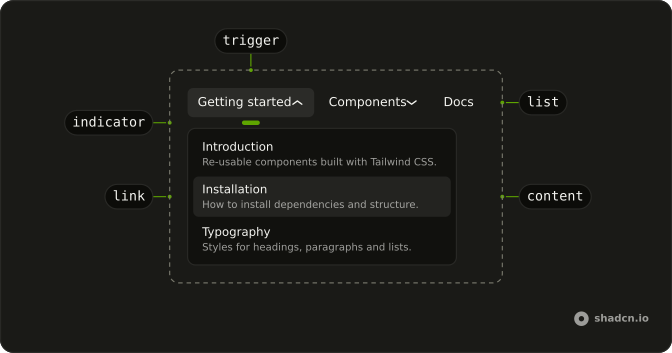
Anatomy
NavigationMenu
├── NavigationMenuList
│   ├── NavigationMenuItem
│   │   ├── NavigationMenuTrigger
│   │   └── NavigationMenuContent
│   │       └── NavigationMenuLink
│   └── NavigationMenuItem
│       └── NavigationMenuLink
└── NavigationMenuIndicator
Usage
import {
  NavigationMenu, NavigationMenuContent, NavigationMenuItem,
  NavigationMenuLink, NavigationMenuList, NavigationMenuTrigger,
} from "@/components/ui/navigation-menu";<NavigationMenu>
<NavigationMenuList>
<NavigationMenuItem>
<NavigationMenuTrigger>Item One</NavigationMenuTrigger>
<NavigationMenuContent>
<NavigationMenuLink href="#">Link</NavigationMenuLink>
</NavigationMenuContent>
</NavigationMenuItem>
</NavigationMenuList>
</NavigationMenu>Accessibility
- Enter
- Activate the focused control.
- Space
- Activate the focused control.
- Arrow Left
- Move left.
- Arrow Right
- Move right.
- Escape
- Close the open panel.
Demos
Rtl
The header in Arabic: a getting-started list, a component grid that wraps into columns, and a docs link with no panel. dir is rtl on the wrapper, so the triggers run from the right and panels follow the reading order. Arrow keys follow that order too. Set direction on the container you ship, and check that a wide panel does not spill off the far edge.
FAQ
How do I use router links in the React Navigation Menu?
Render your router's link through NavigationMenuLink, so it keeps the menu's styles and focus handling.
Pass asChild and put Next.js Link (or your router's link) inside: <NavigationMenuLink asChild><Link href="/docs">Docs</Link></NavigationMenuLink>.
How do I highlight the current page in the Navigation Menu?
Set aria-current="page" on the link that matches the current route. Screen readers announce it, and you can style it with Tailwind's aria-[current=page]: variant.
active on NavigationMenuLink does both for you.
How do I change how fast the Radix UI Navigation Menu opens on hover?
Set delayDuration on NavigationMenu (200ms by default). skipDelayDuration is why the next trigger opens at once while you move along the bar.
How do I control which Navigation Menu panel is open in React?
Pass value and onValueChange on NavigationMenu: value is the open item's value, and an empty string closes every panel. Choosing a link closes the menu on its own.
How do I make the Navigation Menu work on mobile?
Hide the bar below md and put the same links in a Sheet behind a menu button. Wide panels under a header bar don't suit small touch screens, and a sheet gives every link a full-width tap target.
When should I use a Navigation Menu instead of a Dropdown Menu or a Menubar?
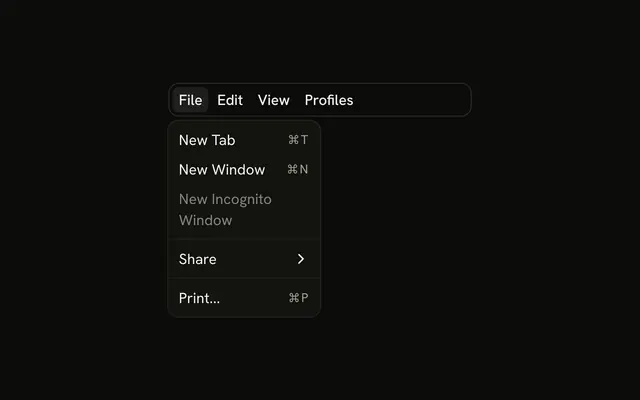
Use the Navigation Menu for site navigation: links in a header, grouped under triggers. A Dropdown Menu holds actions like Export or Delete, and a Menubar is an app's File, Edit, View bar. Each gives assistive tech the roles that match what it does.
Is the Radix UI Navigation Menu accessible?
Yes. It renders a nav landmark, Tab moves between triggers and links, Enter or Space opens a trigger's panel, and Escape closes it and returns focus to the trigger. Give each link text that makes sense on its own, since screen readers can list them out of context.
API Reference
NavigationMenu
<nav> data-slot="navigation-menu"
value?string
The value. Pair with onValueChange to control it.
defaultValue?string
The value it starts with, when you don't control value.
onValueChange?{ bivarianceHack(value: string): void; }["bivarianceHack"]
Called when the value changes.
- Type
{ bivarianceHack(value: string): void; }["bivarianceHack"]
activationMode?(typeof ActivationMode)[keyof typeof ActivationMode]
Whether an item is activated automatically or manually.
- "automatic": hovering or focusing a trigger opens its item, and moving
away closes it after a short delay.
- "manual": clicking a trigger toggles the item; hover and focus are ignored
- Type
(typeof ActivationMode)[keyof typeof ActivationMode]- Default
"automatic"
delayDuration?number
The duration from when the pointer enters the trigger until the tooltip
gets opened. When activationMode is manual, this prop is ignored.
- Default
200
dir?(typeof Direction)[keyof typeof Direction]
The reading direction. Inherits the nearest DirectionProvider when unset.
- Type
(typeof Direction)[keyof typeof Direction]
orientation?(typeof Orientation)[keyof typeof Orientation]
Horizontal or vertical: which arrow keys move between items.
- Type
(typeof Orientation)[keyof typeof Orientation]- Default
"horizontal"
skipDelayDuration?number
How much time a user has to enter another trigger without incurring a delay
again. When activationMode is manual, this prop is ignored.
- Default
300
viewport?boolean
Opens every item's content in one shared viewport under the list. Off, * each opens under its own trigger.
- Default
true
asChild?boolean
Merge props onto the child element instead of rendering a host.
className?string
Merged with the part's classes.
data-orientationOrientation
Mirrors the orientation prop.
data-viewport?string
Mirrors viewport.
--trigger-heightstring--trigger-widthstring--trigger-xstring--trigger-ystring--viewport-heightstring--viewport-widthstring--viewport-xstring--viewport-ystringNavigationMenuViewport
<div> data-slot="navigation-menu-viewport"
forceMount?true
Used to force mounting when more control is needed. Useful when controlling animation with React animation libraries.
asChild?boolean
Merge props onto the child element instead of rendering a host.
className?string
Merged with the part's classes.
--radix-navigation-menu-viewport-heightstring--radix-navigation-menu-viewport-widthstringNavigationMenuTrigger
<button> data-slot="navigation-menu-trigger"
asChild?boolean
Merge props onto the child element instead of rendering a host.
className?string
Merged with the part's classes.
data-disabled?string
Present when disabled is true.
data-state"open" | "closed"
"open" or "closed".
- Type
"open" | "closed"
data-trigger-proxy-idstring
Id of the triggerProxy part.
data-uidstring
Mirrors the id prop.
data-valuestring
The item's value.
NavigationMenuContent
<div> data-slot="navigation-menu-content"
deferPointerDownOutside?boolean
When true, a pointerdown event outside of the layered element will
wait for the interaction's click event before dispatching, allowing
third-party code to stop propagation of later events and cancel dismissal.
forceMount?true
Used to force mounting when more control is needed. Useful when controlling animation with React animation libraries.
onEscapeKeyDown?{ bivarianceHack(event: KeyboardEvent): void; }["bivarianceHack"]
Event handler called when the escape key is down. Can be prevented.
- Type
{ bivarianceHack(event: KeyboardEvent): void; }["bivarianceHack"]
onFocusOutside?{ bivarianceHack(event: FocusOutsideEvent): void; }["bivarianceHack"]
Event handler called when the focus moves outside of the DismissableLayer.
Can be prevented.
- Type
{ bivarianceHack(event: FocusOutsideEvent): void; }["bivarianceHack"]
onInteractOutside?{ bivarianceHack(event: PointerDownOutsideEvent | FocusOutsideEvent): void; }["bivarianceHack"]
Event handler called when an interaction happens outside the DismissableLayer.
Specifically, when a pointerdown event happens outside or focus moves outside of it.
Can be prevented.
- Type
{ bivarianceHack(event: PointerDownOutsideEvent | FocusOutsideEvent): void; }["bivarianceHack"]
onPointerDownOutside?{ bivarianceHack(event: PointerDownOutsideEvent): void; }["bivarianceHack"]
Event handler called when the a pointerdown event happens outside of the DismissableLayer.
Can be prevented.
- Type
{ bivarianceHack(event: PointerDownOutsideEvent): void; }["bivarianceHack"]
asChild?boolean
Merge props onto the child element instead of rendering a host.
className?string
Merged with the part's classes.
data-orientationOrientation
Mirrors the orientation prop.
data-state"open" | "closed"
"open" or "closed".
- Type
"open" | "closed"
data-uidstring
Mirrors the id prop.
data-valuestring
The item's value.
NavigationMenuList
<div> data-slot="navigation-menu-list"
asChild?boolean
Merge props onto the child element instead of rendering a host.
className?string
Merged with the part's classes.
data-orientationOrientation
Mirrors the orientation prop.
NavigationMenuItem
<div> data-slot="navigation-menu-item"
value?string
The item's value.
asChild?boolean
Merge props onto the child element instead of rendering a host.
className?string
Merged with the part's classes.
data-disabled?string
Present when disabled is true.
data-orientationOrientation
Mirrors the orientation prop.
data-state"open" | "closed"
"open" or "closed".
- Type
"open" | "closed"
data-valuestring
The item's value.
NavigationMenuLink
<a> data-slot="navigation-menu-link"
active?boolean
Whether it links to the current page.
onSelect?{ bivarianceHack(event: Event): void; }["bivarianceHack"]
Called when the item is selected, by pointer or keyboard. Prevent its default to keep the menu open.
- Type
{ bivarianceHack(event: Event): void; }["bivarianceHack"]
asChild?boolean
Merge props onto the child element instead of rendering a host.
className?string
Merged with the part's classes.
data-current?string
Present when current is true.
data-ownedbystring
Id of the content part.
data-valuestring
The item's value.
NavigationMenuIndicator
<div> data-slot="navigation-menu-indicator"
forceMount?true
Used to force mounting when more control is needed. Useful when controlling animation with React animation libraries.
asChild?boolean
Merge props onto the child element instead of rendering a host.
className?string
Merged with the part's classes.
data-orientationOrientation
Mirrors the orientation prop.
data-state"open" | "closed"
"open" or "closed".
- Type
"open" | "closed"