shadcn.io is an independent project built on shadcn/ui
File, Edit, and View stay on screen while the document underneath changes.
Use it when those commands belong to the window, not to one action. Links that move around a marketing site belong in a Navigation Menu. In React, Radix UI keeps unavailable commands in the menu, disabled, so the row doesn't grow and shrink.
Installation
Anatomy
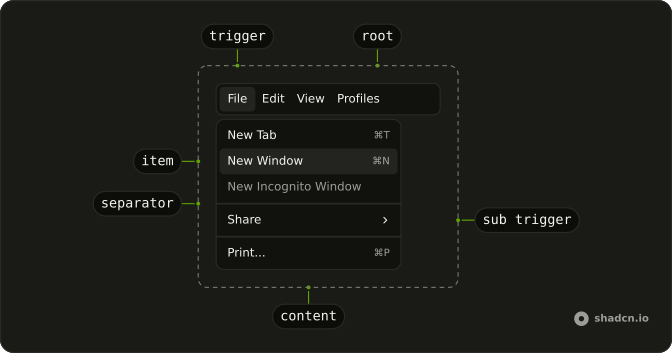
Menubar
├── MenubarMenu
│   ├── MenubarTrigger
│   └── MenubarContent
│       ├── MenubarGroup
│       │   ├── MenubarLabel
│       │   ├── MenubarItem
│       │   └── MenubarItem
│       ├── MenubarSeparator
│       ├── MenubarGroup
│       │   ├── MenubarCheckboxItem
│       │   └── MenubarCheckboxItem
│       ├── MenubarRadioGroup
│       │   ├── MenubarRadioItem
│       │   └── MenubarRadioItem
│       └── MenubarSub
│           ├── MenubarSubTrigger
│           └── MenubarSubContent
│               └── MenubarItem
└── MenubarMenu
    ├── MenubarTrigger
    └── MenubarContent
Usage
import {
  Menubar, MenubarCheckboxItem, MenubarContent, MenubarGroup,
  MenubarItem, MenubarMenu, MenubarRadioGroup, MenubarRadioItem,
  MenubarSeparator, MenubarShortcut, MenubarSub, MenubarSubContent,
  MenubarSubTrigger, MenubarTrigger,
} from "@/components/ui/menubar";
const MenubarDemo = () => (
<Menubar className="w-72 max-w-full">
<MenubarMenu>
<MenubarTrigger>File</MenubarTrigger>
<MenubarContent>
<MenubarGroup>
<MenubarItem>
New Tab <MenubarShortcut>⌘T</MenubarShortcut>
</MenubarItem>
<MenubarItem>
New Window <MenubarShortcut>⌘N</MenubarShortcut>
</MenubarItem>
<MenubarItem disabled>New Incognito Window</MenubarItem>
</MenubarGroup>
<MenubarSeparator />
<MenubarGroup>
<MenubarSub>
<MenubarSubTrigger>Share</MenubarSubTrigger>
<MenubarSubContent>
<MenubarGroup>
<MenubarItem>Email link</MenubarItem>
<MenubarItem>Messages</MenubarItem>
<MenubarItem>Notes</MenubarItem>
</MenubarGroup>
</MenubarSubContent>
</MenubarSub>
</MenubarGroup>
<MenubarSeparator />
<MenubarGroup>
<MenubarItem>
Print... <MenubarShortcut>⌘P</MenubarShortcut>
</MenubarItem>
</MenubarGroup>
</MenubarContent>
</MenubarMenu>
<MenubarMenu>
<MenubarTrigger>Edit</MenubarTrigger>
<MenubarContent>
<MenubarGroup>
<MenubarItem>
Undo <MenubarShortcut>⌘Z</MenubarShortcut>
</MenubarItem>
<MenubarItem>
Redo <MenubarShortcut>⇧⌘Z</MenubarShortcut>
</MenubarItem>
</MenubarGroup>
<MenubarSeparator />
<MenubarGroup>
<MenubarSub>
<MenubarSubTrigger>Find</MenubarSubTrigger>
<MenubarSubContent>
<MenubarGroup>
<MenubarItem>Search the web</MenubarItem>
</MenubarGroup>
<MenubarSeparator />
<MenubarGroup>
<MenubarItem>Find...</MenubarItem>
<MenubarItem>Find Next</MenubarItem>
<MenubarItem>Find Previous</MenubarItem>
</MenubarGroup>
</MenubarSubContent>
</MenubarSub>
</MenubarGroup>
<MenubarSeparator />
<MenubarGroup>
<MenubarItem>Cut</MenubarItem>
<MenubarItem>Copy</MenubarItem>
<MenubarItem>Paste</MenubarItem>
</MenubarGroup>
</MenubarContent>
</MenubarMenu>
<MenubarMenu>
<MenubarTrigger>View</MenubarTrigger>
<MenubarContent className="w-44 max-w-full">
<MenubarGroup>
<MenubarCheckboxItem>Bookmarks Bar</MenubarCheckboxItem>
<MenubarCheckboxItem checked>Full URLs</MenubarCheckboxItem>
</MenubarGroup>
<MenubarSeparator />
<MenubarGroup>
<MenubarItem inset>
Reload <MenubarShortcut>⌘R</MenubarShortcut>
</MenubarItem>
<MenubarItem disabled inset>
Force Reload <MenubarShortcut>⇧⌘R</MenubarShortcut>
</MenubarItem>
</MenubarGroup>
<MenubarSeparator />
<MenubarGroup>
<MenubarItem inset>Toggle Fullscreen</MenubarItem>
</MenubarGroup>
<MenubarSeparator />
<MenubarGroup>
<MenubarItem inset>Hide Sidebar</MenubarItem>
</MenubarGroup>
</MenubarContent>
</MenubarMenu>
<MenubarMenu>
<MenubarTrigger>Profiles</MenubarTrigger>
<MenubarContent>
<MenubarRadioGroup value="benoit">
<MenubarRadioItem value="andy">Andy</MenubarRadioItem>
<MenubarRadioItem value="benoit">Benoit</MenubarRadioItem>
<MenubarRadioItem value="Luis">Luis</MenubarRadioItem>
</MenubarRadioGroup>
<MenubarSeparator />
<MenubarGroup>
<MenubarItem inset>Edit...</MenubarItem>
</MenubarGroup>
<MenubarSeparator />
<MenubarGroup>
<MenubarItem inset>Add Profile...</MenubarItem>
</MenubarGroup>
</MenubarContent>
</MenubarMenu>
</Menubar>
);
Accessibility
- Enter
- Activate the focused control.
- Space
- Activate the focused control.
- Arrow Down
- Move down.
- Arrow Up
- Move up.
- Arrow Left
- Move left.
- Arrow Right
- Move right.
- Home
- Go to the start.
- End
- Go to the end.
Demos
Checkbox
View holds two checkbox items, bookmarks and full URLs, beside ordinary commands such as Reload. Format is only checkboxes: strikethrough, code, and superscript. Several can be on, and each keeps its checked state after the menu closes if you store it. Give plain items inset so their labels line up, and reserve checkboxes for settings rather than one-shot actions.
Radio
Profiles is a radio group, Andy, Benoit, or Luis, with Edit and Add Profile as plain items underneath. Theme is a second group: light, dark, or system, and only one item in a group stays selected. Keep commands that are not part of the choice outside the group, with inset so they line up, and use two menus so unrelated choices do not share a selection.
Submenu
File opens Share beside the item: email, messages, and notes, then Print under a separator. Edit nests Find the same way, between undo and the clipboard commands. A submenu is for a cluster that does not deserve its own top-level menu, and one extra level is usually enough. Do not put another menubar inside an item.
Icons
File leads New, Open, and Save with icons, and the shortcuts stay at the end of the row. More uses icons for Settings and Help, then a destructive Delete. The icon is decorative when the label is there, so hide it from assistive tech. Icons pay off on a menu people scan often, and the destructive variant still marks the dangerous row.
Rtl
The full bar, File through Profiles, is in Arabic. The wrapper and each menu set dir to rtl, so triggers run from the right and submenus open toward the start of the line. Checkboxes, radios, and shortcuts follow. Set the direction on the nested menus too, since a direction on the page alone can miss content that has been portaled out of the bar.
FAQ
How do I control a checkbox in a Menubar in React?
A checkbox row toggles a setting and stays in the menu, unlike a command that runs once, and each choice is its own MenubarCheckboxItem. Keep that choice in state if it should survive closing the menu. Pass checked and onCheckedChange, whose handler receives a boolean.
How do I keep one Menubar radio item selected?
Put the choices in one MenubarRadioGroup so only one of them is selected, and leave unrelated commands, such as Edit, as MenubarItem elements beside the group. The group is the control, and the items only name the options. Pass value, and read the next string from onValueChange.
Can I operate a Menubar from the keyboard?
Yes. Arrow keys move between triggers and items, Home and End jump to the ends, and Enter or Space activates the focused control. MenubarShortcut only displays the hint you put inside it. It does not register a key listener, so those glyphs are not a shortcut system.
Should I use a Menubar or a Dropdown Menu?
Use a Menubar for a persistent row of commands, such as File and Edit. Use a Dropdown Menu for one button that opens a single menu, and a Navigation Menu for links that move around the site. A menubar item is a command unless you render it as a link yourself.
Why is my Menubar menu clipped or hidden?
Menu content is portaled, so overflow hidden on a parent does not clip it. If a dialog or another layer still covers the menu, raise the content in the menubar file under components/ui. The content is already stacked above ordinary page content. Inset lines up an item that has no icon with items that do.
How do I style a Menubar with Radix UI?
Edit the menubar file under components/ui. Triggers and items are flex rows, and MenubarItem accepts variant destructive for a dangerous command. inset on an item, label, or submenu trigger sets data-inset so the label lines up with checked rows. Shortcuts are pushed to the end of the row with a logical margin.
API Reference
Menubar
data-slot="menubar"
value?string
The value. Pair with onValueChange to control it.
defaultValue?string
The value it starts with, when you don't control value.
onValueChange?{ bivarianceHack(value: string): void; }["bivarianceHack"]
Called when the value changes.
- Type
{ bivarianceHack(value: string): void; }["bivarianceHack"]
dir?Direction
The reading direction. Inherits the nearest DirectionProvider when unset.
loop?boolean
Whether arrow keys wrap from the last item to the first and back.
asChild?boolean
Merge props onto the child element instead of rendering a host.
className?string
Merged with the part's classes.
MenubarMenu
data-slot="menubar-menu"
value?string
The menu's value.
MenubarGroup
data-slot="menubar-group"
asChild?boolean
Merge props onto the child element instead of rendering a host.
MenubarPortal
data-slot="menubar-portal"
container?Element | DocumentFragment | null
Specify a container element to portal the content into.
- Type
Element | DocumentFragment | null
forceMount?true
Used to force mounting when more control is needed. Useful when controlling animation with React animation libraries.
MenubarRadioGroup
data-slot="menubar-radio-group"
value?string
The radio group's value.
onValueChange?{ bivarianceHack(value: string): void; }["bivarianceHack"]
Called when the value changes.
- Type
{ bivarianceHack(value: string): void; }["bivarianceHack"]
asChild?boolean
Merge props onto the child element instead of rendering a host.
MenubarTrigger
data-slot="menubar-trigger"
asChild?boolean
Merge props onto the child element instead of rendering a host.
className?string
Merged with the part's classes.
MenubarContent
data-slot="menubar-content"
align?(typeof ALIGN_OPTIONS)[number]
How it lines up with the trigger: start, center or end.
- Default
"start"
alignOffset?number
How far it shifts from its align position, in px.
- Default
-4
arrowPadding?number
The space kept between the arrow and the content's corners, in px.
avoidCollisions?boolean
Whether it flips and shifts to stay in view.
collisionBoundary?Boundary | Boundary[]
The element or elements it stays inside. The viewport when unset.
- Type
Boundary | Boundary[]
collisionPadding?number | Partial<Record<Side, number>>
The distance it keeps from the boundary's edges, in px, or one per side.
- Type
number | Partial<Record<Side, number>>
forceMount?true
Used to force mounting when more control is needed. Useful when controlling animation with React animation libraries.
hideWhenDetached?boolean
Whether it hides when its trigger is entirely out of view.
loop?boolean
Whether keyboard navigation should loop around.
onCloseAutoFocus?{ bivarianceHack(event: Event): void; }["bivarianceHack"]
Event handler called when auto-focusing on close. Can be prevented.
- Type
{ bivarianceHack(event: Event): void; }["bivarianceHack"]
onEscapeKeyDown?{ bivarianceHack(event: KeyboardEvent): void; }["bivarianceHack"]
Called when Escape is pressed. Prevent its default to keep it open.
- Type
{ bivarianceHack(event: KeyboardEvent): void; }["bivarianceHack"]
onFocusOutside?{ bivarianceHack(event: FocusOutsideEvent): void; }["bivarianceHack"]
Called when focus moves outside it. Prevent its default to keep it open.
- Type
{ bivarianceHack(event: FocusOutsideEvent): void; }["bivarianceHack"]
onInteractOutside?{ bivarianceHack(event: PointerDownOutsideEvent | FocusOutsideEvent): void; }["bivarianceHack"]
Called on any pointer or focus interaction outside it. Prevent its default to keep it open.
- Type
{ bivarianceHack(event: PointerDownOutsideEvent | FocusOutsideEvent): void; }["bivarianceHack"]
onPointerDownOutside?{ bivarianceHack(event: PointerDownOutsideEvent): void; }["bivarianceHack"]
Called when a pointer goes down outside it. Prevent its default to keep it open.
- Type
{ bivarianceHack(event: PointerDownOutsideEvent): void; }["bivarianceHack"]
side?(typeof SIDE_OPTIONS)[number]
The side of the trigger it opens on. It flips when there's no room, unless avoidCollisions is off.
sideOffset?number
The distance from the trigger, in px.
- Default
8
sticky?(typeof Sticky)[keyof typeof Sticky]
How it stays in view along its trigger: partial while the trigger is partly visible, always whatever the trigger does.
- Type
(typeof Sticky)[keyof typeof Sticky]
updatePositionStrategy?(typeof UpdatePositionStrategy)[keyof typeof UpdatePositionStrategy]
How often it updates its position: optimized, on layout changes, or always, every animation frame.
- Type
(typeof UpdatePositionStrategy)[keyof typeof UpdatePositionStrategy]
asChild?boolean
Merge props onto the child element instead of rendering a host.
className?string
Merged with the part's classes.
--radix-menubar-content-transform-originstringMenubarItem
data-slot="menubar-item"
disabled?boolean
Whether the item is disabled.
inset?boolean
Indents it to line up with items that have an icon or indicator.
onSelect?{ bivarianceHack(event: Event): void; }["bivarianceHack"]
Called when the item is selected, by pointer or keyboard. Prevent its default to keep the menu open.
- Type
{ bivarianceHack(event: Event): void; }["bivarianceHack"]
textValue?string
The text typeahead matches, when the item's content isn't plain text.
variant?"default" | "destructive"
The visual style.
- Type
"default" | "destructive"- Default
"default"
asChild?boolean
Merge props onto the child element instead of rendering a host.
className?string
Merged with the part's classes.
data-inset?string
Mirrors inset.
data-variant?string
Mirrors variant.
MenubarCheckboxItem
data-slot="menubar-checkbox-item"
checked?boolean | "indeterminate"
Whether it's checked. Pair with onCheckedChange to control it.
- Type
boolean | "indeterminate"
onCheckedChange?{ bivarianceHack(checked: boolean): void; }["bivarianceHack"]
Called when the checked state changes.
- Type
{ bivarianceHack(checked: boolean): void; }["bivarianceHack"]
disabled?boolean
Whether the checkbox item is disabled.
inset?boolean
Indents it to line up with items that have an icon or indicator.
onSelect?{ bivarianceHack(event: Event): void; }["bivarianceHack"]
Called when the item is selected, by pointer or keyboard. Prevent its default to keep the menu open.
- Type
{ bivarianceHack(event: Event): void; }["bivarianceHack"]
textValue?string
The text typeahead matches, when the item's content isn't plain text.
asChild?boolean
Merge props onto the child element instead of rendering a host.
className?string
Merged with the part's classes.
data-inset?string
Mirrors inset.
MenubarRadioItem
data-slot="menubar-radio-item"
valuestring
The radio item's value.
disabled?boolean
Whether the radio item is disabled.
inset?boolean
Indents it to line up with items that have an icon or indicator.
onSelect?{ bivarianceHack(event: Event): void; }["bivarianceHack"]
Called when the item is selected, by pointer or keyboard. Prevent its default to keep the menu open.
- Type
{ bivarianceHack(event: Event): void; }["bivarianceHack"]
textValue?string
The text typeahead matches, when the item's content isn't plain text.
asChild?boolean
Merge props onto the child element instead of rendering a host.
className?string
Merged with the part's classes.
data-inset?string
Mirrors inset.
MenubarLabel
data-slot="menubar-label"
inset?boolean
Indents it to line up with items that have an icon or indicator.
asChild?boolean
Merge props onto the child element instead of rendering a host.
className?string
Merged with the part's classes.
data-inset?string
Mirrors inset.
MenubarSeparator
data-slot="menubar-separator"
asChild?boolean
Merge props onto the child element instead of rendering a host.
className?string
Merged with the part's classes.
MenubarShortcut
<span> data-slot="menubar-shortcut"
className?string
Merged with the part's classes.
MenubarSub
data-slot="menubar-sub"
open?boolean
Whether it's open. Pair with onOpenChange to control it.
defaultOpen?boolean
Whether it starts open, when you don't control open.
onOpenChange?{ bivarianceHack(open: boolean): void; }["bivarianceHack"]
Called when it opens or closes.
- Type
{ bivarianceHack(open: boolean): void; }["bivarianceHack"]
MenubarSubTrigger
data-slot="menubar-sub-trigger"
disabled?boolean
Whether the sub trigger is disabled.
inset?boolean
Indents it to line up with items that have an icon or indicator.
textValue?string
The text typeahead matches, when the item's content isn't plain text.
asChild?boolean
Merge props onto the child element instead of rendering a host.
className?string
Merged with the part's classes.
data-inset?string
Mirrors inset.
MenubarSubContent
data-slot="menubar-sub-content"
align?Exclude<(typeof PopperPrimitive.ALIGN_OPTIONS)[number], "center">
Controls the direction the subcontent appears from its anchor menu item Default: start
- Type
Exclude<(typeof PopperPrimitive.ALIGN_OPTIONS)[number], "center">
alignOffset?number
How far it shifts from its align position, in px.
arrowPadding?number
The space kept between the arrow and the content's corners, in px.
avoidCollisions?boolean
Whether it flips and shifts to stay in view.
collisionBoundary?Boundary | Boundary[]
The element or elements it stays inside. The viewport when unset.
- Type
Boundary | Boundary[]
collisionPadding?number | Partial<Record<Side, number>>
The distance it keeps from the boundary's edges, in px, or one per side.
- Type
number | Partial<Record<Side, number>>
forceMount?true
Used to force mounting when more control is needed. Useful when controlling animation with React animation libraries.
hideWhenDetached?boolean
Whether it hides when its trigger is entirely out of view.
loop?boolean
Whether keyboard navigation should loop around.
onEscapeKeyDown?{ bivarianceHack(event: KeyboardEvent): void; }["bivarianceHack"]
Called when Escape is pressed. Prevent its default to keep it open.
- Type
{ bivarianceHack(event: KeyboardEvent): void; }["bivarianceHack"]
onFocusOutside?{ bivarianceHack(event: FocusOutsideEvent): void; }["bivarianceHack"]
Called when focus moves outside it. Prevent its default to keep it open.
- Type
{ bivarianceHack(event: FocusOutsideEvent): void; }["bivarianceHack"]
onInteractOutside?{ bivarianceHack(event: PointerDownOutsideEvent | FocusOutsideEvent): void; }["bivarianceHack"]
Called on any pointer or focus interaction outside it. Prevent its default to keep it open.
- Type
{ bivarianceHack(event: PointerDownOutsideEvent | FocusOutsideEvent): void; }["bivarianceHack"]
onPointerDownOutside?{ bivarianceHack(event: PointerDownOutsideEvent): void; }["bivarianceHack"]
Called when a pointer goes down outside it. Prevent its default to keep it open.
- Type
{ bivarianceHack(event: PointerDownOutsideEvent): void; }["bivarianceHack"]
sideOffset?number
The distance from the trigger, in px.
sticky?(typeof Sticky)[keyof typeof Sticky]
How it stays in view along its trigger: partial while the trigger is partly visible, always whatever the trigger does.
- Type
(typeof Sticky)[keyof typeof Sticky]
updatePositionStrategy?(typeof UpdatePositionStrategy)[keyof typeof UpdatePositionStrategy]
How often it updates its position: optimized, on layout changes, or always, every animation frame.
- Type
(typeof UpdatePositionStrategy)[keyof typeof UpdatePositionStrategy]
asChild?boolean
Merge props onto the child element instead of rendering a host.
className?string
Merged with the part's classes.
--radix-menubar-content-transform-originstring