shadcn.io is an independent project built on shadcn/ui
The card opens on hover and stays up so the pointer can move inside. People can select the text in it.
Use it for a preview that takes more than a glance, like a handle and a short bio. A Tooltip is enough for a few words on an icon button. In React, Radix UI waits briefly before closing so the pointer can cross into the card.
Installation
Anatomy
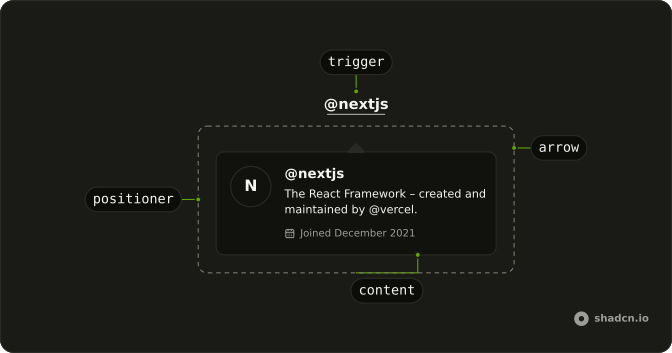
HoverCardArrow
└── HoverCardArrowTip
HoverCardTrigger
HoverCardContent
└── HoverCardPositioner
Usage
import { Button } from "@/components/ui/button";
import {
  HoverCard, HoverCardContent, HoverCardTrigger,
} from "@/components/ui/hover-card";<HoverCard>
<HoverCardTrigger asChild>
<Button variant="link">Hover Here</Button>
</HoverCardTrigger>
<HoverCardContent className="flex w-64 flex-col gap-0.5">
<div className="font-semibold">@nextjs</div>
<div>The React Framework – created and maintained by @vercel.</div>
<div className="mt-1 text-muted-foreground text-xs">
Joined December 2021
</div>
</HoverCardContent>
</HoverCard>Accessibility
- Tab
- Opens the hover card once focus reaches the trigger, after the open delay. Closes it when focus leaves.
- Escape
- If open, closes the hover card.
- Enter
- Activate the focused item.
- Space
- Activate the focused control.
Demos
Sides
Four buttons open the same card on the left, top, bottom, and right, and each card says which side it used. The open and close delays are short here so you can move between them. Pin a side when the default would cover the link the person is reading. Leave it unset when there is room for the card to flip on its own.
Rtl
The card is a product preview in Arabic, wireless headphones and a price, opened from buttons for each physical side. A second row is labeled as the start and the end of the line. Direction is set on the wrapper and again on the card, so the price and the title align with the page instead of hugging the wrong edge.
FAQ
How do I control whether a Hover Card is open in React?
Leave the card uncontrolled and it opens from hover and keyboard focus, then closes after the pointer and focus leave. Control it when another part of the screen must force it open or closed, using defaultOpen only for the first state, because the close delay is what lets the pointer move into the content.
Pass open, and onOpenChange receives the next boolean.
How do I choose which side a Hover Card appears on with Radix UI?
The Sides demo places the card on the left, top, bottom, or right, and the content is portaled and stacked at z-50 so overflow on a parent does not clip it. A longer close delay, measured in milliseconds, makes the card easier to reach.
Set side on HoverCardContent, and set openDelay and closeDelay on HoverCard, with align and sideOffset adjusting that position.
How do I use a button as the Hover Card trigger in React?
The trigger must be focusable, or keyboard users cannot open the card, so a Button or a link is the right host. The card then opens from hover and from focus, and Escape closes it, as the Accessibility section describes. Do not put the preview text inside the trigger label.
Set asChild on HoverCardTrigger, pass one Button, and use HoverCardContent as the popup.
Can I open a Hover Card from the keyboard?
Yes, focus opens a Hover Card after the delay, and moving focus away closes it, while Escape dismisses an open card. The Accessibility section also lists Enter and Space for activating the focused control. On a touch screen there is no hover, so use a Popover when the preview must open from a tap and stay until dismissed.
How do I install Hover Card?
Run the command in the Installation section above. It adds Hover Card, its trigger, and its content to your ui folder. Install from that section rather than pasting a partial tree, so the positioning parts stay together, and check the Anatomy section for the arrow and positioner on the builds that render them. The command uses the shadcn CLI.
Why does a Hover Card close before I can read it?
The pointer left the trigger before the close delay elapsed, so the Hover Card shut, and raising the close delay gives the pointer time to cross the gap into the content. The open delay is the wait before it appears, which avoids flashing while the pointer passes by. Both are milliseconds, and the side question above says which component receives them.
API Reference
HoverCard
data-slot="hover-card"
open?boolean
Whether it's open. Pair with onOpenChange to control it.
defaultOpen?boolean
Whether it starts open, when you don't control open.
onOpenChange?{ bivarianceHack(open: boolean): void; }["bivarianceHack"]
Called when it opens or closes.
- Type
{ bivarianceHack(open: boolean): void; }["bivarianceHack"]
closeDelay?number
How long it waits to close after the pointer leaves, in milliseconds.
- Default
300
openDelay?number
How long the pointer rests on the trigger before it opens, in milliseconds.
- Default
600
HoverCardTrigger
<button> data-slot="hover-card-trigger"
asChild?boolean
Merge props onto the child element instead of rendering a host.
HoverCardContent
<div> data-slot="hover-card-content"
align?(typeof ALIGN_OPTIONS)[number]
How it lines up with the trigger: start, center or end.
- Default
"center"
alignOffset?number
How far it shifts from its align position, in px.
arrowPadding?number
The space kept between the arrow and the content's corners, in px.
avoidCollisions?boolean
Whether it flips and shifts to stay in view.
collisionBoundary?Boundary | Boundary[]
The element or elements it stays inside. The viewport when unset.
- Type
Boundary | Boundary[]
collisionPadding?number | Partial<Record<Side, number>>
The distance it keeps from the boundary's edges, in px, or one per side.
- Type
number | Partial<Record<Side, number>>
forceMount?true
Used to force mounting when more control is needed. Useful when controlling animation with React animation libraries.
hideWhenDetached?boolean
Whether it hides when its trigger is entirely out of view.
onEscapeKeyDown?{ bivarianceHack(event: KeyboardEvent): void; }["bivarianceHack"]
Event handler called when the escape key is down. Can be prevented.
- Type
{ bivarianceHack(event: KeyboardEvent): void; }["bivarianceHack"]
onFocusOutside?{ bivarianceHack(event: FocusOutsideEvent): void; }["bivarianceHack"]
Event handler called when the focus moves outside of the HoverCard.
Can be prevented.
- Type
{ bivarianceHack(event: FocusOutsideEvent): void; }["bivarianceHack"]
onInteractOutside?{ bivarianceHack(event: PointerDownOutsideEvent | FocusOutsideEvent): void; }["bivarianceHack"]
Event handler called when an interaction happens outside the HoverCard.
Specifically, when a pointerdown event happens outside or focus moves outside of it.
Can be prevented.
- Type
{ bivarianceHack(event: PointerDownOutsideEvent | FocusOutsideEvent): void; }["bivarianceHack"]
onPointerDownOutside?{ bivarianceHack(event: PointerDownOutsideEvent): void; }["bivarianceHack"]
Event handler called when the a pointerdown event happens outside of the HoverCard.
Can be prevented.
- Type
{ bivarianceHack(event: PointerDownOutsideEvent): void; }["bivarianceHack"]
side?(typeof SIDE_OPTIONS)[number]
The side of the trigger it opens on. It flips when there's no room, unless avoidCollisions is off.
sideOffset?number
The distance from the trigger, in px.
- Default
4
sticky?(typeof Sticky)[keyof typeof Sticky]
How it stays in view along its trigger: partial while the trigger is partly visible, always whatever the trigger does.
- Type
(typeof Sticky)[keyof typeof Sticky]
updatePositionStrategy?(typeof UpdatePositionStrategy)[keyof typeof UpdatePositionStrategy]
How often it updates its position: optimized, on layout changes, or always, every animation frame.
- Type
(typeof UpdatePositionStrategy)[keyof typeof UpdatePositionStrategy]
asChild?boolean
Merge props onto the child element instead of rendering a host.
className?string
Merged with the part's classes.
data-placementstring
The content's placement on its trigger, such as bottom-start.
data-side"top" | "right" | "bottom" | "left"
The side of the trigger the content sits on.
- Type
"top" | "right" | "bottom" | "left"
data-state"open" | "closed"
"open" or "closed".
- Type
"open" | "closed"
--radix-hover-card-content-transform-originstring