shadcn.io is an independent project built on shadcn/ui
The panel sits next to the button that opened it. You can still use the page around it.
Use it for a small edit or a short explanation. A task that should block the page until it is finished is a Dialog. In React, Radix UI moves focus into the panel and returns it on Escape.
Installation
Anatomy
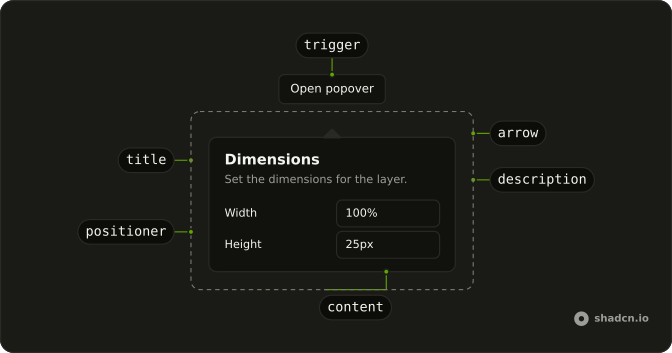
PopoverArrow
└── PopoverArrowTip
PopoverAnchor
PopoverTrigger
PopoverIndicator
PopoverPositioner
PopoverContent
PopoverTitle
PopoverDescription
PopoverClose
Usage
import { Button } from "@/components/ui/button";
import { Field, FieldGroup, FieldLabel } from "@/components/ui/field";
import { Input } from "@/components/ui/input";
import {
  Popover, PopoverContent, PopoverDescription, PopoverHeader,
  PopoverTitle, PopoverTrigger,
} from "@/components/ui/popover";<Popover>
<PopoverTrigger asChild>
<Button variant="outline">Open popover</Button>
</PopoverTrigger>
<PopoverContent className="w-64 max-w-full">
<PopoverHeader>
<PopoverTitle>Dimensions</PopoverTitle>
<PopoverDescription>
Set the dimensions for the layer.
</PopoverDescription>
</PopoverHeader>
<FieldGroup className="min-w-0 gap-3">
<Field className="min-w-0" orientation="horizontal">
<FieldLabel className="w-1/2">Width</FieldLabel>
<Input className="min-w-0" defaultValue="100%" />
</Field>
<Field className="min-w-0" orientation="horizontal">
<FieldLabel className="w-1/2">Height</FieldLabel>
<Input className="min-w-0" defaultValue="25px" />
</Field>
</FieldGroup>
</PopoverContent>
</Popover>Accessibility
- Space
- Opens/closes the popover.
- Enter
- Opens/closes the popover.
- Tab
- Moves focus to the next focusable element within the content. Note: If there are no focusable elements, focus is moved to the next focusable element after the trigger.
- Shift+Tab
- Moves focus to the previous focusable element within the content. Note: If there are no focusable elements, focus is moved to the trigger.
- Escape
- Closes the popover and moves focus to the trigger.
Demos
Basic
A title and one sentence, with no inputs. The panel lines up with the start of the button rather than its center, so it reads as a note attached to that control. Use this for a definition that should stay open while someone reads it. A Tooltip is the lighter choice when a single line on hover or focus is enough and does not need a dismiss.
Alignments
Three triggers place the panel at the start, the center, or the end of the button. Prefer start or end near a corner, and keep one alignment on a toolbar so the panels do not jump. Ark-based stacks use positioning.placement on Popover, Base UI and Radix use align on PopoverContent, and React Aria uses placement with a space, as in bottom start.
Form
Width and height live in the panel, under a title that says what you are editing. Focus moves into the fields when it opens, and Escape or a click outside closes it. Use this for a small edit that should stay next to its button. More than a couple of fields, or a page that must wait, belongs in a Dialog.
Rtl
The row sets dir to rtl, and each button opens the panel toward a physical side: left, top, bottom, or right. Those edges do not mirror just because the language does. The trigger text is Arabic so it runs with the page. If the panel should swap sides with the writing direction, use a logical placement instead of left or right.
FAQ
How do I open the Popover from code in React?
Pass open and onOpenChange on Popover; the callback gets a boolean.
It still needs its trigger, or an anchor, to know where to sit.
How do I align the Radix UI Popover to the start or end of its trigger?
Pass align on PopoverContent: start, center (the default) or end. side and sideOffset move it around the trigger.
The Alignments demo above shows all three.
How do I position the Popover next to another element?
Wrap that element in PopoverAnchor: the trigger still opens the Popover, and the content positions against the anchor.
How do I make the Popover as wide as its trigger?
Give PopoverContent a width from the CSS variable the positioner sets:
w-(--radix-popover-trigger-width).
It updates as the trigger resizes, which suits pickers and menus under a field.
How do I put a form inside a Popover?
Put the fields in PopoverContent, as in the Form demo: focus moves into the panel when it opens, and Escape or a click outside closes it. To close it after saving, control its open state and set it to closed in your submit handler.
When should I use a Popover instead of a Dialog, a Tooltip or a Hover Card?
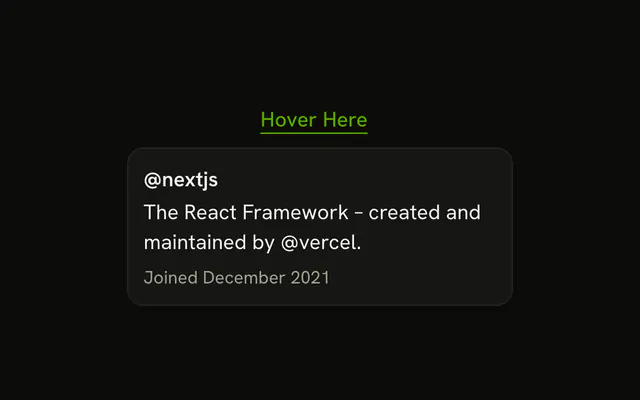
Use a Popover for a short form or extra controls next to what opened it, while the rest of the page stays usable. A Dialog blocks the page for a task that needs full attention, a Tooltip gives a one-line hint on hover or focus, and a Hover Card previews content while the pointer rests on a link.
API Reference
Popover
data-slot="popover"
open?boolean
Whether it's open. Pair with onOpenChange to control it.
defaultOpen?boolean
Whether it starts open, when you don't control open.
onOpenChange?{ bivarianceHack(open: boolean): void; }["bivarianceHack"]
Called when it opens or closes.
- Type
{ bivarianceHack(open: boolean): void; }["bivarianceHack"]
modal?boolean
Whether it's modal: the rest of the page can't be reached and focus stays inside while it's open.
- Default
false
PopoverAnchor
<div> data-slot="popover-anchor"
virtualRef?React.RefObject<Measurable | null>
A virtual element to position against: anything with getBoundingClientRect().
- Type
React.RefObject<Measurable | null>
asChild?boolean
Merge props onto the child element instead of rendering a host.
PopoverTrigger
<button> data-slot="popover-trigger"
asChild?boolean
Merge props onto the child element instead of rendering a host.
PopoverContent
<div> data-slot="popover-content"
align?(typeof ALIGN_OPTIONS)[number]
How it lines up with the trigger: start, center or end.
- Default
"center"
alignOffset?number
How far it shifts from its align position, in px.
arrowPadding?number
The space kept between the arrow and the content's corners, in px.
avoidCollisions?boolean
Whether it flips and shifts to stay in view.
collisionBoundary?Boundary | Boundary[]
The element or elements it stays inside. The viewport when unset.
- Type
Boundary | Boundary[]
collisionPadding?number | Partial<Record<Side, number>>
The distance it keeps from the boundary's edges, in px, or one per side.
- Type
number | Partial<Record<Side, number>>
deferPointerDownOutside?boolean
When true, a pointerdown event outside of the layered element will
wait for the interaction's click event before dispatching, allowing
third-party code to stop propagation of later events and cancel dismissal.
forceMount?true
Used to force mounting when more control is needed. Useful when controlling animation with React animation libraries.
hideWhenDetached?boolean
Whether it hides when its trigger is entirely out of view.
onCloseAutoFocus?{ bivarianceHack(event: Event): void; }["bivarianceHack"]
Event handler called when auto-focusing on close. Can be prevented.
- Type
{ bivarianceHack(event: Event): void; }["bivarianceHack"]
onEscapeKeyDown?{ bivarianceHack(event: KeyboardEvent): void; }["bivarianceHack"]
Event handler called when the escape key is down. Can be prevented.
- Type
{ bivarianceHack(event: KeyboardEvent): void; }["bivarianceHack"]
onFocusOutside?{ bivarianceHack(event: FocusOutsideEvent): void; }["bivarianceHack"]
Event handler called when the focus moves outside of the DismissableLayer.
Can be prevented.
- Type
{ bivarianceHack(event: FocusOutsideEvent): void; }["bivarianceHack"]
onInteractOutside?{ bivarianceHack(event: PointerDownOutsideEvent | FocusOutsideEvent): void; }["bivarianceHack"]
Event handler called when an interaction happens outside the DismissableLayer.
Specifically, when a pointerdown event happens outside or focus moves outside of it.
Can be prevented.
- Type
{ bivarianceHack(event: PointerDownOutsideEvent | FocusOutsideEvent): void; }["bivarianceHack"]
onOpenAutoFocus?{ bivarianceHack(event: Event): void; }["bivarianceHack"]
Event handler called when auto-focusing on open. Can be prevented.
- Type
{ bivarianceHack(event: Event): void; }["bivarianceHack"]
onPointerDownOutside?{ bivarianceHack(event: PointerDownOutsideEvent): void; }["bivarianceHack"]
Event handler called when the a pointerdown event happens outside of the DismissableLayer.
Can be prevented.
- Type
{ bivarianceHack(event: PointerDownOutsideEvent): void; }["bivarianceHack"]
side?(typeof SIDE_OPTIONS)[number]
The side of the trigger it opens on. It flips when there's no room, unless avoidCollisions is off.
sideOffset?number
The distance from the trigger, in px.
- Default
4
sticky?(typeof Sticky)[keyof typeof Sticky]
How it stays in view along its trigger: partial while the trigger is partly visible, always whatever the trigger does.
- Type
(typeof Sticky)[keyof typeof Sticky]
updatePositionStrategy?(typeof UpdatePositionStrategy)[keyof typeof UpdatePositionStrategy]
How often it updates its position: optimized, on layout changes, or always, every animation frame.
- Type
(typeof UpdatePositionStrategy)[keyof typeof UpdatePositionStrategy]
asChild?boolean
Merge props onto the child element instead of rendering a host.
className?string
Merged with the part's classes.
data-expanded?string
Present when open is true.
data-placementstring
The content's placement on its trigger, such as bottom-start.
data-side"top" | "right" | "bottom" | "left"
The side of the trigger the content sits on.
- Type
"top" | "right" | "bottom" | "left"
data-state"open" | "closed"
"open" or "closed".
- Type
"open" | "closed"
--radix-popover-content-transform-originstringPopoverHeader
<div> data-slot="popover-header"
className?string
Merged with the part's classes.
PopoverTitle
<div> data-slot="popover-title"
asChild?boolean
Merge props onto the child element instead of rendering a host.
className?string
Merged with the part's classes.
PopoverDescription
<p> data-slot="popover-description"
asChild?boolean
Merge props onto the child element instead of rendering a host.
className?string
Merged with the part's classes.