shadcn.io is an independent project built on shadcn/ui
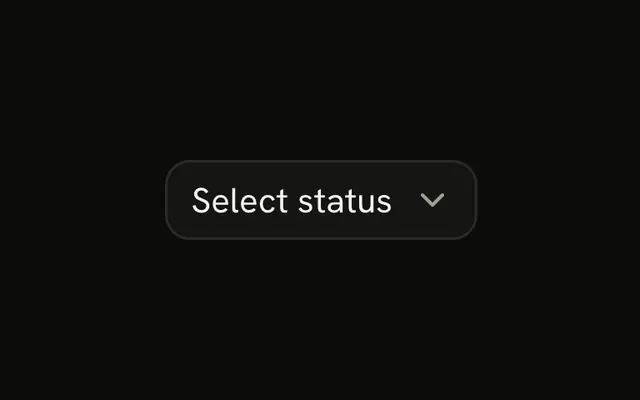
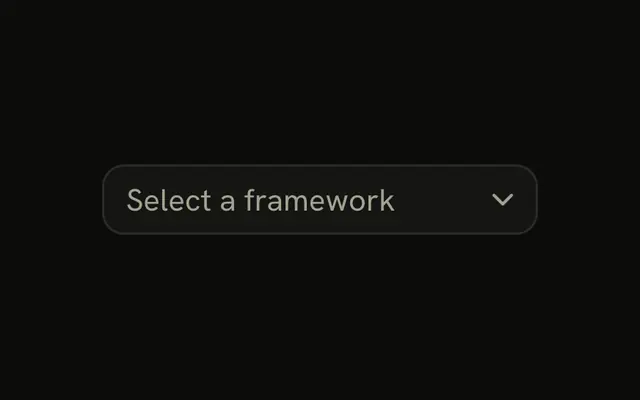
Known options live in a closed list. A button opens it and shows the one you picked.
Use it when the list is short enough to scan and people should not type their own value. If they need to filter a long catalog, use a Combobox. In React, you hold the chosen value when the form is controlled, and Radix UI shows it on the trigger.
Installation
Anatomy
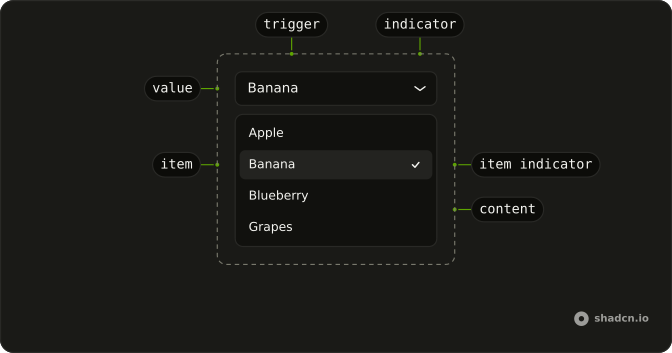
SelectRoot
├── SelectLabel
├── SelectClearTrigger
├── SelectItem
│   ├── SelectItemText
│   ├── SelectItemIndicator
│   └── SelectGroup
│       └── SelectGroupLabel
├── SelectList
├── SelectContent
│   └── SelectPositioner
├── SelectTrigger
│   └── SelectIndicator
└── SelectValue
Usage
import {
  Select, SelectContent, SelectGroup, SelectItem, SelectTrigger,
  SelectValue,
} from "@/components/ui/select";
const SelectDemo = () => (
<Select>
<SelectTrigger className="w-48">
<SelectValue placeholder="Select a fruit" />
</SelectTrigger>
<SelectContent>
<SelectGroup>
<SelectItem value="apple">Apple</SelectItem>
<SelectItem value="banana">Banana</SelectItem>
<SelectItem value="blueberry">Blueberry</SelectItem>
</SelectGroup>
</SelectContent>
</Select>
);Accessibility
- Space
- When focus is on trigger, opens the select and focuses the first selected item. When focus is on the content, selects the highlighted item.
- Enter
- When focus is on trigger, opens the select and focuses the first selected item. When focus is on content, selects the focused item.
- Arrow Down
- When focus is on trigger, opens the select. When focus is on content, moves focus to the next item.
- Arrow Up
- When focus is on trigger, opens the select. When focus is on content, moves focus to the previous item.
- Escape
- Closes the select and moves focus to trigger.
- A-Z
- When focus is on trigger, selects the item whose label starts with the typed character. When focus is on the listbox, moves focus to the next item with a label that starts with the typed character.
- a-z
- When focus is on trigger, selects the item whose label starts with the typed character. When focus is on the listbox, moves focus to the next item with a label that starts with the typed character.
- Arrow Left
- Move left.
- Arrow Right
- Move right.
- Home
- Go to the start.
- End
- Go to the end.
Demos
Align Item
A switch above the fruit list turns item alignment on and off. On, the open popup lines the selected row up with the trigger. Off, the popup sits against an edge instead, which stays put once the list is long enough to scroll, while item alignment keeps a short list's choice under the pointer. The prop differs by base, and the FAQ on this page names it.
Groups
Fruits and vegetables are two groups, each with a heading, and a SelectSeparator between them. Group a list when the options are one choice but people scan by category, such as timezones, roles, or cuisines. The separator is only a visual break, not a second label. Skip both when you have a handful of peers and a heading would repeat the field label.
Scrollable
The list is timezones, grouped by region, and longer than the popup, so the content scrolls rather than growing to fit every zone. Use a scrolling select when the catalog is long but people still choose by looking, not by typing a filter. If they know the name and will type it, a Combobox is faster than hunting through a scroll. Headings still help once the list moves.
Disabled
disabled on the select keeps the trigger from opening, and the control reads as unavailable. Use it when an earlier answer is missing, or when this user cannot change a value that is already set. Do not disable an option to hide it: remove it, or leave it enabled and explain the constraint. A disabled select still shows its placeholder, so the field does not look missing.
Invalid
The fruit field is in an error state: a label, an invalid trigger, and a FieldError that says to select a fruit. Use this after submit when a choice was required and none was made. The sentence is the error, and the color only supports it. How you mark the control invalid differs by base, the FAQ names the prop, and the message belongs in a Field.
Rtl
dir is rtl, and the options are Arabic names for the same fruits. The trigger, the value, and the popup follow that direction, so the text and the indicator start on the right. Set dir on the select when only this field is right-to-left, and on the document when the whole page is. A single control with dir will not fix the headings around it.
FAQ
How do I control the selected Select value in React?
Keep the selection in state and pass it back to Select, or use the default prop when the first choice is enough. The shape of that value depends on the base.
The value is a single string. Pass value, and onValueChange receives the new string, pass defaultValue when you do not need control, and set each SelectItem value to the string that should be submitted, since there is no collection.
How do I show a placeholder in a Select?
The empty label is not a selected value. Show it until someone chooses an item, then replace it with the item label, so people can tell the prompt from a real choice.
Set placeholder on SelectValue. It is shown only while nothing is selected.
How do I align a Select popup with Radix UI?
The popup can line the selected item up with the trigger, or sit against an edge. The Align Item demo is the place to compare those, except on React Aria, which only anchors the popup.
position on SelectContent defaults to item-aligned, which lines the selected item up with the trigger. Set position to popper for edge alignment.
How do I submit a Select with a form?
Set name on Select to the field name the form should receive. The selected value is submitted through a hidden field, so the visible trigger does not have to be a native select, and Select stays inside the form.
Set required when a choice is mandatory.
How do I show a Select as invalid?
Pair the control with Field so the message sits under the trigger, and keep that message in text because color alone is not the error. The Invalid demo is the pattern to copy.
Set data-invalid on Field and aria-invalid on SelectTrigger.
Should I use a Select, a Combobox, or a Native Select?
Use Select for one choice from a list that stays closed until it is opened. Use a Combobox when people need to type and filter. Use a Native Select when you want the browser's own menu, which is often the better control on a phone.
Can I use a Select from the keyboard?
Yes. From the trigger, Enter, Space, or Arrow Down opens the list. Arrow keys move between items, Enter or Space selects the highlighted one, and Escape closes the list and returns focus to the trigger. Typing a letter moves to a label that starts with that letter.
How do I install Select in React?
Run the command in the Installation section above. It adds Select and its parts to your ui folder. Import from that folder when the command finishes, instead of copying the source by hand, and rerun the command later if you want the latest files. The command uses the shadcn CLI.
API Reference
Select
<div> data-slot="select"
open?boolean
Whether it's open. Pair with onOpenChange to control it.
defaultOpen?boolean
Whether it starts open, when you don't control open.
onOpenChange?{ bivarianceHack(open: boolean): void; }["bivarianceHack"]
Called when it opens or closes.
- Type
{ bivarianceHack(open: boolean): void; }["bivarianceHack"]
value?string
The value. Pair with onValueChange to control it.
defaultValue?string
The value it starts with, when you don't control value.
onValueChange?{ bivarianceHack(value: string): void; }["bivarianceHack"]
Called when the value changes.
- Type
{ bivarianceHack(value: string): void; }["bivarianceHack"]
autoComplete?string
The autocomplete attribute for the hidden select. Enables browser autofill (e.g. "address-level1" for state).
dir?(typeof Direction)[keyof typeof Direction]
The reading direction. Inherits the nearest DirectionProvider when unset.
- Type
(typeof Direction)[keyof typeof Direction]
disabled?boolean
Whether it's disabled.
form?string
The id of the form it submits with, when it isn't inside one.
name?string
The name it submits with its form.
required?boolean
Whether a value is required to submit its form.
data-invalid?string
Present when invalid is true.
data-readonly?string
Present when readOnly is true.
SelectLabel
<label> data-slot="select-label"
asChild?boolean
Merge props onto the child element instead of rendering a host.
className?string
Merged with the part's classes.
data-disabled?string
Present when disabled is true.
data-invalid?string
Present when invalid is true.
data-readonly?string
Present when readOnly is true.
data-required?string
Present when required is true.
SelectTrigger
<button> data-slot="select-trigger"
size?"sm" | "default"
The size.
- Type
"sm" | "default"- Default
"default"
asChild?boolean
Merge props onto the child element instead of rendering a host.
className?string
Merged with the part's classes.
data-disabled?string
Present when disabled is true.
data-invalid?string
Present when invalid is true.
data-placeholder-shown?string
Present when placeholder shown.
data-placementstring
The content's placement on its trigger, such as bottom-start.
data-readonly?string
Present when readOnly is true.
data-side"top" | "right" | "bottom" | "left"
The side of the trigger the content sits on.
- Type
"top" | "right" | "bottom" | "left"
data-size?string
Mirrors size.
data-state"open" | "closed"
"open" or "closed".
- Type
"open" | "closed"
SelectItem
<div> data-slot="select-item"
valuestring
The item's value.
disabled?boolean
Whether the item is disabled.
textValue?string
The text typeahead matches, when the item's content isn't plain text.
asChild?boolean
Merge props onto the child element instead of rendering a host.
className?string
Merged with the part's classes.
data-disabled?string
Present when disabled is true.
data-highlighted?string
Present when highlighted is true.
data-state"checked" | "unchecked"
"checked" or "unchecked".
- Type
"checked" | "unchecked"
data-valueboolean
Value of value.
SelectItemText
<span>
data-disabled?string
Present when disabled is true.
data-highlighted?string
Present when highlighted is true.
data-state"checked" | "unchecked"
"checked" or "unchecked".
- Type
"checked" | "unchecked"
SelectItemIndicator
<div>
data-state"checked" | "unchecked"
"checked" or "unchecked".
- Type
"checked" | "unchecked"
SelectContent
<div> data-slot="select-content"
align?(typeof ALIGN_OPTIONS)[number]
How it lines up with the trigger: start, center or end.
- Default
"center"
alignOffset?number
How far it shifts from its align position, in px.
arrowPadding?number
The space kept between the arrow and the content's corners, in px.
avoidCollisions?boolean
Whether it flips and shifts to stay in view.
collisionBoundary?Boundary | Boundary[]
The element or elements it stays inside. The viewport when unset.
- Type
Boundary | Boundary[]
collisionPadding?number | Partial<Record<Side, number>>
The distance it keeps from the boundary's edges, in px, or one per side.
- Type
number | Partial<Record<Side, number>>
forceMount?true
Used to force mounting when more control is needed. Useful when controlling animation with React animation libraries.
hideWhenDetached?boolean
Whether it hides when its trigger is entirely out of view.
onCloseAutoFocus?{ bivarianceHack(event: Event): void; }["bivarianceHack"]
Event handler called when auto-focusing on close. Can be prevented.
- Type
{ bivarianceHack(event: Event): void; }["bivarianceHack"]
onEscapeKeyDown?{ bivarianceHack(event: KeyboardEvent): void; }["bivarianceHack"]
Event handler called when the escape key is down. Can be prevented.
- Type
{ bivarianceHack(event: KeyboardEvent): void; }["bivarianceHack"]
onPointerDownOutside?{ bivarianceHack(event: PointerDownOutsideEvent): void; }["bivarianceHack"]
Event handler called when the a pointerdown event happens outside of the DismissableLayer.
Can be prevented.
- Type
{ bivarianceHack(event: PointerDownOutsideEvent): void; }["bivarianceHack"]
position?(typeof Position)[keyof typeof Position]
popper places it next to the trigger like a popover; item-aligned places it so the selected item sits over the trigger.
- Type
(typeof Position)[keyof typeof Position]- Default
"item-aligned"
side?(typeof SIDE_OPTIONS)[number]
The side of the trigger it opens on. It flips when there's no room, unless avoidCollisions is off.
sideOffset?number
The distance from the trigger, in px.
sticky?(typeof Sticky)[keyof typeof Sticky]
How it stays in view along its trigger: partial while the trigger is partly visible, always whatever the trigger does.
- Type
(typeof Sticky)[keyof typeof Sticky]
updatePositionStrategy?(typeof UpdatePositionStrategy)[keyof typeof UpdatePositionStrategy]
How often it updates its position: optimized, on layout changes, or always, every animation frame.
- Type
(typeof UpdatePositionStrategy)[keyof typeof UpdatePositionStrategy]
asChild?boolean
Merge props onto the child element instead of rendering a host.
className?string
Merged with the part's classes.
data-activedescendantstring
Mirrors ariaActiveDescendant.
data-align-trigger?stringdata-placementstring
The content's placement on its trigger, such as bottom-start.
data-side"top" | "right" | "bottom" | "left"
The side of the trigger the content sits on.
- Type
"top" | "right" | "bottom" | "left"
data-state"open" | "closed"
"open" or "closed".
- Type
"open" | "closed"
--radix-select-content-available-heightstring--radix-select-content-transform-originstring--radix-select-trigger-heightstring--radix-select-trigger-widthstringSelectGroup
data-slot="select-group"
asChild?boolean
Merge props onto the child element instead of rendering a host.
className?string
Merged with the part's classes.
SelectValue
data-slot="select-value"
placeholder?React.ReactNode
What it shows before a value is chosen.
asChild?boolean
Merge props onto the child element instead of rendering a host.
SelectSeparator
data-slot="select-separator"
asChild?boolean
Merge props onto the child element instead of rendering a host.
className?string
Merged with the part's classes.
SelectScrollUpButton
data-slot="select-scroll-up-button"
asChild?boolean
Merge props onto the child element instead of rendering a host.
className?string
Merged with the part's classes.
SelectScrollDownButton
data-slot="select-scroll-down-button"
asChild?boolean
Merge props onto the child element instead of rendering a host.
className?string
Merged with the part's classes.