shadcn.io is an independent project built on shadcn/ui
Direction tells the components inside it which way the text reads, left to right or right to left, for a whole app or for one region of a page. Wrap an Arabic, Hebrew or Persian interface in it so arrow keys, sliders and submenus work the right way round.
It renders no element, so the dir attribute that flips your CSS is still yours to set. For one field where people may type in either script, dir="auto" on an Input is enough.
Installation
Anatomy
Usage
import { DirectionProvider } from "@/components/ui/direction";The provider tells components the direction, and the dir attribute on the element inside it is what mirrors the layout, so set both to the same value.
<DirectionProvider direction="rtl">
  <div dir="rtl">
    <p>Everything in here reads right to left.</p>
  </div>
</DirectionProvider>
Demos
RTL
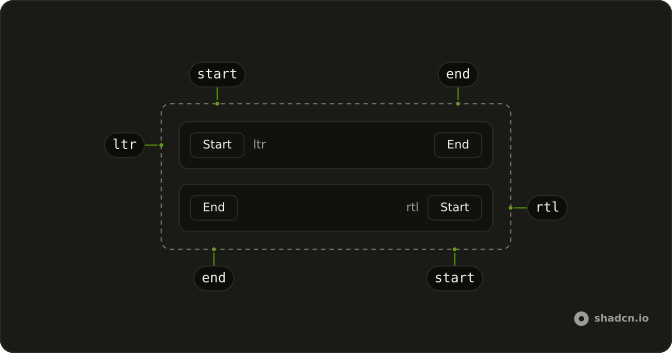
A row with Start, the current direction and End, inside a DirectionProvider set to rtl and a div with dir set to rtl. The middle label prints what useDirection reads from the provider, and the attribute puts Start on the right while ms-auto pushes End to the left. Drop either one and the label and the layout disagree.
FAQ
How do I set up a right-to-left (RTL) layout in React?
Do two things at the top of the app. Set dir to rtl on the html element, with a lang such as ar or he, which flips the CSS and turns on Tailwind's rtl: variant. Then wrap the app in DirectionProvider with direction set to rtl, which tells the components.
Write your own styles with logical classes, such as ms-4, ps-2, start-0 and text-start, and they mirror with no further work, as the ms-auto in the RTL demo does.
Why do I need DirectionProvider if the html tag already has dir?
The attribute is for CSS, and the components don't read it.
Radix UI takes the direction from this provider, or from a dir prop on a single component, and assumes left to right without either. It also writes dir="ltr" on some of its own elements, such as a Scroll Area's root, so their content reads left to right even on a right-to-left page.
How do I read the current text direction in a component?
Call useDirection from a component inside the provider. It returns "ltr" or "rtl", which is enough to swap an icon, pick an animation's starting side, or set dir on an element you render yourself. The middle label of the RTL demo prints it.
Outside any provider it returns "ltr", whatever the page's dir says.
Does DirectionProvider change the locale too?
No, it only sets the direction. Date and number formatting follow each component's own locale settings, so an Arabic interface still needs those set where it shows dates, prices or counts.
The lang attribute is separate in every case, so set it next to dir for screen readers to read the text in the right voice.
Can only part of the page be right-to-left?
Yes. Providers nest, and the nearest one wins, so wrap that region in its own DirectionProvider and set dir on the region's outer element. Everything outside keeps the page's direction.
This suits a preview of a translated email, a quoted message in Hebrew inside an English thread, or two editors side by side, one per language.
How do I make my own CSS work in both directions?
Use logical utilities instead of left and right: ms-* and me-* for margins, ps-* and pe-* for padding, start-* and end-* for position, text-start, border-s and rounded-s-*. They follow the dir attribute with no extra code, which is how the demo's End label moves to the far side.
Keep the rtl: variant for what logical properties can't express, such as flipping an arrow icon. It also reads the attribute, not the provider, so it only works where dir is set.
Should icons flip in a right-to-left layout?
Flip the ones that point forward or back in reading order: arrows, the chevrons on a breadcrumb or a next button, a reply or send icon. Add rtl:-scale-x-100 to mirror them, or choose the icon with useDirection.
Checkmarks, clocks, search glasses and logos stay as they are, and so do media controls, since a play button points the way the tape runs, not the way the text reads.
API Reference
DirectionProvider
dir?Direction
The reading direction. Inherits the nearest DirectionProvider when unset.
direction?Direction
The reading direction it sets for everything inside it.