shadcn.io is an independent project built on shadcn/ui
A command menu narrows its actions as you type.
Use it to run an action or jump to a place. If the list is a form value you must store, use a Combobox. In React, Radix UI filters the collection you passed in.
Installation
Anatomy
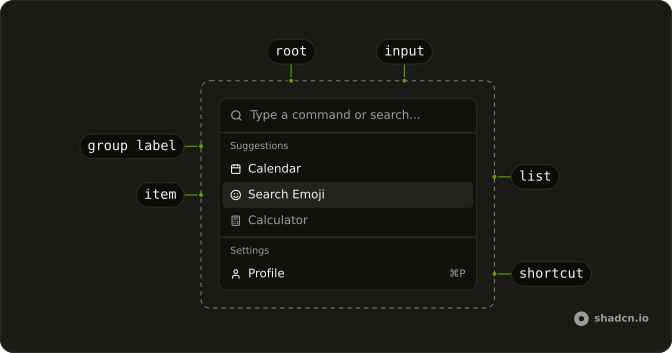
CommandRoot
├── CommandClearTrigger
├── CommandContent
├── CommandControl
├── CommandInput
├── CommandItem
│   ├── CommandGroup
│   │   └── CommandGroupLabel
│   ├── CommandItemIndicator
│   └── CommandItemText
├── CommandLabel
├── CommandList
├── CommandPositioner
└── CommandTrigger
Usage
import {
  CalculatorIcon, CalendarIcon, CreditCardIcon, SettingsIcon, SmileIcon,
  UserIcon,
} from "lucide-react";
import {
  Command, CommandEmpty, CommandGroup, CommandInput, CommandItem,
  CommandList, CommandSeparator, CommandShortcut,
} from "@/components/ui/command";
const CommandDemo = () => (
<Command className="max-w-sm rounded-lg border">
<CommandInput placeholder="Type a command or search..." />
<CommandList>
<CommandEmpty>No results found.</CommandEmpty>
<CommandGroup heading="Suggestions">
<CommandItem>
<CalendarIcon aria-hidden="true" />
<span>Calendar</span>
</CommandItem>
<CommandItem>
<SmileIcon aria-hidden="true" />
<span>Search Emoji</span>
</CommandItem>
<CommandItem disabled>
<CalculatorIcon aria-hidden="true" />
<span>Calculator</span>
</CommandItem>
</CommandGroup>
<CommandSeparator />
<CommandGroup heading="Settings">
<CommandItem>
<UserIcon aria-hidden="true" />
<span>Profile</span>
<CommandShortcut>⌘P</CommandShortcut>
</CommandItem>
<CommandItem>
<CreditCardIcon aria-hidden="true" />
<span>Billing</span>
<CommandShortcut>⌘B</CommandShortcut>
</CommandItem>
<CommandItem>
<SettingsIcon aria-hidden="true" />
<span>Settings</span>
<CommandShortcut>⌘S</CommandShortcut>
</CommandItem>
</CommandGroup>
</CommandList>
</Command>
);Accessibility
- Arrow Down
- Move down.
- Arrow Up
- Move up.
- Home
- Go to the start.
- End
- Go to the end.
- Enter
- Activate the focused item.
- Escape
- Dismiss.
- Space
- Activate the focused control.
- Arrow Left
- Move left.
- Arrow Right
- Move right.
Demos
Basic
Open Menu puts a short list in a dialog: Calendar, Search Emoji, and Calculator, plus a field that filters them. There are no icons and no shortcut hints. An empty state replaces the rows when nothing matches. Use the dialog when the menu should cover the page, and keep the inline list, like the one at the top of this page, when it should stay put.
Shortcuts
Profile, Billing, and Settings, each with an icon and a shortcut hint at the end of the row. The hint is only a label, and nothing here listens for those keys. Show a shortcut when the action is also bound somewhere else, and attach that binding yourself. The dialog still opens from a button, the same way the basic menu does.
Groups
Suggestions and Settings, split by a separator, with an icon on every row and shortcut hints only on the settings rows. Each item carries a group, and the collection builds the headings from that, so you are not hand-writing two lists. Use groups once commands fall into more than one kind. A single list is easier to scan only while it is short.
Scrollable
Navigation, Actions, View, Account, and Tools, enough rows that the dialog has to scroll. The list already overflows on its own, so a second scroll container would fight it. Filtering still removes what does not match, which matters more at this length. Keep the headings, because a long run of unlabeled icons is harder to scan than the field is to type into.
Palette
Command-K or Control-K toggles the dialog from anywhere on the page, and the Search button does the same for a pointer. Pages and Actions are grouped, a few rows show shortcut hints, and the footer names the arrow keys, Enter, and Escape. Picking an item writes its name under the button and closes the dialog. The value stays empty so choosing that same item again still runs.
Rtl
The inline menu from the top of the page, with dir set to rtl on the command and on the input. Headings, labels, the placeholder, and the empty state are Arabic, and the disabled calculator is still disabled. Shortcut hints sit at the inline end of the row. Use this to check the filter and the separator when the line runs right to left.
FAQ
How do I open the Command palette with Cmd+K in React?
Listen for the key yourself: on keydown, when the key is k and metaKey or ctrlKey is pressed, toggle the open state you pass to CommandDialog. The Palette demo has the whole handler, plus a "Search…" button for touch screens.
How do I run an action when a Command item is selected?
Pass onSelect to each CommandItem. Close the dialog in the same handler.
The Palette demo shows the selection on the page.
Should I use a Command or a Combobox?
Use a Command to run an action or jump somewhere, like a command palette or a searchable action menu. Use a Combobox when the choice is a value that stays in a form field.
Why doesn't pressing a Command shortcut do anything?
CommandShortcut is only a label at the end of an item: it shows the keys but doesn't bind them. Listen for those keys yourself, the same way the palette listens for Cmd+K.
How do I show a message when no Command results match?
Put a CommandEmpty with the text in the list: it only shows when the search leaves nothing.
How do I group Command items under headings?
Wrap related items in a CommandGroup with a heading, and put a CommandSeparator between groups, as in the Groups demo. Group by task, like Pages and Actions, rather than by where things live.
API Reference
Command
data-slot="command"
asChild?boolean
Merge props onto the child element instead of rendering a host.
className?string
Merged with the part's classes.
CommandDialog
open?boolean
Whether it's open. Pair with onOpenChange to control it.
defaultOpen?boolean
Whether it starts open, when you don't control open.
onOpenChange?{ bivarianceHack(open: boolean): void; }["bivarianceHack"]
Called when it opens or closes.
- Type
{ bivarianceHack(open: boolean): void; }["bivarianceHack"]
description?string
The dialog's description, for screen readers.
- Default
"Search for a command to run..."
modal?boolean
Whether it's modal: the rest of the page can't be reached and focus stays inside while it's open.
showCloseButton?boolean
Shows the close button in the corner.
- Default
false
title?string
The dialog's title, for screen readers.
- Default
"Command Palette"
className?string
Merged with the part's classes.
CommandInput
<div> data-slot="command-input"
asChild?boolean
Merge props onto the child element instead of rendering a host.
className?string
Merged with the part's classes.
CommandList
data-slot="command-list"
asChild?boolean
Merge props onto the child element instead of rendering a host.
className?string
Merged with the part's classes.
CommandEmpty
data-slot="command-empty"
asChild?boolean
Merge props onto the child element instead of rendering a host.
className?string
Merged with the part's classes.
CommandGroup
data-slot="command-group"
asChild?boolean
Merge props onto the child element instead of rendering a host.
className?string
Merged with the part's classes.
CommandSeparator
data-slot="command-separator"
asChild?boolean
Merge props onto the child element instead of rendering a host.
className?string
Merged with the part's classes.
CommandItem
data-slot="command-item"
asChild?boolean
Merge props onto the child element instead of rendering a host.
className?string
Merged with the part's classes.
CommandShortcut
<span> data-slot="command-shortcut"
className?string
Merged with the part's classes.