shadcn.io is an independent project built on shadcn/ui
The bar fills from a number your code already has. It doesn't watch the request for you.
Use it for an upload or a numbered step when people should see how much is left. If there is nothing to measure, use a Spinner. In React, React Aria draws the bar and can leave it indeterminate when you do not know the end.
Installation
Anatomy
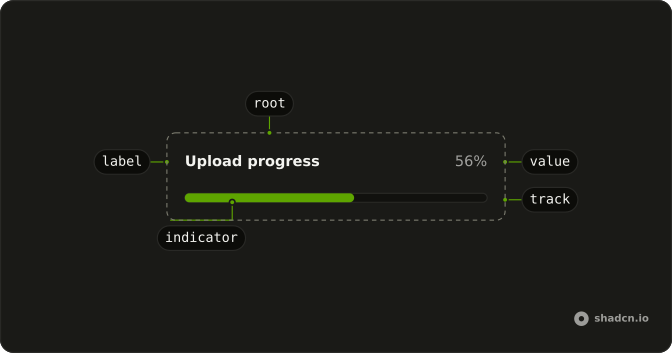
Progress
├── ProgressLabel
├── ProgressTrack
├── ProgressIndicator
├── ProgressValue
├── ProgressView
└── ProgressCircle
    ├── ProgressCircleTrack
    └── ProgressCircleRange
Usage
import { useEffect, useState } from "react";
import { Progress } from "@/components/ui/progress";
const ProgressDemo = () => {
const [progress, setProgress] = useState(13);
useEffect(() => {
const timer = setTimeout(() => setProgress(66), 500);
return () => clearTimeout(timer);
}, []);
return <Progress className="w-[60%]" value={progress} />;
};Demos
Label
ProgressLabel names the bar, here an upload, and ProgressValue prints the percent beside it. Both sit in Progress and follow value. Use them when a bare bar on the page could be any of several tasks. The label also names the bar for assistive tech, so you can skip a separate aria-label when the visible word is the right name.
Controlled
The bar only displays value. A Slider writes that number here so you can drag and watch the fill, which is a stand-in for the real source. In the app, the number comes from the upload or from the step you are on, and the bar will not subscribe to a request. Use a controlled value whenever the task can report how far it has gotten.
Rtl
dir set to rtl puts the Arabic caption and the percent on a right-to-left row. The number is the same value. Use this to check a translated page, not as a variant you render only for one language. Set dir on Progress when this bar should follow a right-to-left parent even if you have not flipped the whole document.
FAQ
How do I update the Progress value in React?
Pass value and change it as the work advances: Progress shows the number you give it and doesn't watch your request. For an upload, set it from the request's progress events; for a multi-step task, set it per step.
The Controlled demo above drives it from a Slider.
How do I show an indeterminate Progress bar when I don't know how long it will take?
Pass isIndeterminate on Progress: the bar reports an indeterminate state instead of a percentage.
If there's nothing to measure at all, a Spinner says "working" more honestly than an empty bar.
How do I count steps instead of percent with the React Aria Progress?
Set minValue and maxValue on Progress (0 and 100 by default), then pass value in the same units, such as 3 with a maxValue of 5 for the third of five steps.
How do I change what screen readers hear for the React Aria Progress?
Pass valueLabel for the text, or formatOptions with Intl.NumberFormat options.
How do I show a label and the percentage next to the Progress bar?
Add ProgressLabel for the name and ProgressValue for the number inside Progress, as in the Label demo above. The value text follows value, and the label names the bar for screen readers too.
When should I use a Slider or a Circular Progress instead of a Progress bar?
Progress only displays a value. If people should set the number, use a Slider; for a ring in a small space, use Circular Progress; and for work with no measurable amount, use a Spinner.
API Reference
Progress
data-slot="progress"
formatOptions?Intl.NumberFormatOptions
The display format of the value label.
- Default
{ style: 'percent' }
isIndeterminate?boolean
Whether presentation is indeterminate when progress isn't known.
label?ReactNode
The content to display as the label.
maxValue?number
The largest value allowed for the input.
- Default
100
minValue?number
The smallest value allowed for the input.
- Default
0
value?number
The current value (controlled).
- Default
0
valueLabel?ReactNode
The content to display as the value's label (e.g. 1 of 4).
className?string
Merged with the part's classes.
ProgressTrack
<span> data-slot="progress-track"
className?string
Merged with the part's classes.
ProgressIndicator
<span> data-slot="progress-indicator"
className?string
Merged with the part's classes.
ProgressRange
ProgressLabel
data-slot="progress-label"
elementType?string
The element it renders, such as span.
render?DOMRenderFunction<E, T>
Overrides the default DOM element with a custom render function.
This allows rendering existing components with built-in styles and behaviors
such as router links, animation libraries, and pre-styled components.
Requirements:
- You must render the expected element type (e.g. if <button> is expected, you cannot render an
<a>).
- Only a single root DOM element can be rendered (no fragments).
- You must pass through props and ref to the underlying DOM element, merging with your own prop
as appropriate.
- Type
DOMRenderFunction<E, T>
className?string
Merged with the part's classes.
ProgressValue
<span>
className?string
Merged with the part's classes.