shadcn.io is an independent project built on shadcn/ui
Headings stacked in one column. Each heading opens its own section.
Use it for an FAQ or a settings list where most sections should stay closed. For one section on its own, use a Collapsible. In React, Radix UI may unmount a closed panel, so a form field in it might not submit.
Installation
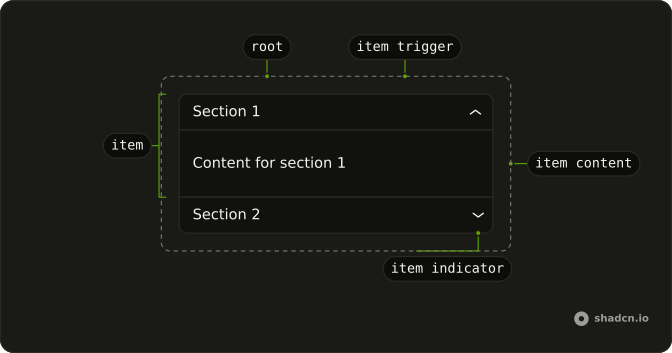
Anatomy
Usage
import {
  Accordion, AccordionContent, AccordionItem, AccordionTrigger,
} from "@/components/ui/accordion";
const AccordionDemo = () => (
<Accordion
className="w-full max-w-sm"
collapsible
defaultValue="shipping"
type="single"
>
<AccordionItem value="shipping">
<AccordionTrigger>What are your shipping options?</AccordionTrigger>
<AccordionContent>
We offer standard (5-7 days), express (2-3 days), and overnight
shipping. Free shipping on international orders.
</AccordionContent>
</AccordionItem>
<AccordionItem value="returns">
<AccordionTrigger>What is your return policy?</AccordionTrigger>
<AccordionContent>
Returns accepted within 30 days. Items must be unused and in original
packaging. Refunds processed within 5-7 business days.
</AccordionContent>
</AccordionItem>
<AccordionItem value="support">
<AccordionTrigger>How can I contact customer support?</AccordionTrigger>
<AccordionContent>
Reach us via email, live chat, or phone. We respond within 24 hours
during business days.
</AccordionContent>
</AccordionItem>
</Accordion>
);Accessibility
- Space
- When focus is on a trigger of a collapsed item, the item is expanded.
- Enter
- When focus is on a trigger of a collapsed section, expands the section.
- Tab
- Moves focus to the next focusable element.
- Shift+Tab
- Moves focus to the previous focusable element.
- Arrow Down
- Moves focus to the next trigger.
- Arrow Up
- Moves focus to the previous trigger.
- Home
- When focus is on a trigger, moves focus to the first trigger.
- End
- When focus is on a trigger, moves focus to the last trigger.
- Arrow Right
- Move to the next item.
- Arrow Left
- Move to the previous item.
Demos
Basic
Account questions, one open at a time, with the password item starting open. The rows come from a list, so another question is another entry rather than a fresh block of markup. Use this for a short FAQ where two answers on screen at once would be noise. If people compare sections, let more than one stay open.
Multiple
Notifications start open, and privacy or billing can open beside them. The copy is settings, not a three-line FAQ. Allow several sections at once when people compare answers or fill related groups without losing the one they just read. A single-open list makes them hunt for the heading they closed by accident.
Disabled
History and email still toggle. The middle item, premium feature information, sets disabled on AccordionItem, so its trigger does nothing. Leave a disabled row when the heading should stay visible as a locked feature and the upgrade path lives elsewhere on the page. If the plan will never include it, omit the row.
Borders
The root gets a border and a radius. Each item gets a bottom border and horizontal padding, and the last item drops its border so it does not double up with the outline. Use the bordered list when the accordion is the surface, sitting on a plain page. Skip the extra edges when a card already supplies them.
Card
The questions sit in CardContent, under a title and a short description about subscription and billing. Plans starts open. Use the card when this FAQ is one block among others, on a pricing or billing screen, and it needs a heading that is not itself a trigger. A bare accordion is enough when the page heading already names the topic.
RTL
The same account questions, in Arabic, with dir set to rtl and the first item open. Triggers, text, and the chevron follow the inline direction, so the icon is not stuck on the physical right. Use this when the page language is Arabic or Hebrew. The open behavior does not change, only the direction of the row.
FAQ
How do I let only one Accordion item open at a time in React?
Set type="single" on Accordion, and add collapsible so the open item can be closed again. Use type="multiple" to let several items stay open.
How do I make an Accordion item open by default?
Pass the item's value as defaultValue: a string with type="single", an array with type="multiple". The Basic demo starts with its first item open.
How do I control which Accordion items are open?
Pass value and update it in onValueChange: a string with type="single", an array with type="multiple".
Do form fields inside a closed Accordion item still submit?
Not by default: Radix UI unmounts closed content. Add forceMount to AccordionContent to keep it in the DOM.
Is the Radix UI Accordion accessible with the keyboard?
Yes. Each trigger is a button with aria-expanded and aria-controls, Enter and Space toggle it, and the Accessibility section lists every key. Keep a real heading level around each trigger in long pages, and don't put interactive controls inside the trigger itself.
Can I nest an Accordion inside another Accordion?
You can, but a Collapsible inside the panel is usually better: two nested accordions mean two sets of arrow-key handling in one place. If people jump between every section, Tabs may fit better than an accordion.
API Reference
Accordion
<div> data-slot="accordion"
value?string[]
The controlled stateful value of the accordion items whose contents are expanded.
defaultValue?string[]
The value of the items whose contents are expanded when the accordion is initially rendered. Use
defaultValue if you do not need to control the state of an accordion.
onValueChange?{ bivarianceHack(value: string[]): void; }["bivarianceHack"]
The callback that fires when the state of the accordion changes.
- Type
{ bivarianceHack(value: string[]): void; }["bivarianceHack"]
typetypeof AccordionType.Multiple
single keeps one item open at a time; multiple lets any number be open.
collapsible?boolean
Whether an accordion item can be collapsed after it has been opened.
- Default
false
dir?(typeof Direction)[keyof typeof Direction]
The language read direction.
- Type
(typeof Direction)[keyof typeof Direction]
disabled?boolean
Whether or not an accordion is disabled from user interaction.
orientation?(typeof Orientation)[keyof typeof Orientation]
The layout in which the Accordion operates.
- Type
(typeof Orientation)[keyof typeof Orientation]- Default
vertical
asChild?boolean
Merge props onto the child element instead of rendering a host.
className?string
Merged with the part's classes.
data-motion?string
Present when motion is true.
data-orientationstring
Mirrors the orientation prop.
AccordionItem
<div> data-slot="accordion-item"
valuestring
A string value for the accordion item. All items within an accordion should use a unique value.
disabled?boolean
Whether or not an accordion item is disabled from user interaction.
asChild?boolean
Merge props onto the child element instead of rendering a host.
className?string
Merged with the part's classes.
data-disabled?string
Present when disabled is true.
data-focus?string
Present when focused is true.
data-orientationstring
Mirrors the orientation prop.
data-state"open" | "closed"
"open" or "closed".
- Type
"open" | "closed"
AccordionTrigger
data-slot="accordion-trigger"
asChild?boolean
Merge props onto the child element instead of rendering a host.
className?string
Merged with the part's classes.
AccordionContent
data-slot="accordion-content"
forceMount?true
Used to force mounting when more control is needed. Useful when controlling animation with React animation libraries.
asChild?boolean
Merge props onto the child element instead of rendering a host.
className?string
Merged with the part's classes.