shadcn.io is an independent project built on shadcn/ui
Links for the site sit in one row. Some open a panel of related pages, and some are just a link.
Use it for destinations in a header. Commands such as Export or Delete belong in a Dropdown Menu. In React, React Aria renders a navigation landmark, and router links go in the link part so the focus behavior stays.
Installation
Anatomy
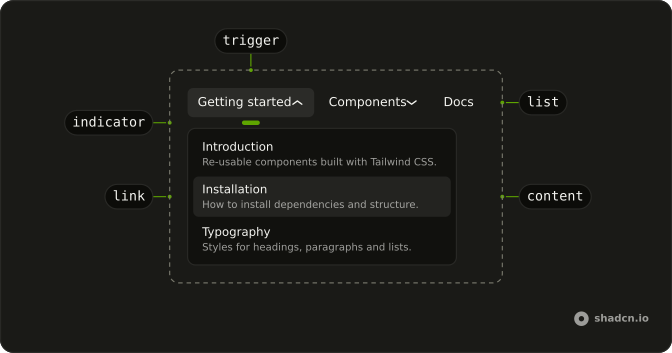
NavigationMenu
├── NavigationMenuList
│   ├── NavigationMenuItem
│   │   ├── NavigationMenuTrigger
│   │   └── NavigationMenuContent
│   │       └── NavigationMenuLink
│   └── NavigationMenuItem
│       └── NavigationMenuLink
└── NavigationMenuIndicator
Usage
import {
  NavigationMenu, NavigationMenuContent, NavigationMenuItem,
  NavigationMenuLink, NavigationMenuList, NavigationMenuTrigger,
} from "@/components/ui/navigation-menu";<NavigationMenu>
<NavigationMenuList>
<NavigationMenuItem>
<NavigationMenuTrigger>Item One</NavigationMenuTrigger>
<NavigationMenuContent>
<NavigationMenuLink href="#">Link</NavigationMenuLink>
</NavigationMenuContent>
</NavigationMenuItem>
</NavigationMenuList>
</NavigationMenu>Accessibility
- Enter
- Activate the focused control.
- Space
- Activate the focused control.
- Arrow Left
- Move left.
- Arrow Right
- Move right.
- Escape
- Close the open panel.
Demos
Rtl
The header in Arabic: a getting-started list, a component grid that wraps into columns, and a docs link with no panel. dir is rtl on the wrapper, so the triggers run from the right and panels follow the reading order. Arrow keys follow that order too. Set direction on the container you ship, and check that a wide panel does not spill off the far edge.
FAQ
How do I use router links in the React Navigation Menu?
Render your router's link through NavigationMenuLink, so it keeps the menu's styles and focus handling.
It's React Aria's Link, which takes href; wrap your app in React Aria's RouterProvider with your router's navigate so links route on the client.
How do I highlight the current page in the Navigation Menu?
Set aria-current="page" on the link that matches the current route. Screen readers announce it, and you can style it with Tailwind's aria-[current=page]: variant.
How do I change how fast the React Aria Navigation Menu opens on hover?
It doesn't open on hover: each panel opens on click, so there's no delay to tune and nothing pops open as the pointer passes over the bar.
How do I control which Navigation Menu panel is open in React?
Pass isOpen and onOpenChange on the NavigationMenuItem you want to control.
How do I make the Navigation Menu work on mobile?
Hide the bar below md and put the same links in a Sheet behind a menu button. Wide panels under a header bar don't suit small touch screens, and a sheet gives every link a full-width tap target.
When should I use a Navigation Menu instead of a Dropdown Menu or a Menubar?
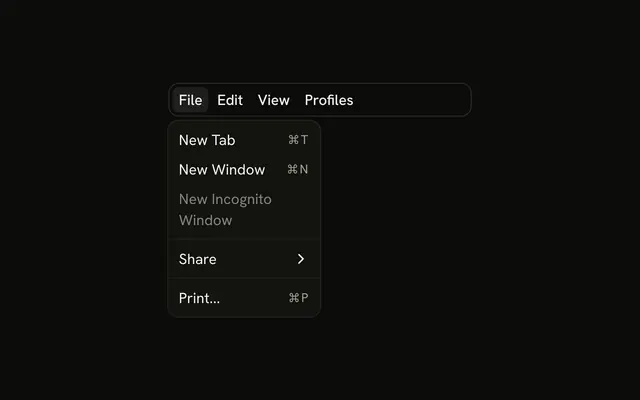
Use the Navigation Menu for site navigation: links in a header, grouped under triggers. A Dropdown Menu holds actions like Export or Delete, and a Menubar is an app's File, Edit, View bar. Each gives assistive tech the roles that match what it does.
Is the React Aria Navigation Menu accessible?
Yes. It renders a nav landmark, Tab moves between triggers and links, Enter or Space opens a trigger's panel, and Escape closes it and returns focus to the trigger. Give each link text that makes sense on its own, since screen readers can list them out of context.
API Reference
NavigationMenu
<nav> data-slot="navigation-menu"
className?string
Merged with the part's classes.
data-orientationstring
Mirrors the orientation prop.
NavigationMenuList
<ul> data-slot="navigation-menu-list"
className?string
Merged with the part's classes.
NavigationMenuItem
<li> data-slot="navigation-menu-item"
defaultOpen?boolean
Whether the overlay is open by default (uncontrolled).
onOpenChange?(isOpen: boolean) → void
Handler that is called when the overlay's open state changes.
- Parameters
isOpen– boolean- Returns
void
isOpen?boolean
Whether the overlay is open by default (controlled).
className?string
Merged with the part's classes.
NavigationMenuTrigger
data-slot="navigation-menu-trigger"
children?ReactNode
The content to display in the button.
isDisabled?boolean
Whether the button is disabled.
className?string
Merged with the part's classes.
data-orientationstring
Mirrors the orientation prop.
NavigationMenuContent
defaultOpen?boolean
Whether the overlay is open by default (uncontrolled).
onOpenChange?(isOpen: boolean) → void
Handler that is called when the overlay's open state changes.
- Parameters
isOpen– boolean- Returns
void
arrowBoundaryOffset?number
The minimum distance the arrow's edge should be from the edge of the overlay element.
- Default
0
arrowRef?RefObject<Element | null>
A ref for the popover arrow element.
- Type
RefObject<Element | null>
boundaryElement?Element
Element that that serves as the positioning boundary.
- Default
document.body
children?ChildrenOrFunction<T>
The children of the component. A function may be provided to alter the children based on component state.
- Type
ChildrenOrFunction<T>
containerPadding?number
The placement padding that should be applied between the element and its surrounding container.
- Default
12
crossOffset?number
The additional offset applied along the cross axis between the element and its anchor element.
- Default
0
getTargetRect?(target: Element) → DOMRect | null
Overrides the target element's bounding rectangle. Useful for positioning relative to a specific point such as the mouse cursor (e.g. context menus) or text selection.
- Type
(target: Element) → DOMRect | null- Default
target.getBoundingClientRect()- Parameters
target– Element- Returns
DOMRect | null
isEntering?boolean
Whether the popover is currently performing an entry animation.
isExiting?boolean
Whether the popover is currently performing an exit animation.
isKeyboardDismissDisabled?boolean
Whether pressing the escape key to close the popover should be disabled. Most popovers should not use this option. When set to true, an alternative way to close the popover with a keyboard must be provided.
- Default
false
isNonModal?boolean
Whether the popover is non-modal, i.e. elements outside the popover may be interacted with by assistive technologies. Most popovers should not use this option as it may negatively impact the screen reader experience. Only use with components such as combobox, which are designed to handle this situation carefully.
isOpen?boolean
Whether the overlay is open by default (controlled).
maxHeight?number
The maxHeight specified for the overlay element. By default, it will take all space up to the current viewport height.
offset?number
The additional offset applied along the main axis between the element and its
anchor element. Ark default: 8.
- Default
6
onBlurWithin?(e: FocusEvent) → void
Handler that is called when the target element and all descendants lose focus.
- Parameters
e– FocusEvent- Returns
void
onFocusWithin?(e: FocusEvent) → void
Handler that is called when the target element or a descendant receives focus.
- Parameters
e– FocusEvent- Returns
void
onFocusWithinChange?(isFocusWithin: boolean) → void
Handler that is called when the the focus within state changes.
- Parameters
isFocusWithin– boolean- Returns
void
placement?"bottom" | "bottom left" | "bottom right" | "bottom start" | "bottom end" | "top" | "top left" | "top right" | "top start" | "top end" | "left" | "left top" | "left bottom" | "start" | "start top" | "start bottom" | "right" | "right top" | "right bottom" | "end" | "end top" | "end bottom"
The placement of the element with respect to its anchor element. Ark default: bottom.
- Type
"bottom" | "bottom left" | "bottom right" | "bottom start" | "bottom end" | "top" | "top left" | "top right" | "top start" | "top end" | "left" | "left top" | "left bottom" | "start" | "start top" | "start bottom" | "right" | "right top" | "right bottom" | "end" | "end top" | "end bottom"- Default
"bottom start"
scrollRef?RefObject<Element | null>
A ref for the scrollable region within the overlay.
- Type
RefObject<Element | null>- Default
overlayRef
shouldCloseOnInteractOutside?(element: Element) → boolean
When user interacts with the argument element outside of the popover ref, return true if onClose should be called. This gives you a chance to filter out interaction with elements that should not dismiss the popover. By default, onClose will always be called on interaction outside the popover ref.
- Parameters
element– Element- Returns
boolean
shouldFlip?boolean
Whether the element should flip its orientation (e.g. top to bottom or left to right) when there is insufficient room for it to render completely.
- Default
true
shouldSkipAnimation?boolean
Whether the popover should appear and disappear without an entry or exit animation. This is used by components such as PreviewTrigger to skip animations when quickly swapping between overlays.
shouldUpdatePosition?boolean
Whether the overlay should update its position automatically.
- Default
true
slot?string | null
A slot name for the component. Slots allow the component to receive props from a parent
component. An explicit null value indicates that the local props completely override all
props received from a parent.
- Type
string | null
style?StyleOrFunction<T>
The inline [style](https://developer.mozilla.org/en-US/docs/Web/API/HTMLElement/style) for the element. A function may be provided to compute the style based on component state.
- Type
StyleOrFunction<T>
trigger?string
The name of the component that triggered the popover. This is reflected on the element
as the data-trigger attribute, and can be used to provide specific
styles for the popover depending on which element triggered it.
triggerRef?RefObject<Element | null>
The ref for the element which the popover positions itself with respect to. When used within a trigger component such as DialogTrigger, MenuTrigger, Select, etc., this is set automatically. It is only required when used standalone.
- Type
RefObject<Element | null>
UNSTABLE_portalContainer?Element
The container element in which the overlay portal will be placed. This may have unknown behavior depending on where it is portalled to. Deprecated. - Use a parent UNSAFE_PortalProvider to set your portal container instead.
- Default
document.body
render?DOMRenderFunction<E, T>
Overrides the default DOM element with a custom render function.
This allows rendering existing components with built-in styles and behaviors
such as router links, animation libraries, and pre-styled components.
Requirements:
- You must render the expected element type (e.g. if <button> is expected, you cannot render an
<a>).
- Only a single root DOM element can be rendered (no fragments).
- You must pass through props and ref to the underlying DOM element, merging with your own prop
as appropriate.
- Type
DOMRenderFunction<E, T>
className?string
Merged with the part's classes.
data-orientationstring
Mirrors the orientation prop.
--trigger-anchor-pointstringNavigationMenuLink
data-slot="navigation-menu-link"
className?string
Merged with the part's classes.
data-orientationstring
Mirrors the orientation prop.
NavigationMenuIndicator
<div> data-slot="navigation-menu-indicator"
className?string
Merged with the part's classes.
NavigationMenuViewport
<div> data-slot="navigation-menu-viewport"
className?string
Merged with the part's classes.
NavigationMenuPositioner
<div> data-slot="navigation-menu-positioner"
className?string
Merged with the part's classes.