shadcn.io is an independent project built on shadcn/ui
The list scrolls inside a fixed box, so the page does not grow with it.
Use it for a menu, a log, or a tag list, and leave the page scroll alone. Slides that should snap belong in a Carousel. In React, put the height on the area or Radix UI will not scroll it.
Installation
Anatomy
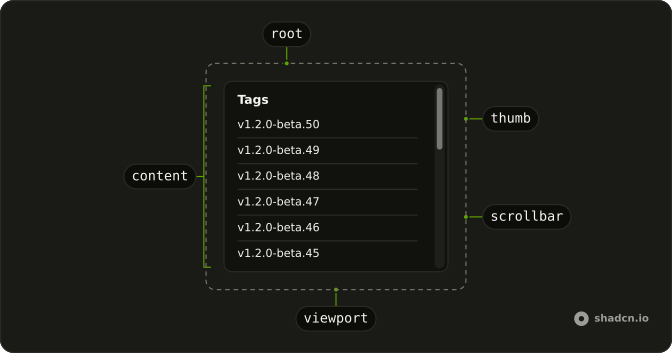
ScrollArea
├── ScrollAreaViewport
├── ScrollAreaContent
├── ScrollAreaScrollbar
│   └── ScrollAreaThumb
└── ScrollAreaCorner
Usage
import { Fragment } from "react";
import { ScrollArea } from "@/components/ui/scroll-area";
import { Separator } from "@/components/ui/separator";
const tags = Array.from({ length: 50 }).map(
(_, i, a) => `v1.2.0-beta.${a.length - i}`
);
const ScrollAreaDemo = () => (
<ScrollArea className="h-72 w-48 rounded-md border">
<div className="p-4">
<h4 className="mb-4 font-medium text-sm leading-none">Tags</h4>
{tags.map((tag) => (
<Fragment key={tag}>
<div className="text-sm">{tag}</div>
<Separator className="my-2" />
</Fragment>
))}
</div>
</ScrollArea>
);Accessibility
- Enter
- Activate the focused item.
Demos
Horizontal
Three artworks and their captions sit in one row that does not wrap, inside a box narrower than the row. The extra width is the scroll range, so the bar runs along the inline axis. Use a horizontal area for a filmstrip or a logo line that must stay one row tall. If the items should snap from one to the next, free scrolling is the wrong feel.
Rtl
The same tag list, with an Arabic heading and dir set to rtl on the area. Rows and the heading align to the start, and the box is still a fixed height, so it scrolls for the same reason the default does. Direction does not turn a vertical list into a horizontal one. Set dir because the page is right-to-left, not to move the bar for decoration.
FAQ
Why will my Scroll Area in React not scroll?
A Scroll Area only scrolls when its box is smaller than the content. Set a height on Scroll Area itself, as the usage does, or a max height. If the height is on an inner element instead, the area grows with the content and the bar never appears. The same rule applies to width for a sideways strip.
How do I scroll a Scroll Area sideways with Radix UI?
Give the area a bounded width and make the content wider than that box, as the Horizontal demo does. Keep the row from wrapping so the extra width becomes scroll range. The built-in bar is vertical. Render ScrollBar inside the Scroll Area and set its orientation to horizontal.
How do I style the Scroll Area thumb?
Edit the scroll-area file under components/ui, where the root is data-slot scroll-area. Keep color changes in that file so the scrolling region matches the rest of the theme. The thumb is data-slot scroll-area-thumb, so change its color and thickness there. ScrollBar is the part that wraps the thumb.
How do I keep the Scroll Area scrollbar visible?
Visibility depends on the base, so check which one you installed before adding props that another base does not have. The bar type defaults to hover, so it shows while the pointer is over the area. Set type to always on Scroll Area to keep it visible. scrollHideDelay is how long a hover or scroll bar stays, in milliseconds, and it defaults to 600.
When should I use a Scroll Area instead of overflow?
Use Scroll Area when the bar should match the theme inside a bounded box, such as a list or a menu. A plain overflow region is enough for a normal page section. Scroll Area does not replace the page scroll. It only scrolls its own box.
Does a Scroll Area follow right-to-left text?
Yes, the Rtl demo places a Scroll Area in a right-to-left page. Give it the same height or width you would in a left-to-right page. Horizontal overflow still follows the content. You do not need a second component for direction.
How do I install Scroll Area in React?
Run the command in the Installation section above. It adds Scroll Area to your ui folder. Import from that folder when the command finishes, instead of copying the source by hand, and rerun the command later if you want the latest files. The command uses the shadcn CLI.
API Reference
ScrollArea
<div> data-slot="scroll-area"
dir?Direction
The reading direction. Inherits the nearest DirectionProvider when unset.
scrollHideDelay?number
How long the scrollbars stay after scrolling stops, in milliseconds.
type?ScrollAreaType
When the scrollbars show: auto when it overflows, always, scroll while scrolling, or hover.
asChild?boolean
Merge props onto the child element instead of rendering a host.
className?string
Merged with the part's classes.
data-overflow-x?string
Present when scrollbarXHidden is false.
data-overflow-y?string
Present when scrollbarYHidden is false.
--corner-heightstring--corner-widthstring--thumb-heightstring--thumb-widthstringScrollAreaViewport
<div> data-slot="scroll-area-viewport"
disableImplicitContentElement?boolean
Disables implicit rendering of an additional wrapper element that measures
the content size. When true, a child <ScrollArea.Content> must be
rendered as a direct child of the viewport.
Implicit rendering of the content element will be removed in the next major
release.
nonce?string
A nonce for the styles it injects, for a strict Content Security Policy.
data-at-bottom?string
Present when bottom is true.
data-at-left?string
Present when left is true.
data-at-right?string
Present when right is true.
data-at-top?string
Present when top is true.
data-overflow-x?string
Present when scrollbarXHidden is false.
data-overflow-y?string
Present when scrollbarYHidden is false.
data-ownedbystring
Id of the root part.
ScrollAreaCorner
<div>
data-hover?string
Present when hovering is true.
data-overflow-x?string
Present when scrollbarXHidden is false.
data-overflow-y?string
Present when scrollbarYHidden is false.
data-ownedbystring
Id of the root part.
data-state"hidden" | "visible"
"hidden" or "visible".
- Type
"hidden" | "visible"
ScrollBar
data-slot="scroll-area-scrollbar"
asChild?boolean
Merge props onto the child element instead of rendering a host.
className?string
Merged with the part's classes.
data-orientation?string
Mirrors orientation.