shadcn.io is an independent project built on shadcn/ui
Item actions show up beside the pointer. Right-click opens them on a desktop, and a long press opens them on a phone.
Use it when those commands belong to the item you clicked and there is no room for a trigger on every row. If the actions can live on one button, a Dropdown Menu is easier to find. In React, Radix UI opens the menu at the pointer, so keep another way to reach the same actions.
Installation
Anatomy
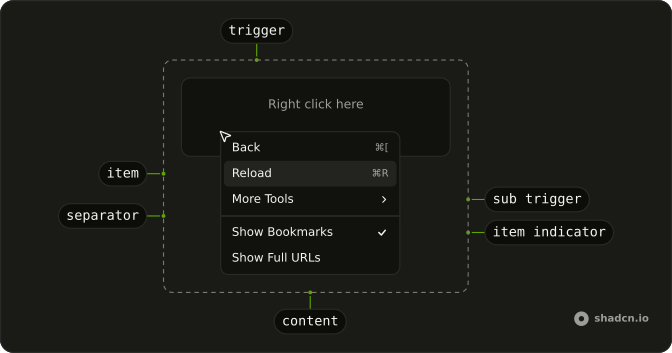
ContextMenuArrow
└── ContextMenuArrowTip
ContextMenuTrigger
ContextMenuIndicator
ContextMenuQuickItem
└── ContextMenuGroup
    ├── ContextMenuSubContent
    │   └── ContextMenuPositioner
    └── ContextMenuGroupLabel
ContextMenuItemIndicator
ContextMenuItemText
ContextMenuSeparator
ContextMenuTrigger
└── ContextMenuSubTrigger
Usage
import {
  ContextMenu, ContextMenuCheckboxItem, ContextMenuContent,
  ContextMenuGroup, ContextMenuGroupLabel, ContextMenuItem,
  ContextMenuRadioGroup, ContextMenuRadioItem, ContextMenuSeparator,
  ContextMenuShortcut, ContextMenuSub, ContextMenuSubContent,
  ContextMenuSubTrigger, ContextMenuTrigger,
} from "@/components/ui/context-menu";
const ContextMenuDemo = () => (
<ContextMenu>
<ContextMenuTrigger className="mx-auto mt-8 flex h-16 w-full max-w-xs items-center justify-center self-start rounded-xl border border-dashed px-4 text-sm">
<span className="pointer-fine:inline-block hidden">Right click here</span>
<span className="pointer-coarse:inline-block hidden">
Long press here
</span>
</ContextMenuTrigger>
<ContextMenuContent className="w-48 max-w-full">
<ContextMenuGroup>
<ContextMenuItem>
Back
<ContextMenuShortcut>⌘[</ContextMenuShortcut>
</ContextMenuItem>
<ContextMenuItem disabled>
Forward
<ContextMenuShortcut>⌘]</ContextMenuShortcut>
</ContextMenuItem>
<ContextMenuItem>
Reload
<ContextMenuShortcut>⌘R</ContextMenuShortcut>
</ContextMenuItem>
<ContextMenuSub>
<ContextMenuSubTrigger>More Tools</ContextMenuSubTrigger>
<ContextMenuSubContent className="w-44">
<ContextMenuGroup>
<ContextMenuItem>Save Page...</ContextMenuItem>
<ContextMenuItem>Create Shortcut...</ContextMenuItem>
<ContextMenuItem>Name Window...</ContextMenuItem>
</ContextMenuGroup>
<ContextMenuSeparator />
<ContextMenuGroup>
<ContextMenuItem>Developer Tools</ContextMenuItem>
</ContextMenuGroup>
<ContextMenuSeparator />
<ContextMenuGroup>
<ContextMenuItem variant="destructive">Delete</ContextMenuItem>
</ContextMenuGroup>
</ContextMenuSubContent>
</ContextMenuSub>
</ContextMenuGroup>
<ContextMenuSeparator />
<ContextMenuGroup>
<ContextMenuCheckboxItem checked>
Show Bookmarks
</ContextMenuCheckboxItem>
<ContextMenuCheckboxItem>Show Full URLs</ContextMenuCheckboxItem>
</ContextMenuGroup>
<ContextMenuSeparator />
<ContextMenuGroup>
<ContextMenuRadioGroup value="pedro">
<ContextMenuGroupLabel>People</ContextMenuGroupLabel>
<ContextMenuRadioItem value="pedro">
Pedro Duarte
</ContextMenuRadioItem>
<ContextMenuRadioItem value="colm">Colm Tuite</ContextMenuRadioItem>
</ContextMenuRadioGroup>
</ContextMenuGroup>
</ContextMenuContent>
</ContextMenu>
);
Accessibility
- Space
- Activates/Selects the highlighted item.
- Enter
- Activates/Selects the highlighted item.
- Arrow Down
- Highlights the next item in the menu.
- Arrow Up
- Highlights the previous item in the menu.
- Arrow Right
- When focus is on trigger, opens or closes the submenu depending on reading direction.
- Arrow Left
- When focus is on trigger, opens or closes the submenu depending on reading direction.
- Escape
- Closes the context menu.
- Home
- Go to the start.
- End
- Go to the end.
Demos
Basic
Back, Forward, and Reload, with Forward disabled because it does not apply yet. This is the smallest menu worth shipping: a trigger area, a few items, and no icons or nested lists. Start here, then add structure once the actions are settled. A disabled item stays visible so people can see the command exists.
Submenu
More Tools opens a second menu: save the page, create a shortcut, name the window, plus developer tools and a delete action set apart at the bottom. Nest a group when the top menu would get long, and keep it to one level so the pointer has less path to lose. The trigger shows that more actions exist before anyone commits to them.
Shortcuts
Each item ends with a key hint, such as the chord for Back or Save. The hint is only a label. It does not listen for the keys, so the shortcut has to be wired up on the page or it will look like a promise you did not keep. Forward stays disabled, hint and all, when the action does not apply.
Groups
File and Edit are labeled sections, and a separator splits those from clipboard commands and from Delete at the end. Group a long menu so people scan chunks instead of one flat list. The label names the section. The line is enough between groups that do not need a heading, and the dangerous action stays last.
Icons
Copy, Cut, Paste, and Delete each lead with an icon, and the icon is hidden from assistive tech because the word is already there. Icons help when the labels are familiar and the menu is scanned more than read. They are a poor idea when the action is obscure, since a picture will not explain it. Delete stays in its own group.
Checkboxes
Show Bookmarks Bar, Show Full URLs, and Show Developer Tools are checkbox items, each with its own checked state. Several can be on at once, which is what you want for view settings that combine. A plain item is the better row when the action runs once, such as Reload, and should leave the menu. Store the checked values if they need to survive the menu closing.
Radio
People and Theme are separate radio groups, so picking a person does not clear the theme. Inside a group only one item stays selected, which is the right model for a mode rather than a command. The labels sit above each group so the two lists do not blur together. Keep unrelated actions as plain items outside the group.
Destructive
Edit and Share are ordinary items. Delete is separated and marked destructive, with a trash icon, so the dangerous action is not just another row. Use that variant for something hard to undo, keep it last, and remember the color is not a confirmation. If the delete is truly costly, follow it with a dialog rather than running it from the menu.
Sides
Four triggers pin the menu to a different side: top, right, bottom, and left. The usual placement sits near the pointer, which fails when the trigger is already against an edge and the menu would open off the screen. Pin a side in that case. The items themselves stay the same, so this is only about where the panel lands.
Rtl
The trigger and the menus are in Arabic, with dir set to rtl on the menu and on each panel. Submenus, shortcuts, and the check marks follow the reading direction instead of staying glued to the left. Use this when the page is right to left, and set the direction on the nested content too, or a submenu can open back toward the wrong side.
FAQ
Should I use a Context Menu or a Dropdown Menu?
Use a Context Menu for actions on the thing under the pointer, like a file, a table row or a canvas shape, opened with a right-click. Use a Dropdown Menu when the actions hang off a visible button. Many apps offer both for the same actions, since a right-click is easy to miss.
How do I handle a Context Menu item click in Radix UI?
Pass onSelect to each ContextMenuItem.
The menu closes after the action runs.
How do I keep the Context Menu open after toggling a checkbox item?
Call event.preventDefault() in the item's onSelect.
The Checkboxes demo shows the toggles.
Why doesn't the Context Menu shortcut do anything?
ContextMenuShortcut is only a label at the end of an item: it shows the keys but doesn't bind them. Listen for those keys yourself so the shortcut works without opening the menu.
Does the Context Menu work on phones and tablets?
Yes: a long press on the trigger opens it.
On touch screens a hidden menu is hard to discover, so also offer the same actions from a visible button, for example a Dropdown Menu or a Sheet.
API Reference
ContextMenu
data-slot="context-menu"
open?boolean
Whether it's open. Pair with onOpenChange to control it.
onOpenChange?{ bivarianceHack(open: boolean): void; }["bivarianceHack"]
Called when it opens or closes.
- Type
{ bivarianceHack(open: boolean): void; }["bivarianceHack"]
dir?(typeof Direction)[keyof typeof Direction]
The reading direction. Inherits the nearest DirectionProvider when unset.
- Type
(typeof Direction)[keyof typeof Direction]
modal?boolean
Whether it's modal: the rest of the page can't be reached and focus stays inside while it's open.
ContextMenuTrigger
data-slot="context-menu-trigger"
disabled?boolean
Whether the trigger is disabled.
asChild?boolean
Merge props onto the child element instead of rendering a host.
className?string
Merged with the part's classes.
ContextMenuGroup
data-slot="context-menu-group"
asChild?boolean
Merge props onto the child element instead of rendering a host.
ContextMenuPortal
data-slot="context-menu-portal"
container?Element | DocumentFragment | null
Specify a container element to portal the content into.
- Type
Element | DocumentFragment | null
forceMount?true
Used to force mounting when more control is needed. Useful when controlling animation with React animation libraries.
ContextMenuSub
data-slot="context-menu-sub"
open?boolean
Whether it's open. Pair with onOpenChange to control it.
defaultOpen?boolean
Whether it starts open, when you don't control open.
onOpenChange?{ bivarianceHack(open: boolean): void; }["bivarianceHack"]
Called when it opens or closes.
- Type
{ bivarianceHack(open: boolean): void; }["bivarianceHack"]
ContextMenuRadioGroup
data-slot="context-menu-radio-group"
value?string
The radio group's value.
onValueChange?{ bivarianceHack(value: string): void; }["bivarianceHack"]
Called when the value changes.
- Type
{ bivarianceHack(value: string): void; }["bivarianceHack"]
asChild?boolean
Merge props onto the child element instead of rendering a host.
ContextMenuContent
data-slot="context-menu-content"
align?(typeof ALIGN_OPTIONS)[number]
How it lines up with the trigger: start, center or end.
alignOffset?number
How far it shifts from its align position, in px.
arrowPadding?number
The space kept between the arrow and the content's corners, in px.
avoidCollisions?boolean
Whether it flips and shifts to stay in view.
collisionBoundary?Boundary | Boundary[]
The element or elements it stays inside. The viewport when unset.
- Type
Boundary | Boundary[]
collisionPadding?number | Partial<Record<Side, number>>
The distance it keeps from the boundary's edges, in px, or one per side.
- Type
number | Partial<Record<Side, number>>
forceMount?true
Used to force mounting when more control is needed. Useful when controlling animation with React animation libraries.
hideWhenDetached?boolean
Whether it hides when its trigger is entirely out of view.
loop?boolean
Whether keyboard navigation should loop around.
onCloseAutoFocus?{ bivarianceHack(event: Event): void; }["bivarianceHack"]
Event handler called when auto-focusing on close. Can be prevented.
- Type
{ bivarianceHack(event: Event): void; }["bivarianceHack"]
onEscapeKeyDown?{ bivarianceHack(event: KeyboardEvent): void; }["bivarianceHack"]
Called when Escape is pressed. Prevent its default to keep it open.
- Type
{ bivarianceHack(event: KeyboardEvent): void; }["bivarianceHack"]
onFocusOutside?{ bivarianceHack(event: FocusOutsideEvent): void; }["bivarianceHack"]
Called when focus moves outside it. Prevent its default to keep it open.
- Type
{ bivarianceHack(event: FocusOutsideEvent): void; }["bivarianceHack"]
onInteractOutside?{ bivarianceHack(event: PointerDownOutsideEvent | FocusOutsideEvent): void; }["bivarianceHack"]
Called on any pointer or focus interaction outside it. Prevent its default to keep it open.
- Type
{ bivarianceHack(event: PointerDownOutsideEvent | FocusOutsideEvent): void; }["bivarianceHack"]
onPointerDownOutside?{ bivarianceHack(event: PointerDownOutsideEvent): void; }["bivarianceHack"]
Called when a pointer goes down outside it. Prevent its default to keep it open.
- Type
{ bivarianceHack(event: PointerDownOutsideEvent): void; }["bivarianceHack"]
side?"top" | "right" | "bottom" | "left"
The side of the trigger it opens on. It flips when there's no room, unless avoidCollisions is off.
- Type
"top" | "right" | "bottom" | "left"
sideOffset?number
The distance from the trigger, in px.
sticky?(typeof Sticky)[keyof typeof Sticky]
How it stays in view along its trigger: partial while the trigger is partly visible, always whatever the trigger does.
- Type
(typeof Sticky)[keyof typeof Sticky]
updatePositionStrategy?(typeof UpdatePositionStrategy)[keyof typeof UpdatePositionStrategy]
How often it updates its position: optimized, on layout changes, or always, every animation frame.
- Type
(typeof UpdatePositionStrategy)[keyof typeof UpdatePositionStrategy]
asChild?boolean
Merge props onto the child element instead of rendering a host.
className?string
Merged with the part's classes.
--radix-context-menu-content-available-heightstring--radix-context-menu-content-transform-originstringContextMenuItem
data-slot="context-menu-item"
disabled?boolean
Whether the item is disabled.
inset?boolean
Indents it to line up with items that have an icon or indicator.
onSelect?{ bivarianceHack(event: Event): void; }["bivarianceHack"]
Called when the item is selected, by pointer or keyboard. Prevent its default to keep the menu open.
- Type
{ bivarianceHack(event: Event): void; }["bivarianceHack"]
textValue?string
The text typeahead matches, when the item's content isn't plain text.
variant?"default" | "destructive"
The visual style.
- Type
"default" | "destructive"- Default
"default"
asChild?boolean
Merge props onto the child element instead of rendering a host.
className?string
Merged with the part's classes.
data-inset?string
Mirrors inset.
data-variant?string
Mirrors variant.
ContextMenuSubTrigger
data-slot="context-menu-sub-trigger"
disabled?boolean
Whether the sub trigger is disabled.
inset?boolean
Indents it to line up with items that have an icon or indicator.
textValue?string
The text typeahead matches, when the item's content isn't plain text.
asChild?boolean
Merge props onto the child element instead of rendering a host.
className?string
Merged with the part's classes.
data-inset?string
Mirrors inset.
ContextMenuSubContent
data-slot="context-menu-sub-content"
align?Exclude<(typeof PopperPrimitive.ALIGN_OPTIONS)[number], "center">
Controls the direction the subcontent appears from its anchor menu item Default: start
- Type
Exclude<(typeof PopperPrimitive.ALIGN_OPTIONS)[number], "center">
alignOffset?number
How far it shifts from its align position, in px.
arrowPadding?number
The space kept between the arrow and the content's corners, in px.
avoidCollisions?boolean
Whether it flips and shifts to stay in view.
collisionBoundary?Boundary | Boundary[]
The element or elements it stays inside. The viewport when unset.
- Type
Boundary | Boundary[]
collisionPadding?number | Partial<Record<Side, number>>
The distance it keeps from the boundary's edges, in px, or one per side.
- Type
number | Partial<Record<Side, number>>- Default
8
forceMount?true
Used to force mounting when more control is needed. Useful when controlling animation with React animation libraries.
hideWhenDetached?boolean
Whether it hides when its trigger is entirely out of view.
loop?boolean
Whether keyboard navigation should loop around.
onEscapeKeyDown?{ bivarianceHack(event: KeyboardEvent): void; }["bivarianceHack"]
Called when Escape is pressed. Prevent its default to keep it open.
- Type
{ bivarianceHack(event: KeyboardEvent): void; }["bivarianceHack"]
onFocusOutside?{ bivarianceHack(event: FocusOutsideEvent): void; }["bivarianceHack"]
Called when focus moves outside it. Prevent its default to keep it open.
- Type
{ bivarianceHack(event: FocusOutsideEvent): void; }["bivarianceHack"]
onInteractOutside?{ bivarianceHack(event: PointerDownOutsideEvent | FocusOutsideEvent): void; }["bivarianceHack"]
Called on any pointer or focus interaction outside it. Prevent its default to keep it open.
- Type
{ bivarianceHack(event: PointerDownOutsideEvent | FocusOutsideEvent): void; }["bivarianceHack"]
onPointerDownOutside?{ bivarianceHack(event: PointerDownOutsideEvent): void; }["bivarianceHack"]
Called when a pointer goes down outside it. Prevent its default to keep it open.
- Type
{ bivarianceHack(event: PointerDownOutsideEvent): void; }["bivarianceHack"]
sideOffset?number
The distance from the trigger, in px.
sticky?(typeof Sticky)[keyof typeof Sticky]
How it stays in view along its trigger: partial while the trigger is partly visible, always whatever the trigger does.
- Type
(typeof Sticky)[keyof typeof Sticky]
updatePositionStrategy?(typeof UpdatePositionStrategy)[keyof typeof UpdatePositionStrategy]
How often it updates its position: optimized, on layout changes, or always, every animation frame.
- Type
(typeof UpdatePositionStrategy)[keyof typeof UpdatePositionStrategy]
asChild?boolean
Merge props onto the child element instead of rendering a host.
className?string
Merged with the part's classes.
--radix-context-menu-content-available-heightstring--radix-context-menu-content-transform-originstringContextMenuCheckboxItem
data-slot="context-menu-checkbox-item"
checked?boolean | "indeterminate"
Whether it's checked. Pair with onCheckedChange to control it.
- Type
boolean | "indeterminate"
onCheckedChange?{ bivarianceHack(checked: boolean): void; }["bivarianceHack"]
Called when the checked state changes.
- Type
{ bivarianceHack(checked: boolean): void; }["bivarianceHack"]
disabled?boolean
Whether the checkbox item is disabled.
inset?boolean
Indents it to line up with items that have an icon or indicator.
onSelect?{ bivarianceHack(event: Event): void; }["bivarianceHack"]
Called when the item is selected, by pointer or keyboard. Prevent its default to keep the menu open.
- Type
{ bivarianceHack(event: Event): void; }["bivarianceHack"]
textValue?string
The text typeahead matches, when the item's content isn't plain text.
asChild?boolean
Merge props onto the child element instead of rendering a host.
className?string
Merged with the part's classes.
data-inset?string
Mirrors inset.
ContextMenuRadioItem
data-slot="context-menu-radio-item"
valuestring
The radio item's value.
disabled?boolean
Whether the radio item is disabled.
inset?boolean
Indents it to line up with items that have an icon or indicator.
onSelect?{ bivarianceHack(event: Event): void; }["bivarianceHack"]
Called when the item is selected, by pointer or keyboard. Prevent its default to keep the menu open.
- Type
{ bivarianceHack(event: Event): void; }["bivarianceHack"]
textValue?string
The text typeahead matches, when the item's content isn't plain text.
asChild?boolean
Merge props onto the child element instead of rendering a host.
className?string
Merged with the part's classes.
data-inset?string
Mirrors inset.
ContextMenuGroupLabel
data-slot="context-menu-group-label"
inset?boolean
Indents it to line up with items that have an icon or indicator.
asChild?boolean
Merge props onto the child element instead of rendering a host.
className?string
Merged with the part's classes.
data-inset?string
Mirrors inset.
ContextMenuLabel
data-slot="context-menu-label"
inset?boolean
Indents it to line up with items that have an icon or indicator.
asChild?boolean
Merge props onto the child element instead of rendering a host.
ContextMenuSeparator
data-slot="context-menu-separator"
asChild?boolean
Merge props onto the child element instead of rendering a host.
className?string
Merged with the part's classes.
ContextMenuShortcut
<span> data-slot="context-menu-shortcut"
className?string
Merged with the part's classes.