shadcn.io is an independent project built on shadcn/ui
Item actions show up beside the pointer. Right-click opens them on a desktop, and a long press opens them on a phone.
Use it when those commands belong to the item you clicked and there is no room for a trigger on every row. If the actions can live on one button, a Dropdown Menu is easier to find. In React, React Aria opens the menu at the pointer, so keep another way to reach the same actions.
Installation
Anatomy
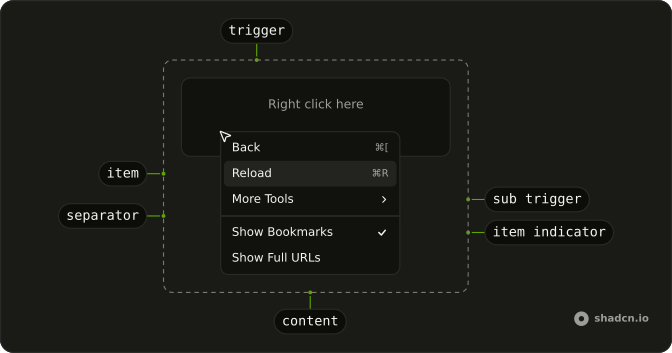
ContextMenuArrow
└── ContextMenuArrowTip
ContextMenuTrigger
ContextMenuIndicator
ContextMenuQuickItem
└── ContextMenuGroup
    ├── ContextMenuSubContent
    │   └── ContextMenuPositioner
    └── ContextMenuGroupLabel
ContextMenuItemIndicator
ContextMenuItemText
ContextMenuSeparator
ContextMenuTrigger
└── ContextMenuSubTrigger
Usage
import {
  ContextMenu, ContextMenuGroup, ContextMenuGroupLabel, ContextMenuItem,
  ContextMenuSeparator, ContextMenuShortcut, ContextMenuSub,
  ContextMenuSubContent, ContextMenuSubTrigger, ContextMenuTrigger,
} from "@/components/ui/context-menu";
const ContextMenuDemo = () => (
<ContextMenuTrigger>
<button
className="mx-auto mt-8 flex h-16 w-full max-w-xs items-center justify-center self-start rounded-xl border border-dashed bg-transparent px-4 text-sm"
type="button"
>
<span className="pointer-fine:inline-block hidden">Right click here</span>
<span className="pointer-coarse:inline-block hidden">
Long press here
</span>
</button>
<ContextMenu className="w-48 max-w-full">
<ContextMenuGroup>
<ContextMenuItem>
Back
<ContextMenuShortcut>⌘[</ContextMenuShortcut>
</ContextMenuItem>
<ContextMenuItem isDisabled>
Forward
<ContextMenuShortcut>⌘]</ContextMenuShortcut>
</ContextMenuItem>
<ContextMenuItem>
Reload
<ContextMenuShortcut>⌘R</ContextMenuShortcut>
</ContextMenuItem>
<ContextMenuSub>
<ContextMenuSubTrigger>More Tools</ContextMenuSubTrigger>
<ContextMenuSubContent className="w-44">
<ContextMenuGroup>
<ContextMenuItem>Save Page...</ContextMenuItem>
<ContextMenuItem>Create Shortcut...</ContextMenuItem>
<ContextMenuItem>Name Window...</ContextMenuItem>
</ContextMenuGroup>
<ContextMenuSeparator />
<ContextMenuGroup>
<ContextMenuItem>Developer Tools</ContextMenuItem>
</ContextMenuGroup>
<ContextMenuSeparator />
<ContextMenuGroup>
<ContextMenuItem variant="destructive">Delete</ContextMenuItem>
</ContextMenuGroup>
</ContextMenuSubContent>
</ContextMenuSub>
</ContextMenuGroup>
<ContextMenuSeparator />
<ContextMenuGroup
defaultSelectedKeys={["bookmarks"]}
selectionMode="multiple"
>
<ContextMenuItem id="bookmarks">Show Bookmarks</ContextMenuItem>
<ContextMenuItem id="urls">Show Full URLs</ContextMenuItem>
</ContextMenuGroup>
<ContextMenuSeparator />
<ContextMenuGroup defaultSelectedKeys={["pedro"]} selectionMode="single">
<ContextMenuGroupLabel>People</ContextMenuGroupLabel>
<ContextMenuItem id="pedro">Pedro Duarte</ContextMenuItem>
<ContextMenuItem id="colm">Colm Tuite</ContextMenuItem>
</ContextMenuGroup>
</ContextMenu>
</ContextMenuTrigger>
);
Accessibility
- Space
- Activates/Selects the highlighted item.
- Enter
- Activates/Selects the highlighted item.
- Arrow Down
- Highlights the next item in the menu.
- Arrow Up
- Highlights the previous item in the menu.
- Arrow Right
- When focus is on trigger, opens or closes the submenu depending on reading direction.
- Arrow Left
- When focus is on trigger, opens or closes the submenu depending on reading direction.
- Escape
- Closes the context menu.
- Home
- Go to the start.
- End
- Go to the end.
Demos
Basic
Back, Forward, and Reload, with Forward disabled because it does not apply yet. This is the smallest menu worth shipping: a trigger area, a few items, and no icons or nested lists. Start here, then add structure once the actions are settled. A disabled item stays visible so people can see the command exists.
Submenu
More Tools opens a second menu: save the page, create a shortcut, name the window, plus developer tools and a delete action set apart at the bottom. Nest a group when the top menu would get long, and keep it to one level so the pointer has less path to lose. The trigger shows that more actions exist before anyone commits to them.
Shortcuts
Each item ends with a key hint, such as the chord for Back or Save. The hint is only a label. It does not listen for the keys, so the shortcut has to be wired up on the page or it will look like a promise you did not keep. Forward stays disabled, hint and all, when the action does not apply.
Groups
File and Edit are labeled sections, and a separator splits those from clipboard commands and from Delete at the end. Group a long menu so people scan chunks instead of one flat list. The label names the section. The line is enough between groups that do not need a heading, and the dangerous action stays last.
Icons
Copy, Cut, Paste, and Delete each lead with an icon, and the icon is hidden from assistive tech because the word is already there. Icons help when the labels are familiar and the menu is scanned more than read. They are a poor idea when the action is obscure, since a picture will not explain it. Delete stays in its own group.
Checkboxes
Show Bookmarks Bar, Show Full URLs, and Show Developer Tools are checkbox items, each with its own checked state. Several can be on at once, which is what you want for view settings that combine. A plain item is the better row when the action runs once, such as Reload, and should leave the menu. Store the checked values if they need to survive the menu closing.
Radio
People and Theme are separate radio groups, so picking a person does not clear the theme. Inside a group only one item stays selected, which is the right model for a mode rather than a command. The labels sit above each group so the two lists do not blur together. Keep unrelated actions as plain items outside the group.
Destructive
Edit and Share are ordinary items. Delete is separated and marked destructive, with a trash icon, so the dangerous action is not just another row. Use that variant for something hard to undo, keep it last, and remember the color is not a confirmation. If the delete is truly costly, follow it with a dialog rather than running it from the menu.
Sides
Four triggers pin the menu to a different side: top, right, bottom, and left. The usual placement sits near the pointer, which fails when the trigger is already against an edge and the menu would open off the screen. Pin a side in that case. The items themselves stay the same, so this is only about where the panel lands.
Rtl
The trigger and the menus are in Arabic, with dir set to rtl on the menu and on each panel. Submenus, shortcuts, and the check marks follow the reading direction instead of staying glued to the left. Use this when the page is right to left, and set the direction on the nested content too, or a submenu can open back toward the wrong side.
FAQ
Should I use a Context Menu or a Dropdown Menu?
Use a Context Menu for actions on the thing under the pointer, like a file, a table row or a canvas shape, opened with a right-click. Use a Dropdown Menu when the actions hang off a visible button. Many apps offer both for the same actions, since a right-click is easy to miss.
How do I handle a Context Menu item click in React Aria?
Pass onAction to each ContextMenuItem, or one to ContextMenu, which receives the item's key.
The menu closes after the action runs.
How do I keep the Context Menu open after toggling a checkbox item?
Set shouldCloseOnSelect to false on the item. A menu with selectionMode="multiple" already stays open.
The Checkboxes demo shows the toggles.
Why doesn't the Context Menu shortcut do anything?
ContextMenuShortcut is only a label at the end of an item: it shows the keys but doesn't bind them. Listen for those keys yourself so the shortcut works without opening the menu.
Does the Context Menu work on phones and tablets?
On touch screens a hidden menu is hard to discover, so also offer the same actions from a visible button, for example a Dropdown Menu or a Sheet.
API Reference
ContextMenu
data-slot="string"
autoFocus?boolean | FocusStrategy
Where the focus should be set.
- Type
boolean | FocusStrategy
crossOffset?number
The additional offset applied along the cross axis between the element and its anchor element.
- Default
0
offset?number
The additional offset applied along the main axis between the element and its
anchor element. Ark default: 8.
- Default
4
onAction?(key: Key, value: T) → void
Handler that is called when an item is selected.
- Parameters
key– Keyvalue– T- Returns
void
onClose?() → void
Handler that is called when the menu should close after selecting an item.
- Returns
void
onContextMenu?(e: ContextMenuEvent) → void
Event that is called when a context menu is triggered.
- Parameters
e– { target: Element; x: number; y: number }- Returns
void
placement?"bottom" | "bottom left" | "bottom right" | "bottom start" | "bottom end" | "top" | "top left" | "top right" | "top start" | "top end" | "left" | "left top" | "left bottom" | "start" | "start top" | "start bottom" | "right" | "right top" | "right bottom" | "end" | "end top" | "end bottom"
The placement of the element with respect to its anchor element. Ark default: bottom.
- Type
"bottom" | "bottom left" | "bottom right" | "bottom start" | "bottom end" | "top" | "top left" | "top right" | "top start" | "top end" | "left" | "left top" | "left bottom" | "start" | "start top" | "start bottom" | "right" | "right top" | "right bottom" | "end" | "end top" | "end bottom"- Default
"bottom start"
shouldFocusWrap?boolean
Whether keyboard navigation is circular.
className?string
Merged with the part's classes.
--trigger-anchor-pointstringContextMenuTrigger
defaultOpen?boolean
Whether the overlay is open by default (uncontrolled).
onOpenChange?(isOpen: boolean) → void
Handler that is called when the overlay's open state changes.
- Parameters
isOpen– boolean- Returns
void
isOpen?boolean
Whether the overlay is open by default (controlled).
trigger?"press" | "longPress" | "contextMenu"
How the menu is triggered.
- Type
"press" | "longPress" | "contextMenu"- Default
"press"
ContextMenuGroup
data-slot="context-menu-group"
dependencies?ReadonlyArray<any>
Values that should invalidate the item cache when using dynamic collections.
- Type
ReadonlyArray<any>
id?Key
The unique id of the section.
shouldCloseOnSelect?boolean
Whether the menu should close when the menu item is selected.
style?CSSProperties
The inline [style](https://developer.mozilla.org/en-US/docs/Web/API/HTMLElement/style) for the element.
value?T
The object value that this section represents. When using dynamic collections, this is set automatically.
render?DOMRenderFunction<E, T>
Overrides the default DOM element with a custom render function.
This allows rendering existing components with built-in styles and behaviors
such as router links, animation libraries, and pre-styled components.
Requirements:
- You must render the expected element type (e.g. if <button> is expected, you cannot render an
<a>).
- Only a single root DOM element can be rendered (no fragments).
- You must pass through props and ref to the underlying DOM element, merging with your own prop
as appropriate.
- Type
DOMRenderFunction<E, T>
className?string
The CSS [className](https://developer.mozilla.org/en-US/docs/Web/API/Element/className) for the element.
- Default
"react-aria-MenuSection"
ContextMenuGroupLabel
data-slot="context-menu-group-label"
inset?boolean
Indents it to line up with items that have an icon or indicator.
render?DOMRenderFunction<E, T>
Overrides the default DOM element with a custom render function.
This allows rendering existing components with built-in styles and behaviors
such as router links, animation libraries, and pre-styled components.
Requirements:
- You must render the expected element type (e.g. if <button> is expected, you cannot render an
<a>).
- Only a single root DOM element can be rendered (no fragments).
- You must pass through props and ref to the underlying DOM element, merging with your own prop
as appropriate.
- Type
DOMRenderFunction<E, T>
className?string
Merged with the part's classes.
data-inset?string
Mirrors inset.
ContextMenuLabel
data-slot="context-menu-label"
inset?boolean
Indents it to line up with items that have an icon or indicator.
render?DOMRenderFunction<E, T>
Overrides the default DOM element with a custom render function.
This allows rendering existing components with built-in styles and behaviors
such as router links, animation libraries, and pre-styled components.
Requirements:
- You must render the expected element type (e.g. if <button> is expected, you cannot render an
<a>).
- Only a single root DOM element can be rendered (no fragments).
- You must pass through props and ref to the underlying DOM element, merging with your own prop
as appropriate.
- Type
DOMRenderFunction<E, T>
ContextMenuItem
data-slot="context-menu-item"
children?ChildrenOrFunction<T>
The children of the component. A function may be provided to alter the children based on component state.
- Type
ChildrenOrFunction<T>
id?Key
The unique id of the item.
inset?boolean
Indents it to line up with items that have an icon or indicator.
isDisabled?boolean
Whether the item is disabled.
onAction?() → void
Handler that is called when the item is selected.
- Returns
void
shouldCloseOnSelect?boolean
Whether the menu should close when the menu item is selected.
style?StyleOrFunction<T>
The inline [style](https://developer.mozilla.org/en-US/docs/Web/API/HTMLElement/style) for the element. A function may be provided to compute the style based on component state.
- Type
StyleOrFunction<T>
textValue?string
A string representation of the item's contents, used for features like typeahead.
value?T
The object value that this item represents. When using dynamic collections, this is set automatically.
variant?"default" | "destructive"
The visual style.
- Type
"default" | "destructive"- Default
"default"
render?(props: DetailedHTMLProps<LinkWithRequiredHref, HTMLAnchorElement> | React.JSX.IntrinsicElements[Fallback], renderProps: T) → ReactElement
Overrides the default DOM element with a custom render function.
This allows rendering existing components with built-in styles and behaviors
such as router links, animation libraries, and pre-styled components.
Note: You can check if 'href' in props in order to tell whether to render an <a> element.
Requirements:
- You must render the expected element type (e.g. if <a> is expected, you cannot render a
<button>).
- Only a single root DOM element can be rendered (no fragments).
- You must pass through props and ref to the underlying DOM element, merging with your own prop
as appropriate.
- Type
(props: DetailedHTMLProps<LinkWithRequiredHref, HTMLAnchorElement> | React.JSX.IntrinsicElements[Fallback], renderProps: T) → ReactElement- Parameters
props– DetailedHTMLProps<LinkWithRequiredHrefHTMLAnchorElement> | React.JSX.IntrinsicElements[Fallback]renderProps– T- Returns
ReactElement
className?string
Merged with the part's classes.
data-inset?string
Mirrors inset.
data-variant?string
Mirrors variant.
ContextMenuSub
data-slot="context-menu-sub"
triggerKeyKey
Key of the trigger item.
ContextMenuSubTrigger
data-slot="context-menu-sub-trigger"
children?ChildrenOrFunction<T>
The children of the component. A function may be provided to alter the children based on component state.
- Type
ChildrenOrFunction<T>
id?Key
The unique id of the item.
inset?boolean
Indents it to line up with items that have an icon or indicator.
isDisabled?boolean
Whether the item is disabled.
onAction?() → void
Handler that is called when the item is selected.
- Returns
void
shouldCloseOnSelect?boolean
Whether the menu should close when the menu item is selected.
style?StyleOrFunction<T>
The inline [style](https://developer.mozilla.org/en-US/docs/Web/API/HTMLElement/style) for the element. A function may be provided to compute the style based on component state.
- Type
StyleOrFunction<T>
textValue?string
A string representation of the item's contents, used for features like typeahead.
value?T
The object value that this item represents. When using dynamic collections, this is set automatically.
render?(props: DetailedHTMLProps<LinkWithRequiredHref, HTMLAnchorElement> | React.JSX.IntrinsicElements[Fallback], renderProps: T) → ReactElement
Overrides the default DOM element with a custom render function.
This allows rendering existing components with built-in styles and behaviors
such as router links, animation libraries, and pre-styled components.
Note: You can check if 'href' in props in order to tell whether to render an <a> element.
Requirements:
- You must render the expected element type (e.g. if <a> is expected, you cannot render a
<button>).
- Only a single root DOM element can be rendered (no fragments).
- You must pass through props and ref to the underlying DOM element, merging with your own prop
as appropriate.
- Type
(props: DetailedHTMLProps<LinkWithRequiredHref, HTMLAnchorElement> | React.JSX.IntrinsicElements[Fallback], renderProps: T) → ReactElement- Parameters
props– DetailedHTMLProps<LinkWithRequiredHrefHTMLAnchorElement> | React.JSX.IntrinsicElements[Fallback]renderProps– T- Returns
ReactElement
className?string
Merged with the part's classes.
data-inset?string
Mirrors inset.
ContextMenuSubContent
data-slot="context-menu-sub-content"
autoFocus?boolean | FocusStrategy
Where the focus should be set.
- Type
boolean | FocusStrategy
crossOffset?number
The additional offset applied along the cross axis between the element and its
anchor element. Ark default: 0.
- Default
-3
offset?number
The additional offset applied along the main axis between the element and its
anchor element. Ark default: 8.
- Default
0
onAction?(key: Key, value: T) → void
Handler that is called when an item is selected.
- Parameters
key– Keyvalue– T- Returns
void
onClose?() → void
Handler that is called when the menu should close after selecting an item.
- Returns
void
onContextMenu?(e: ContextMenuEvent) → void
Event that is called when a context menu is triggered.
- Parameters
e– { target: Element; x: number; y: number }- Returns
void
placement?"bottom" | "bottom left" | "bottom right" | "bottom start" | "bottom end" | "top" | "top left" | "top right" | "top start" | "top end" | "left" | "left top" | "left bottom" | "start" | "start top" | "start bottom" | "right" | "right top" | "right bottom" | "end" | "end top" | "end bottom"
The placement of the element with respect to its anchor element. Ark default: bottom.
- Type
"bottom" | "bottom left" | "bottom right" | "bottom start" | "bottom end" | "top" | "top left" | "top right" | "top start" | "top end" | "left" | "left top" | "left bottom" | "start" | "start top" | "start bottom" | "right" | "right top" | "right bottom" | "end" | "end top" | "end bottom"- Default
"end top"
shouldFocusWrap?boolean
Whether keyboard navigation is circular.
className?string
Merged with the part's classes.
ContextMenuSeparator
data-slot="context-menu-separator"
children?ReactNode
The children of the component.
elementType?string
The HTML element type that will be used to render the separator.
orientation?Orientation
The orientation of the separator.
- Default
"horizontal"
style?CSSProperties
The inline [style](https://developer.mozilla.org/en-US/docs/Web/API/HTMLElement/style) for the element.
className?string
Merged with the part's classes.
ContextMenuShortcut
<span> data-slot="context-menu-shortcut"
className?string
Merged with the part's classes.