shadcn.io is an independent project built on shadcn/ui
Avatar, bubble, and an optional name or time sit on the side of the thread for whoever sent it.
Use the row to lay out a transcript, not to color the text. The colored body is a Bubble, which has no side of its own. In React, Radix UI reverses the row when you set align to end.
Installation
Anatomy
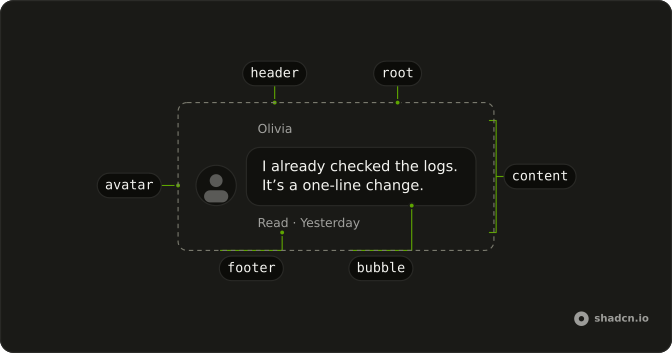
Message
├── MessageAvatar
└── MessageContent
    ├── MessageHeader
    ├── Bubble
    └── MessageFooter
MessageGroup
├── Message
└── MessageUsage
import {
  Avatar, AvatarFallback, AvatarImage,
} from "@/components/ui/avatar";
import { Bubble, BubbleContent } from "@/components/ui/bubble";
import {
  Message, MessageAvatar, MessageContent,
} from "@/components/ui/message";<Message className="max-w-full min-w-0">
<MessageAvatar>
<Avatar>
<AvatarImage src="https://github.com/shadcn.png" alt="@shadcn" />
<AvatarFallback>CN</AvatarFallback>
</Avatar>
</MessageAvatar>
<MessageContent className="min-w-0">
<Bubble>
<BubbleContent>How can I help you today?</BubbleContent>
</Bubble>
</MessageContent>
</Message>Demos
Avatar
MessageAvatar is the slot for an Avatar, and align="end" parks the current person on the end and reverses the row so the picture follows. Show a picture when several people share a thread and a name is easy to miss. A two-person chat can drop it after the first row from each side. The image still needs its own text alternative.
Group
MessageGroup stacks consecutive rows from one person. It does not merge bubbles, and it does not hide a repeated picture. This pair leaves the first avatar slot empty and shows the picture on the second row. Group a run when one person speaks several times and those rows should space as a unit, and do not wrap both sides in one group.
Header and Footer
MessageHeader is the name, or any other meta, above the body. MessageFooter is the line under it, here a read receipt and a day, and an end-aligned footer justifies toward that end. Use a header when there is no avatar and the name has to live in text. Use a footer for delivery state, not for the message itself.
Actions
Copy, like, dislike, and retry sit in MessageFooter as ghost icon buttons, each with an aria-label, so the row does not grow a labeled toolbar. A failed send puts the error in that same footer, beside retry. Actions earn a place on a reply someone will copy or rate. A conversation between people rarely needs a rating under every line.
Attachment
An Attachment sits in MessageContent with the bubble: a photo on the way out, a file and a download on the way back. Use it when the message is a thing and not only a sentence. The file stays outside the bubble, so a long filename does not stretch the text. align="end" still applies to the whole row, picture included.
Markdown
The row does not render markdown. The reply is formatted by the page and placed in a ghost bubble, so the answer is unframed, while the question stays an ordinary bubble. Split them that way when a generated answer has emphasis and code and a person's text should stay plain. To keep a colored surface, leave a filled bubble around the formatted body.
Pattern
One turn with an agent, the way AI Elements' Message pattern builds it. The person's question is a muted bubble on the end side, and the reply is markdown straight on the row, with no bubble, so its code gets the full width. Each side's actions sit in MessageFooter as ghost icon buttons, each in a Tooltip with its label as the button's name, and the footer follows the row's side. Copy writes the reply to the clipboard and shows a check for two seconds. Good response and Bad response are toggles that set aria-pressed, so a screen reader says which one is on. Retry runs the turn again, and Edit on the person's turn puts the text back in the field. The fenced code in the reply is a Code Block with line numbers and its own copy button: in an app, render the markdown with Streamdown and send fenced code there.
A thread of these turns is Chat.
AI SDK
Branch on the message's role. The person's turn is the bubble. The agent's turn is the reply, and regenerate with the message's id runs it again.
const { messages, regenerate } = useChat();

if (message.role === "user") {
  return (
    <Message align="end">
      <MessageContent>
        <Bubble align="end" variant="muted">
          <BubbleContent>{text}</BubbleContent>
        </Bubble>
      </MessageContent>
    </Message>
  );
}

return (
  <Message>
    <MessageContent className="gap-2">
      <Markdown>{text}</Markdown>
      <MessageFooter className="px-0">
        <Button
          aria-label="Retry"
          onClick={() => regenerate({ messageId: message.id })}
          size="icon-sm"
          variant="ghost"
        >
          <RefreshCcwIcon aria-hidden="true" />
        </Button>
      </MessageFooter>
    </MessageContent>
  </Message>
);
Migrating from AI SDK Elements
If you added Message from AI SDK Elements (opens in a new tab), your project has a components/ai-elements/message.tsx wrapper. Paste this prompt into your coding agent to rebuild it on Message, Bubble and Tooltip. Every export keeps its name and props, so the code that uses it keeps working.
Migrate components/ai-elements/message.tsx from AI SDK Elements to the shadcn.io Message, Bubble and Tooltip components.

Keep every export, with the same name and props, so the code that imports it keeps working. Only change how each part renders.

1. Read https://www.shadcn.io/ui/radix/message.md and build each turn the way its Pattern demo does. If the project hasn't got Message, Bubble, Button or Tooltip, run the command in the Installation section of each one's page: https://www.shadcn.io/ui/radix/message.md, https://www.shadcn.io/ui/radix/bubble.md, https://www.shadcn.io/ui/radix/button.md, https://www.shadcn.io/ui/radix/tooltip.md.
2. Rebuild each part:
   - This file exports Message and MessageContent too, so import the shadcn.io parts under other names, like MessageRoot and MessageBody.
   - Message renders the shadcn.io Message, with align="end" when from is "user". Pass from down in a context.
   - MessageContent renders the shadcn.io MessageContent. For the person's messages, wrap the children in a Bubble with align="end" and variant="muted".
   - MessageActions renders a MessageFooter.
   - MessageAction renders a Button with variant="ghost" and size="icon-sm" inside a TooltipTrigger with asChild, with its label as the aria-label and in the TooltipContent. If nothing above the thread renders a TooltipProvider, add one.
   - Keep MessageResponse on Streamdown, and keep the branch parts and MessageToolbar as they are.
3. Remove the imports the file no longer uses.
4. Run the type checker and fix any errors.
FAQ
How do I align a Message to the end in React?
Set align to end for the current person's row, and leave the default start for the other side. end reverses the row so the avatar sits on the end side. The root sets data-align to that value, and the footer uses it to justify its contents toward the end. start is the default.
How do I group several Message rows?
Wrap consecutive rows from the same person in MessageGroup, which is only a vertical stack and does not merge bubbles or hide repeated avatars. Put MessageAvatar on the rows that should show a picture, and leave it off the rows that should not, since each row still has its own align.
Can a Message render markdown?
No. MessageContent is a layout wrapper, not a markdown renderer. Render the formatted body inside it, as the Markdown demo does, and keep a bubble around that body if you still want the colored surface. The row only handles alignment, the avatar, and the header or footer.
How do I add copy, feedback and retry to an agent's reply?
Put them in MessageFooter, which follows the row's side, as ghost icon buttons, each in a Tooltip with its label as the button's aria-label. Copy writes the reply to the clipboard and swaps to a check for two seconds, Good response and Bad response are toggles with aria-pressed, and Retry runs the turn again. With the AI SDK, retry is regenerate with the message's id. The Pattern demo has all four.
Should I use Message or Bubble?
Use Bubble for the colored text body, and Message for the row around it: which side it sits on, the avatar, and the header or footer. A bubble alone has no side. In a scrolling transcript, put each row in a message scroller item. That scroller is Message Scroller.
How do I style a Message with Radix UI?
Edit the message file under components/ui, where the row sets data-align to start or end and end reverses the flex direction. Header, footer, avatar, and content each set their own data-slot, and the footer already justifies to the end when the parent row is aligned end.
How do I install Message in React?
Run the command in the Installation section on this page, which adds Message and the avatar, content, header, footer, and group parts to your ui folder. Bubble and Avatar are separate installs when the row should use them, so import only the parts you render. The command uses the shadcn CLI.
API Reference
Message
<div> data-slot="message"
align?"start" | "end"
The side of the conversation it sits on: start (theirs) or end (yours).
- Type
"start" | "end"- Default
"start"
className?string
Merged with the part's classes.
data-align?string
Mirrors align.
MessageAvatar
<div> data-slot="message-avatar"
className?string
Merged with the part's classes.
MessageContent
<div> data-slot="message-content"
className?string
Merged with the part's classes.
MessageFooter
<div> data-slot="message-footer"
className?string
Merged with the part's classes.
MessageGroup
<div> data-slot="message-group"
className?string
Merged with the part's classes.
MessageHeader
<div> data-slot="message-header"
className?string
Merged with the part's classes.