shadcn.io is an independent project built on shadcn/ui
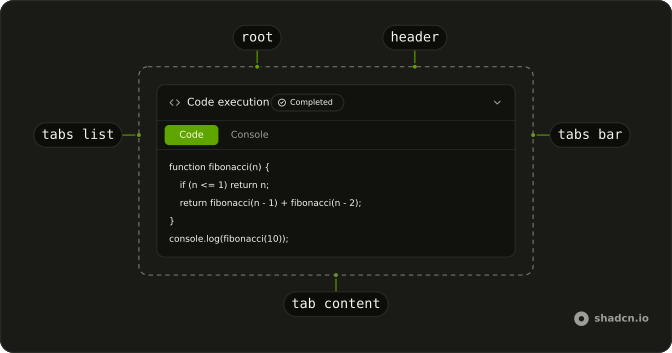
Sandbox Run shows code an agent ran in a sandbox as a card: a header with the file's name and a status badge, Running, Completed or Error, over tabs for the code, what it printed and the files it wrote. The header folds the card, so a finished run can step aside for the reply under it.
It only displays a run that happened elsewhere. To let people edit code and run it in the page, use Sandbox, and for a shell command's streaming output, use Terminal.
Installation
Anatomy
Usage
import {
  SandboxRun, SandboxRunContent, SandboxRunHeader, SandboxRunTabContent,
  SandboxRunTabs, SandboxRunTabsBar, SandboxRunTabsList,
  SandboxRunTabsTrigger,
} from "@/components/ui/sandbox-run";
SandboxRunHeader needs a state, and each SandboxRunTabsTrigger shows the SandboxRunTabContent with the same value. The run starts open.
<SandboxRun>
  <SandboxRunHeader state="completed" title="Code execution" />
  <SandboxRunContent>
    <SandboxRunTabs defaultValue="code">
      <SandboxRunTabsBar>
        <SandboxRunTabsList>
          <SandboxRunTabsTrigger value="code">Code</SandboxRunTabsTrigger>
          <SandboxRunTabsTrigger value="console">Console</SandboxRunTabsTrigger>
        </SandboxRunTabsList>
      </SandboxRunTabsBar>
      <SandboxRunTabContent value="code">
        <pre className="p-3 font-mono text-xs">console.log(fibonacci(10));</pre>
      </SandboxRunTabContent>
      <SandboxRunTabContent value="console">
        <pre className="p-3 font-mono text-xs">55</pre>
      </SandboxRunTabContent>
    </SandboxRunTabs>
  </SandboxRunContent>
</SandboxRun>Accessibility
The header is a <button> with aria-expanded, named by its title and then the badge's word, analyze.py Completed, since the badge's icon and pulsing dot are hidden from screen readers. Nothing announces a change of state, so a reader finds out a run finished by going back to the header. SandboxRunTabsList is a tablist, each trigger a tab and each panel a tabpanel, with only the selected tab in the tab order. Give an icon button in SandboxRunTabsBar an aria-label, as the Files demo does for its copy button.
- Tab
- Moves focus from the header to the selected tab, then to any button after the tabs in the bar, then into the open panel.
- Shift+Tab
- Moves focus back the same way.
- Enter
- When focus is on the header, opens or closes the run. When focus is on a tab, shows its panel.
- Space
- When focus is on the header, opens or closes the run. When focus is on a tab, shows its panel.
- Arrow Right
- When focus is on a tab, moves focus to the next tab and shows its panel, wrapping from the last to the first.
- Arrow Left
- When focus is on a tab, moves focus to the previous tab and shows its panel, wrapping from the first to the last.
- Home
- When focus is on a tab, moves focus to the first tab and shows its panel.
- End
- When focus is on a tab, moves focus to the last tab and shows its panel.
Demos
States
Three Python runs, one per state, all closed through defaultOpen set to false. train.py is still running with a pulsing dot in its badge, sum.py is completed with a check, and load.py ended in an error with a cross and prints its traceback in a destructive Code Block. Close finished runs when the reply under them matters more.
Files
One pandas run, analyze.py, with four tabs: the code, a table of revenue by region, the console and the two files it wrote, summary.csv and chart.png. It opens on Output, the tab that answers the question, and a copy button for the code sits at the end of SandboxRunTabsBar. Leave out a tab the run has nothing for.
Streaming
Press Run again and check-endpoints.js prints a console line every 700 ms, with state at running until the last line and completed after it. Stream into the console tab as the sandbox reports, and switch the state only when the run ends, so the badge never says Completed over a console that is still filling.
AI SDK
A code run is a tool call, runCode in this example, and SandboxRunHeader takes the tool part's state as it is, so the badge follows the part without a mapping of yours. The tool's input holds the code, and its output what the run printed.
{message.parts.map((part) =>
  part.type === "tool-runCode" ? (
    <SandboxRun key={part.toolCallId}>
      <SandboxRunHeader
        state={
          part.state === "output-available" && part.preliminary
            ? "running"
            : part.state
        }
        title={part.input?.filename}
      />
      <SandboxRunContent>{/* the tabs, from part.input and part.output */}</SandboxRunContent>
    </SandboxRun>
  ) : null
)}
state | Badge |
|---|---|
input-streaming | Pending |
running, input-available | Running |
approval-requested | Awaiting approval |
approval-responded | Responded |
completed, output-available | Completed |
error, output-error | Error |
output-denied | Denied |
A tool that streams its console by yielding from execute sends each yield as output-available with preliminary: true, which the badge would read as Completed, so the header needs running until a part arrives without that flag.
Migrating from AI SDK Elements
If you added Sandbox from AI SDK Elements (opens in a new tab), your project has a components/ai-elements/sandbox.tsx. Here its parts are Sandbox Run's, because Sandbox is the editor that runs code in the page. Run the command in the Installation section, then import from @/components/ui/sandbox-run and rename each part: Sandbox is SandboxRun, SandboxHeader is SandboxRunHeader, SandboxContent is SandboxRunContent, SandboxTabs is SandboxRunTabs, SandboxTabsBar is SandboxRunTabsBar, SandboxTabsList is SandboxRunTabsList, SandboxTabsTrigger is SandboxRunTabsTrigger and SandboxTabContent is SandboxRunTabContent. To leave your JSX as it is, import them under the old names: import { SandboxRun as Sandbox, … }.
The props stay: title and state on the header, which takes a tool part's state as before, and value and defaultValue on the tabs. onValueChange on SandboxRunTabs gets the tab's value.
FAQ
What's the difference between Sandbox Run and Sandbox?
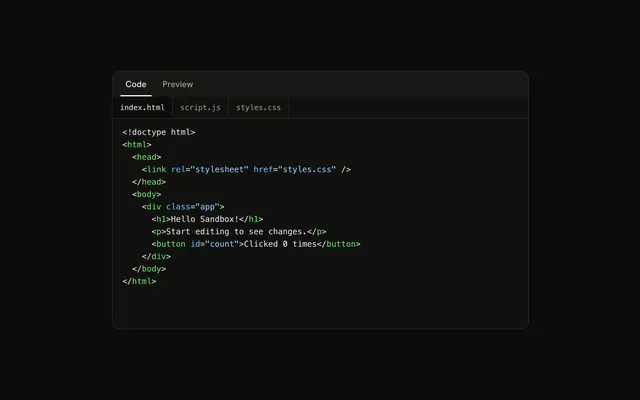
Sandbox Run shows code that already ran somewhere else, in an agent's sandbox, with what came out of it, and nothing runs in the page. Sandbox is an HTML, CSS and JavaScript playground, where the reader edits the files and sees them run in a sandboxed frame.
Their parts are named apart, SandboxRun and its parts against Sandbox and its own, so one page can hold both: the run the agent made, and an editor to try a change to it.
Which states does the Sandbox Run header show?
Three of its own, running, completed and error, as a badge with a pulsing dot, a check or a cross. It also takes an AI SDK tool part's state as it is, reading input-available as Running and output-available as Completed, and shows Pending, Awaiting approval, Responded or Denied for the states a run can't name. The dot stops pulsing for people who ask for reduced motion.
A run whose chat stopped mid-call stays input-available, so its badge keeps saying Running. Pass error once the chat has stopped and the part never got an output.
How do I start a Sandbox Run closed, or close it when the run ends?
Set defaultOpen to false on SandboxRun, since it starts open, as the States demo does. To close it from your code, hold the open state yourself and pass it as open, updating it from onOpenChange.
Closing a run when the reply under it starts keeps the answer in view, and the header still shows how the run ended. Leave a failed run open, so the traceback is the first thing people see.
Which tabs should a Sandbox Run have?
The ones the run has something for: the code, then what came out of it, as an output, a console or files. Name each in a SandboxRunTabsTrigger and give its SandboxRunTabContent the same value, and open on the tab that answers the question with defaultValue.
SandboxRunTabsBar holds the list and anything after it, such as a copy or download button, as the Files demo shows. An empty Files tab is a click for nothing, so leave it out.
How do I highlight the code in a Sandbox Run?
Put a Code Block in the code tab and fill it from useHighlightedCode, one CodeBlockLine per line, as every demo does. Give the block a rounded-none border-0 class so it sits flush inside the run's own border.
Sandbox Run doesn't highlight anything itself. Pass the hook the language the sandbox ran, python or js in the demos, and leave the console as plain text in a Code Block of its own, as they do.
Why does my Sandbox Run say Completed while the console is still streaming?
Because the AI SDK sends each value a tool yields as output-available with preliminary: true, and the header reads output-available as Completed. The run is done only when a part arrives without that flag.
Pass running to SandboxRunHeader while preliminary is set, as the AI SDK section's code does, and the part's own state after. The Streaming demo shows what to aim for: Running while lines arrive, and Completed once the last one is in.
Can people use a Sandbox Run with the keyboard?
Yes. The header is a button with aria-expanded, so Tab reaches it and Enter or Space opens or closes the run. Tab then moves to the selected tab, where the arrow keys move between tabs and show each one's panel.
A Code Block in a panel is a tab stop of its own, so the arrow keys scroll long code once it has focus. A button in SandboxRunTabsBar, such as the copy button in the Files demo, comes between the tabs and the panel in the tab order.
API Reference
SandboxRun
data-slot="sandbox-run"
open?boolean
Whether it's open. Pair with onOpenChange to control it.
defaultOpen?boolean
Whether it starts open, when you don't control open.
- Default
true
onOpenChange?{ bivarianceHack(open: boolean): void; }["bivarianceHack"]
Called when it opens or closes.
- Type
{ bivarianceHack(open: boolean): void; }["bivarianceHack"]
disabled?boolean
Whether it's disabled.
asChild?boolean
Merge props onto the child element instead of rendering a host.
className?string
Merged with the part's classes.
SandboxRunContent
data-slot="sandbox-run-content"
disableAnimation?boolean
Opens and closes it at once, without the height animation.
forceMount?true
Used to force mounting when more control is needed. Useful when controlling animation with React animation libraries.
asChild?boolean
Merge props onto the child element instead of rendering a host.
className?string
Merged with the part's classes.
SandboxRunHeader
data-slot="sandbox-run-header"
stateSandboxRunState
Where the run is, shown as a badge after the title.
title?string
What ran, in a few words: "Code execution", "analyze.py".
asChild?boolean
Merge props onto the child element instead of rendering a host.
className?string
Merged with the part's classes.
data-state?string
Mirrors state.
SandboxRunTabContent
data-slot="sandbox-run-tab-content"
valuestring
The tab content's value.
forceMount?true
Used to force mounting when more control is needed. Useful when controlling animation with React animation libraries.
asChild?boolean
Merge props onto the child element instead of rendering a host.
className?string
Merged with the part's classes.
SandboxRunTabs
data-slot="sandbox-run-tabs"
value?string
The value for the selected tab, if controlled.
defaultValue?string
The value of the tab to select by default, if uncontrolled.
onValueChange?{ bivarianceHack(value: string): void; }["bivarianceHack"]
A function called when a new tab is selected.
- Type
{ bivarianceHack(value: string): void; }["bivarianceHack"]
activationMode?(typeof ActivationMode)[keyof typeof ActivationMode]
Whether a tab is activated automatically or manually.
- Type
(typeof ActivationMode)[keyof typeof ActivationMode]
dir?Direction
The direction of navigation between toolbar items.
orientation?Orientation
The orientation the tabs are layed out. Mainly so arrow navigation is done accordingly (left & right vs. up & down)
asChild?boolean
Merge props onto the child element instead of rendering a host.
className?string
Merged with the part's classes.
SandboxRunTabsBar
<div> data-slot="sandbox-run-tabs-bar"
className?string
Merged with the part's classes.
SandboxRunTabsList
data-slot="sandbox-run-tabs-list"
loop?boolean
Whether arrow keys wrap from the last item to the first and back.
variant?"default" | "line"
Ark default: default.
- Type
"default" | "line"- Default
"line"
asChild?boolean
Merge props onto the child element instead of rendering a host.
className?string
Merged with the part's classes.
SandboxRunTabsTrigger
data-slot="sandbox-run-tabs-trigger"
valuestring
The tabs trigger's value.
asChild?boolean
Merge props onto the child element instead of rendering a host.
className?string
Merged with the part's classes.