shadcn.io is an independent project built on shadcn/ui
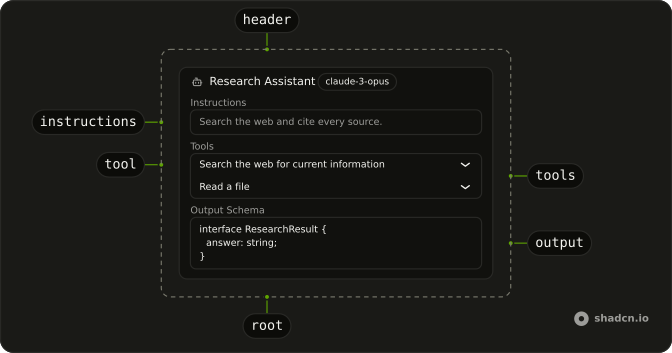
Agent is a card that describes an agent before it runs: its name and model, the system prompt it follows, the tools it may call, each opening into its input schema, and the shape of what it returns. Put it on an agent's settings page, in a picker that compares agents, or in the docs for an agent you ship.
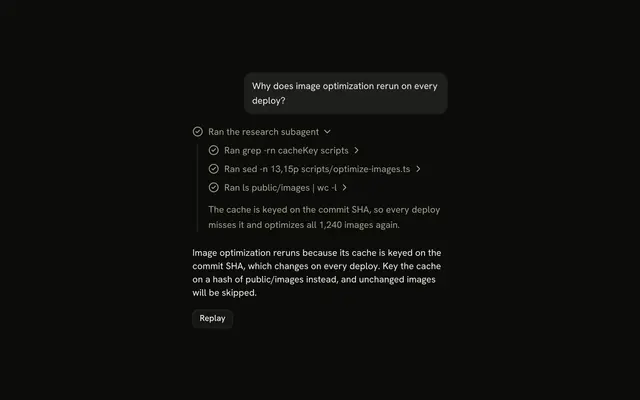
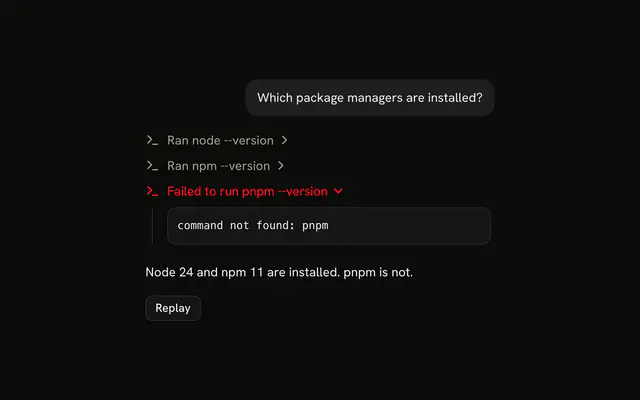
To show what an agent did during a run, use Subagent for work it handed off or Tool for a single call.
Installation
The install adds Accordion for the tool rows, Badge for the model, and Code Block with its highlighter for the schemas.
Anatomy
Usage
import {
  Agent, AgentContent, AgentHeader, AgentInstructions, AgentOutput,
  AgentTool, AgentTools,
} from "@/components/ui/agent";<Agent>
<AgentHeader model="gpt-4o" name="Research Assistant" />
<AgentContent>
<AgentInstructions>Search the web and cite every source.</AgentInstructions>
<AgentTools>
<AgentTool
tool={{
description: "Search the web",
jsonSchema: { properties: { query: { type: "string" } }, type: "object" },
}}
value="search"
/>
</AgentTools>
<AgentOutput schema="interface Result { answer: string }" />
</AgentContent>
</Agent>AgentHeader needs a name, and every other part is optional: a card shows only the parts you give it.
Accessibility
The tool rows sit in a group named by the label above them, Tools unless you set label. Each row is a <button> named by the tool's description, and aria-expanded tells a screen reader whether its schema is open. The button sits inside an h3, so every tool also lands in the page's heading outline. If the card sits under its own h3, change that level in components/ui/accordion, which every accordion in the app shares. A schema scrolls inside its block, which takes focus so the arrow keys can scroll it. Its copy button appears on focus as well as on hover and announces "Copied". The bot icon is hidden from screen readers.
- Space
- When focus is on a tool's row, opens or closes its schema.
- Enter
- When focus is on a tool's row, opens or closes its schema.
- Tab
- Moves focus to the next focusable element: the next row, or in an open tool its copy button and then its schema.
- Shift+Tab
- Moves focus to the previous focusable element.
- Arrow Down
- When focus is on a row, moves it to the next row, and from the last one back to the first.
- Arrow Up
- When focus is on a row, moves it to the previous row, and from the first one to the last.
- Home
- When focus is on a row, moves it to the first row.
- End
- When focus is on a row, moves it to the last row.
Demos
Controlled
A support agent's three tools, with the refund tool open and an Expand all button in the header that turns into Collapse all once every row is open. The open rows live in the demo's own state, passed to AgentTools as value. Control the list this way when a link or a failed call should open one particular tool.
Team
Three cards in a column for a researcher, a writer and a reviewer, each with its model and a count of its tools in an outline Badge at the end of the header. The cards hold only their instructions. Use this layout to compare agents that split one job, where the full tool schemas would bury the differences between them.
AI SDK tools
A trip planner's two tools, a weather lookup and a flight search, written the way the AI SDK's tool() returns them: a description and an inputSchema wrapped as jsonSchema() wraps it. AgentTool unwraps the schema itself. The output schema is JSON, so AgentOutput gets language set to json. Start here when the card documents tools you already hand to a model.
AI SDK
A tool from the AI SDK's tool() is a description and an input schema, which is what AgentTool takes.
Map the record you hand the model, keyed by tool name:
import { jsonSchema, tool } from "ai";

const tools = {
  getWeather: tool({
    description: "Get the current weather for a city",
    inputSchema: jsonSchema<{ city: string }>({
      properties: { city: { type: "string" } },
      required: ["city"],
      type: "object",
    }),
  }),
};

export function WeatherAgentTools() {
  return (
    <AgentTools>
      {Object.entries(tools).map(([name, definition]) => (
        <AgentTool key={name} tool={definition} value={name} />
      ))}
    </AgentTools>
  );
}
AgentTool reads the jsonSchema field of the wrapper that jsonSchema() and zodSchema() return, and converts nothing itself. A tool whose inputSchema is a bare Zod schema needs one of those first: wrap it in zodSchema() from ai, or pass the result of Zod 4's z.toJSONSchema() as jsonSchema. Show the model id you pass to the provider in AgentHeader's model, and the system prompt in AgentInstructions.
Migrating from AI SDK Elements
If you added Agent from AI SDK Elements (opens in a new tab), your project has components/ai-elements/agent.tsx. Install Agent from this page, change the imports from @/components/ai-elements/agent to @/components/ui/agent, and delete the old file. The parts keep their names, and name, model, tool, value and schema mean what they did. What changes:
tooltakes any object with adescriptionand ajsonSchemaorinputSchema, so the AI SDK'sToolstill fits, and the file no longer importsai.- Schemas show in a Code Block, highlighted, with a copy button.
AgentOutputtakeslanguage, TypeScript by default. AgentInstructions,AgentToolsandAgentOutputtakelabelfor the text above them, andAgentHeaderrenders its children at the end of the row.
AgentTools is Radix UI's Accordion here, as before, with type set to "multiple" unless you pass "single". A type="multiple" in the old code can stay or go, and a controlled value with onValueChange keeps working.
FAQ
How do I list an agent's tools with their input schemas?
Put one AgentTool per tool inside AgentTools, each with the tool object as tool and a unique value. The row's label is the tool's description, or "No description" when it has none, and the row opens into the input schema printed as JSON in a Code Block.
AgentTool reads jsonSchema first and falls back to inputSchema, so an object with either field works. Several rows can be open at once unless you pass type="single" to AgentTools, and then add collapsible so the open row can close again.
Can I pass AI SDK tools to the Agent component?
Yes. The AI SDK's tool() returns the object you give it, a description and an inputSchema, and that is what AgentTool reads. When the schema comes from jsonSchema() or zodSchema(), it is a wrapper whose jsonSchema field holds the JSON Schema, and AgentTool unwraps it.
A bare Zod schema as inputSchema is the exception, because AgentTool doesn't convert it. Wrap it in zodSchema() from ai, or pass the result of Zod 4's z.toJSONSchema() as jsonSchema. The AI SDK section maps a whole tools record to rows.
What is the difference between Agent and Subagent?
Agent describes an agent before it runs: the model, the system prompt, the tools it may call and the shape of its answer. It belongs on a settings page, in a picker or in your docs.
Subagent shows a run that already happened, as one line in the conversation that opens into the calls the subagent made and what it found. A chat that hands work to other agents shows Subagent lines in the thread, and the Agent card wherever people set those agents up.
How do I show an agent's output schema?
Pass the schema as a string to schema on AgentOutput: a TypeScript interface, a JSON Schema, or the source of a Zod schema. A JSON Schema object goes through JSON.stringify first. It's highlighted as TypeScript unless you set language, such as json, and a language the highlighter doesn't know shows as plain text.
The block stops growing at 18rem and scrolls inside, and its copy button copies the whole schema. Leave AgentOutput out when the agent answers in free text.
How do I open an Agent tool from code in React?
Hold the open tools' values in state, pass them to AgentTools as value, and update them in onValueChange. Both are arrays, since the list is type="multiple" unless you change it. The Controlled demo drives an Expand all button this way.
To open a tool from the first render without holding state, list its value in defaultValue instead. Open the tool a deep link names, or the one whose last call failed, so the reader lands on the schema they came for.
How do I style the parts of an Agent card?
Every part carries a data-slot you can target from CSS: agent, agent-header, agent-name, agent-model, agent-content, agent-instructions, agent-tools, agent-tool and agent-output. For lasting changes, edit components/ui/agent, which is your code once installed.
A class passed to a part merges with its own. On AgentTools it lands on the wrapper that holds the label, not on the bordered list, so restyle the list in the agent file. The rows and the schema blocks come from your Accordion and Code Block, so a change to those shows here too.
How do I show a long system prompt in AgentInstructions?
Pass the prompt as one string. AgentInstructions keeps its line breaks and wraps long lines, and the box grows with the text, with no height limit or scroll, so a prompt of several screens makes a tall card.
The text renders as written, so Markdown shows its asterisks and pound signs. For a long prompt, give the box in components/ui/agent a maximum height and let it scroll, or show the prompt elsewhere and keep a one-line summary in the card.
How do I add a button or a badge to the Agent header?
Put it inside AgentHeader as its children. They render after the name and the model badge, pushed to the far end of the row, which is where the Controlled demo puts its Expand all button and the Team demo its count of tools.
When the row runs short, the agent's name and the model badge both shrink and truncate with an ellipsis. A Badge or a Button you add keeps its full width, since both carry shrink-0, so keep what you put there short in a card that can get narrow.
API Reference
Agent
<div> data-slot="agent"
className?string
Merged with the part's classes.
AgentHeader
<div> data-slot="agent-header"
namestring
The agent's name.
model?string
The model it runs on, shown as a badge after its name.
className?string
Merged with the part's classes.
AgentContent
<div> data-slot="agent-content"
className?string
Merged with the part's classes.
AgentInstructions
<div> data-slot="agent-instructions"
childrenstring
The system prompt.
label?string
The heading above it.
- Default
"Instructions"
className?string
Merged with the part's classes.
AgentTools
<div> data-slot="agent-tools"
label?string
The heading above the list.
- Default
"Tools"
type?"multiple"
"multiple" by default: any number of tools open at once.
className?string
Merged with the part's classes.
AgentTool
data-slot="agent-tool"
toolobject
The tool: its description is the row, its input schema the panel.
- Type
{ description?: string; inputSchema?: unknown; jsonSchema?: unknown }
valuestring
A string value for the accordion item. All items within an accordion should use a unique value.
disabled?boolean
Whether or not an accordion item is disabled from user interaction.
asChild?boolean
Merge props onto the child element instead of rendering a host.
className?string
Merged with the part's classes.
AgentOutput
<div> data-slot="agent-output"
schemastring
What the agent returns: a type or a JSON Schema, as text.
label?string
The heading above it.
- Default
"Output Schema"
language?string
The language the schema is highlighted in.
- Default
"typescript"
className?string
Merged with the part's classes.